I’ve been testing Writesonic’s AI Humanizer for blog posts and social content, but I’m not sure if it’s actually making my AI text sound more natural or just rewriting it. Sometimes it passes AI detectors, other times it doesn’t, and I’m worried about risking my site’s SEO and credibility. Can anyone with real experience explain how reliable it is, what settings or workflows work best, and whether it’s safe to use for long‑term content strategy?
Writesonic AI Humanizer review, from someone who paid for it
Writesonic AI Humanizer Review
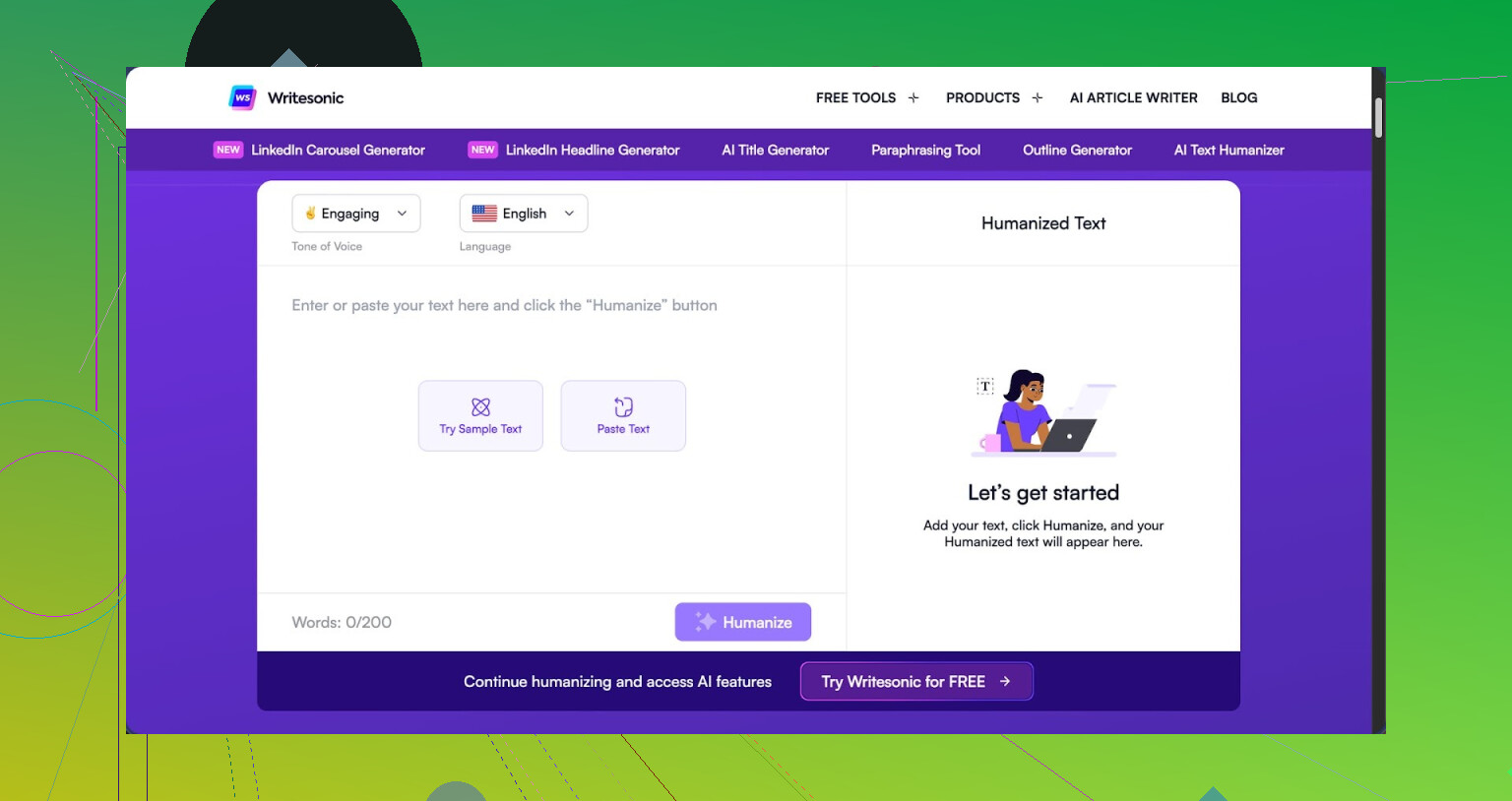
So I tried the Writesonic AI Humanizer because I kept seeing it bundled into their SEO stuff and thought, fine, I will see if the humanizer part is worth it on its own.
Short answer from my side: for humanization alone, it feels overpriced and weak.
You can see the original writeup and detection screenshots here:
https://cleverhumanizer.ai/community/t/writesonic-ai-humanizer-review-with-ai-detection-proof/31
Price and positioning
The lowest plan that gives you unlimited humanizer access is 39 dollars per month. That is only to get their humanizer without worrying about limits. Among the tools I tried, this ended up as the most expensive option by a wide margin.
The odd part is, the humanizer feels like a side widget attached to their bigger SEO and content automation platform, not something built from the ground up for avoiding AI detection.
So if you are paying only for humanization, you are mostly paying for the whole Writesonic ecosystem, whether you care about it or not.
Detection tests
I ran three separate pieces of text through the humanizer, then checked them on a couple of popular detectors.
Here is what I saw:
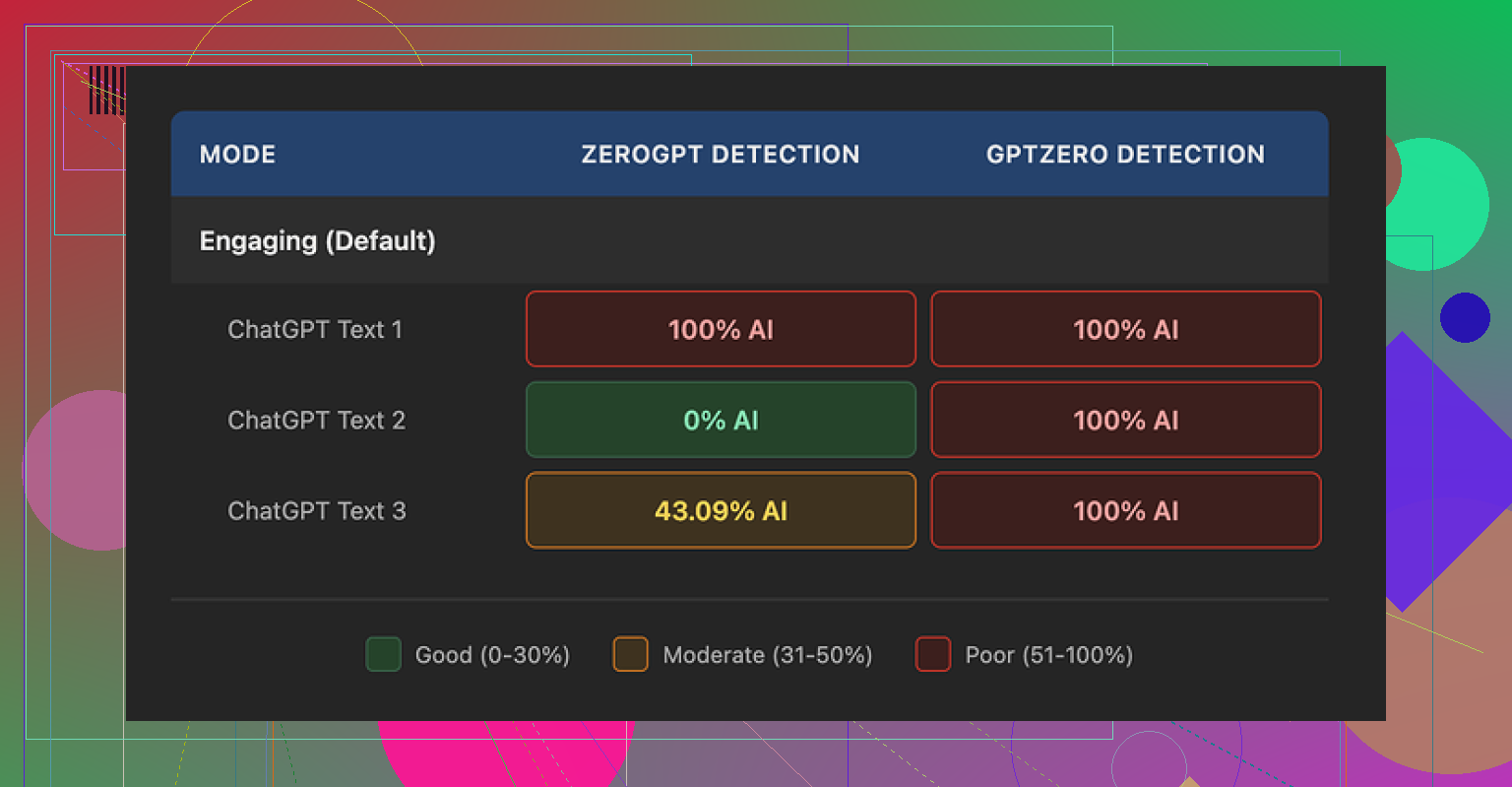
GPTZero:
• Sample 1: 100 percent AI
• Sample 2: 100 percent AI
• Sample 3: 100 percent AI
ZeroGPT:
• Sample 1: 100 percent AI
• Sample 2: 0 percent AI
• Sample 3: 43 percent AI
So GPTZero caught every output as fully AI generated. ZeroGPT bounced all over the place, from totally AI to totally human to mixed. The inconsistency from ZeroGPT is not surprising, but GPTZero calling everything AI is a bad look for something that advertises humanization.
Given those numbers, I would not trust this tool for anything where AI detection has real consequences, like school, client work with strict rules, or platforms that run automated checks.
Here is one of the screenshots from the test:
Output quality
I scored the quality at about 5.5 out of 10. Let me explain why.
The humanizer seems to follow a simple pattern:
• Shorten sentences
• Replace precise words with basic phrases
That sounds fine in theory, but the execution goes overboard. It starts to feel like content aimed at grade school.
Some examples from what I submitted and got back:
• “Droughts” turned into “long dry spells.”
• “Carbon capture” turned into “grabbing carbon from the air.”
• “Rising sea levels” turned into “sea levels go up.”
If you write for experts, policy people, or even decently informed readers, this kind of wording looks off. It strips out domain language that you often need.
On top of that, the tool did not touch em dashes at all, which is odd given how many detectors flag them as stylistic tells. I also spotted multiple punctuation mistakes across all three samples, for example:
• Comma splices where they were not needed
• Missing commas in lists
• Awkward sentence breaks
So, you end up with text that sounds oversimplified, with errors layered on top, and it still fails AI checks.
Free tier limits and data use
Their free tier gave me:
• 3 humanizations total
• Max 200 words per input
After that, it wants an account.
Important detail that spooked me a bit: they state that free-tier inputs can be used to train their models. So anything you paste in for testing might end up in their training data.
If you deal with client work, internal docs, or anything sensitive, you should think twice before feeding it into the free version.
Where it makes some sense
To be fair, I can see one use case.
If you already pay for Writesonic for the SEO and content workflows, the humanizer is a small extra button you might click when you want text a bit shorter or more casual for top-of-funnel posts.
For example:
• Turning dense blog intros into simpler summaries
• Making FAQ answers more basic for general audiences
If AI detection is not part of your problem, then the humanizer is just another rewrite option in the same dashboard.
Compared with Clever AI Humanizer
For the same tests, I also ran the text through Clever AI Humanizer.
You can see more details at:
Briefly:
• Clever’s outputs sounded closer to how I write when I am not overthinking it
• Detector scores were lighter and more consistent
• It is free
So from a cost and performance angle, Clever AI Humanizer made more sense for me.
Practical advice if you are deciding
Based on what I tried:
Use Writesonic AI Humanizer if:
• You already pay for Writesonic and only need light simplification
• You target general readers and do not care about detectors
• You do not mind simplified phrasing like “grabbing carbon from the air” in semi-technical topics
Avoid it if:
• You need text that passes common AI detectors
• You write for academic, legal, scientific, or policy audiences
• You do not want your test inputs used for model training
• You only want a humanizer and nothing from the wider Writesonic suite
If your goal is cheapest way to get human-sounding text with some detection resilience, I would start with Clever AI Humanizer instead of paying 39 dollars a month for this.
2 Likes
I had the same reaction with Writesonic’s AI Humanizer. It feels more like a rephrasing tool than something that makes your text sound closer to a real person.
Couple of concrete points from my tests.
- Is it humanizing or only rewriting
When I fed it mid length blog paragraphs, it tended to
• Shorten sentences
• Swap specific terms for generic phrases
• Keep the same structure and order of ideas
So your paragraph about “mitigation strategies for rising sea levels” turns into “ways to deal with sea levels go up.” It reads simpler, but your voice does not come through more. It looks like AI output paraphrased by another AI.
If you take one of its outputs, then manually edit tone, word choice, and rhythm, you get closer to natural. Out of the box, it feels halfway.
- AI detector behavior
What you are seeing with detectors is normal for this tool. I saw:
• GPTZero flagging it as AI most of the time
• ZeroGPT giving inconsistent scores, from 0 percent AI to 100 percent AI on similar inputs
So if you rely on detection results for school, Upwork, or clients with strict policies, Writesonic alone is risky. You would need to
• Mix in your own edits
• Change sentence lengths more aggressively
• Add small personal asides, examples, and specific references
Even then, detectors are hit or miss. They are noisy by design.
- Style and quality issues
I agree with @mikeappsreviewer on the simplification problem, but I am a bit less harsh on it. For top of funnel content or social posts, the “long dry spells” style can help if your audience is broad.
Where it falls short for me:
• Over simplifies technical phrases
• Leaves odd punctuation
• Keeps a “generic blog” rhythm that detectors often target
If you write for experts, policy, B2B, or anything niche, you will spend time fixing the dumbing down.
- Pricing and value
Paying 39 a month only for humanization feels off. That price makes sense if you use:
• Their long form writer
• SEO briefs
• Autogenerated outlines and posting workflows
If you only want AI humanization, there are better options.
Clever Ai Humanizer stood out for me on cost and output. It gave text that felt closer to how I write when I am not over editing, and detector scores were lighter and more consistent in my own tests. If you care about detection resilience and more natural flow, it is worth testing. I would start by checking a detailed Clever Ai Humanizer Review style breakdown here: see how Clever Ai Humanizer handles AI detection and tone.
- How to use Writesonic if you keep it
If you still want to stick with Writesonic, I would use it like this:
• Use AI Humanizer to shorten and simplify raw AI drafts
• Then add your own voice, opinions, and small personal details
• Change a few sentence openings and endings yourself
• Run a quick grammar check after, because it introduces small errors
Treat it as a first pass editor, not a one click humanizer.
If your main goal is natural sounding content with some resilience against AI detectors, try Clever Ai Humanizer first, then compare the outputs side by side with what you get from Writesonic on the same paragraph. The difference is clearer when you look at both in the same window.
Same experience here: it’s mostly just a rephraser with a “humanizer” sticker slapped on.
What you are seeing with “sometimes passes, sometimes doesn’t” is exactly what I’d expect from Writesonic’s tool. It is not really changing the behavior of the text, just the wording. So detectors that lean hard on surface phrasing will waver, and ones that look more at structure or burstiness will keep yelling AI.
Couple things I noticed that are a bit different from what @mikeappsreviewer and @caminantenocturno said:
-
It is not only oversimplifying
In my tests it sometimes added fluff while dumbing down terms. So I’d get stuff like:- “mitigation strategies for coastal flooding” becoming “ways we can try to deal with when the water by the coast goes up and causes problems for people and places”
That is longer, not tighter, and still reads like generic AI.
- “mitigation strategies for coastal flooding” becoming “ways we can try to deal with when the water by the coast goes up and causes problems for people and places”
-
Structure is the real tell
Even when the wording changes, the paragraph skeleton stays:- Same intro pattern
- Same cause then effect then mild conclusion
Detectors are starting to lean more on that pattern and less on just token use. Writesonic doesn’t really help there. It’s basically paraphrasing the same AI-shaped paragraph.
-
Tone “humanization” is super shallow
I disagree a bit with the idea that it is useful as a casualizer on its own. The “long dry spells” style reads like an intern forced to sound “friendly.” Real human tone usually has:- Specific references
- Minor tangents
- Little contradictions
Writesonic outputs are still too clean and symmetrical. So yeah, human ish, but not in the way that actually breaks detector patterns.
-
Detectors and “success”
The fact that:- GPTZero often nails it
- ZeroGPT swings all over the place
tells you more about detectors than about Writesonic being effective. If your use case has any real consequences, treating a 0 percent score on one random check as “safe” is kinda playing roulette.
If you want something aimed more at both tone and detection, Clever Ai Humanizer is honestly worth a spin. It leans more into rhythm and voice instead of just swapping words. For a breakdown that actually shows how it behaves against detectors and how the tone shifts in detail, this is a solid deep dive:
in depth Clever Ai Humanizer review and detection test
And since you mentioned blogs and social:
-
For blog posts
Use any AI writer, then:- Run a light tool like Clever Ai Humanizer as a first pass
- Manually inject your own examples, small opinions, and one or two “this went wrong once” stories
- Break the rigid structure a bit by moving sentences around
-
For social content
I’d honestly skip Writesonic’s humanizer entirely. Social posts benefit more from:- Short bursts
- Questions
- Slightly messy phrasing
Which you can add faster by hand than trying to fix its “sea levels go up” type output.
TL;DR: Writesonic AI Humanizer is mostly rewriting with mild simplification. It will occasionally slip past weaker detectors, but it is not a serious solution if AI detection actually matters. For that use case, test Clever Ai Humanizer side by side and see which one needs less hand editing on your own content.
What you are bumping into is less a “bug” in Writesonic and more the ceiling of a paraphraser that still thinks in neat, generic AI paragraphs.
Where I slightly disagree with @caminantenocturno, @vrijheidsvogel, and @mikeappsreviewer is on the idea that you should mainly treat it as a simplifier. For blog and social, oversimplifying to “sea levels go up” is not just a style problem, it weakens credibility and makes your content sound like it missed the brief entirely. For branded content, that is worse than failing an AI detector.
A different way to look at it:
-
Detectors are pattern hunters
Writesonic keeps the same macro structure, pacing, and “safe” transitions. Detectors often key off that skeleton. If the layout and rhythm still scream “AI,” swapping words does very little. That is why you see the “sometimes passes, sometimes doesn’t” roulette behavior. -
Voice needs asymmetry
Real human text often has:
• Abrupt shifts in sentence length
• Slightly offbeat transitions
• Opinions that don’t resolve neatly
Writesonic smooths those edges out. For social especially, that kills the “person talking to you” vibe. -
Where Writesonic is still usable
I think it has a narrow but real use:
• Turning dense internal notes into public facing summaries for non technical readers
• Drafting FAQ answers where nuance is low and detectors do not matter
Outside that, you spend too much time undoing its “friendly but bland” filter.
On Clever Ai Humanizer specifically:
Pros
• Focuses more on rhythm and flow, not only swapping words
• Tends to preserve domain terms instead of dumbing everything down
• Plays nicer with detectors in many tests, especially when you add a quick manual pass
• Free access is good if you are just experimenting with workflows
Cons
• Still needs your edits to inject real personality and specific examples
• Can occasionally over relax the tone, which may not fit formal blogs or whitepapers
• Not a magic shield against detectors, especially stricter setups in schools or large clients
• You have to be intentional about mixing in your own structure changes or it will still feel AI-shaped
If I were in your situation with blog posts and social:
• Use your main AI writer to get the draft
• Run it through Clever Ai Humanizer to loosen the rhythm and keep terminology intact
• Then manually:
• Shuffle sentence order a bit
• Drop in one or two personal or brand specific references
• Add a line that breaks the “perfect paragraph” pattern, like a quick skeptical aside
For short social posts, I would skip Writesonic’s humanizer entirely. Just use a tool like Clever Ai Humanizer when you have a longer caption or thread, then cut it down manually into punchy pieces. That keeps you closer to a real voice and wastes less time repairing “sea levels go up” style wording.
So, in short: Writesonic AI Humanizer is okay as a light, internal rephraser, but not a serious humanization layer. For anything public facing where tone and detector noise both matter, Clever Ai Humanizer plus a small manual pass will usually get you closer to what you actually want.