I’ve been using WriteHuman AI for content drafting, but I’ve hit its usage limits and can’t afford a paid upgrade right now. I need a reliable, free alternative that can help with human-like blog posts, product descriptions, and social media captions. What tools or platforms are you using that offer similar quality without costing anything, and are they safe and easy to use for regular content creation?
- Clever AI Humanizer review from someone who got tired of false positives
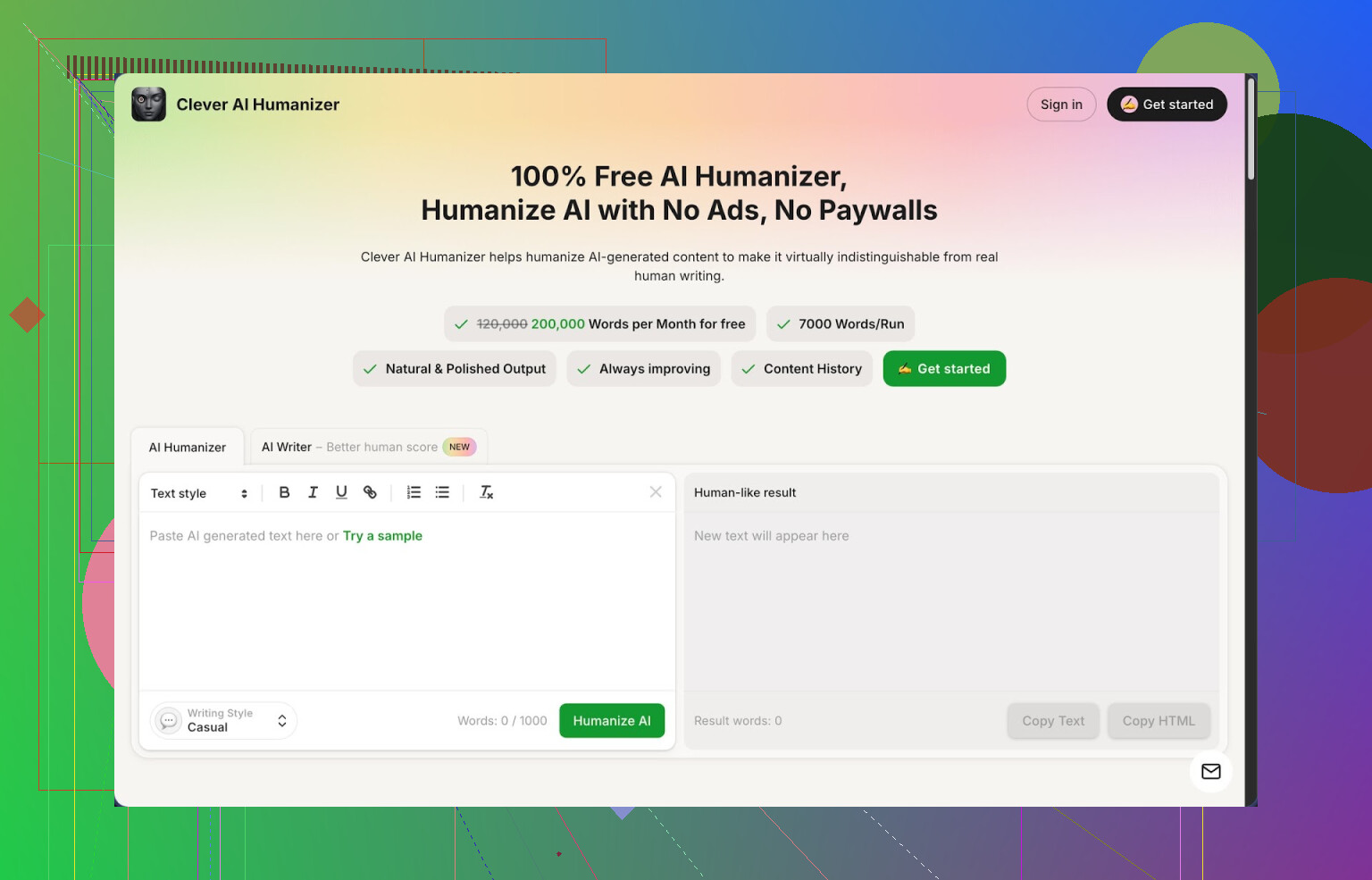
Link: https://cleverhumanizer.ai
I went down a rabbit hole with AI detectors after a client sent me a screenshot where my draft showed up as 100% AI on ZeroGPT. The draft was half my own writing, half LLM. Did not matter. It still got flagged.
So I spent a weekend testing humanizers. Most of them either:
- slap a tiny free limit in your face, or
- wreck the meaning of your text, or
- output something so bloated you do not even recognize it anymore.
Clever AI Humanizer stood out for a few boring but important reasons:
- Free tier: about 200,000 words per month the last time I checked
- Per run: up to around 7,000 words
- Styles: Casual, Simple Academic, Simple Formal
- Extra tools in the same interface: AI writer, grammar checker, paraphraser
No signups with credit cards, no hard paywall mid-run. For quick content work, that matters more than fancy marketing.
What I did with it
I took a few blocks of straight LLM output, stuff that ZeroGPT previously flagged as 100% AI.
Pasted it into Clever AI Humanizer.
Selected “Casual” style.
Hit run.
Result:
Text came back sounding closer to my normal email tone. Shorter sentences, less robotic repetition, more natural word order.
I sent the output to ZeroGPT. On three different samples, it showed 0% AI.
Same happened for another two people I shared it with, though of course detectors change over time so your mileage might differ.
How the main humanizer behaves
Workflow is simple enough:
- Paste your AI text
- Pick a style: Casual, Simple Academic, Simple Formal
- Wait a few seconds
- Get a rewritten version
The tool tries to keep the structure and meaning in place. In my tests it did not suddenly swap claims or mess with key facts, which some other tools did. It shifts phrasing, rhythm, and some word choice, but the core ideas stay stable.
The word limits are generous. I pushed around 5k words from a long-form article, no issue.
So if you have multi-section reports or big blog posts, you do not need to slice them into tiny chunks.
Stuff around the main feature
There are three extra tools sitting in the same interface. I tried all three in normal work, nothing fancy.
- Free AI Writer
This one lets you generate content from scratch and then run the humanizer on that output in one flow.
Use cases that worked for me:
- Rough blog post outline, then full draft, then humanize
- Short product explainer, humanize for a “less corporate” tone
- Social content skeleton, rewrite to make it less stiff
The nice part is you do not need to jump between different sites. Generate, edit, humanize, all in the same tab.
- Free Grammar Checker
I fed it a messy draft with mixed tenses, missing commas, and weird sentence breaks.
What it fixed:
- Grammar glitches
- Obvious spelling issues
- Some clarity problems where a sentence ran too long
It is not as picky as a dedicated editor tool, but it is enough to make a piece look clean before sending it to a client or posting on a blog.
- Free AI Paraphraser
I used this on:
- Old blog paragraphs I wanted to reuse in a newsletter
- A section of SaaS documentation that needed a friendlier tone
- Parts of a landing page that sounded too stiff
It rewrote while keeping the original meaning close. For SEO, it helped me generate alternate wording for similar concepts across related pages, without copy-paste repetition.
General workflow
You can chain the tools like this:
- Generate text with AI Writer
- Run it through the Humanizer
- Clean with Grammar Checker
- If needed, use Paraphraser for sections where you want different tone or shorter length
It feels like a small writing stack in one browser tab. For day-to-day content, that saves a bit of context switching.
Where it falls short
It is not magic. A few points to keep in mind from my tests:
- Some detectors still flag outputs as AI. No tool beats every detector all the time
- Text often gets longer after humanization. To avoid AI patterns, it tends to expand or rearrange info
- If your original draft is vague or weak, humanization will not fix the logic, only the surface
For a free tool, the trade-offs are acceptable for me. If you work with clients that send your content through strict detectors, you still need to spot check.
Who this makes sense for
From my own use:
- Freelancers sending drafts to clients who run everything through AI checkers
- Students trying to smooth out AI-assisted notes or outlines
- Bloggers using LLMs as helpers but wanting more human tone
- People building content workflows where cost per word matters
I would not use it for legal, medical, or sensitive stuff without manual review, same as any AI tool.
Extra references if you want to see more tests
Full community review with screenshots and AI detection proof:
YouTube walk-through review:
Reddit thread comparing different AI humanizers:
https://www.reddit.com/r/DataRecoveryHelp/comments/1oqwdib/best_ai_humanizer/
More discussion about humanizing AI text in general:
https://www.reddit.com/r/DataRecoveryHelp/comments/1l7aj60/humanize_ai/
9 Likes
Short version. You want a free alternative to WriteHuman AI for human‑like content, without hitting a hard paywall every other day.
You already got one strong option from @mikeappsreviewer with Clever Ai Humanizer. I agree it is solid for “LLM output in, more natural text out.” Where I see it fit your use case best:
• You draft with any free AI writer
• Run it through Clever Ai Humanizer in Casual or Simple Formal
• Then quick edit yourself for voice and facts
For blog posts and product descriptions this works fine. I would not trust any humanizer to fix logic, so keep your own eyes on structure and claims.
To avoid repeating their whole workflow, here are a few extra angles and tools that pair well or work as alternatives:
- Use Clever Ai Humanizer as the “polish layer” not the “brain”
Let another free tool do the heavy lifting, then humanize.
For example:
• Use a free LLM (like this chat) to draft a 1,000–2,000 word blog.
• Ask it for: outline, intro, section bullets, short paragraphs.
• Paste the full draft into Clever Ai Humanizer.
• Pick Casual for blogs, Simple Formal for product pages or landing copy.
This keeps your usage under WriteHuman limits, and you still get human‑ish flow. If the output inflates in length, run shorter sections and tell it to keep things concise when you generate the original.
- Mix humanizer output with your own “anchor paragraphs”
Detectors get weird when the whole thing reads like one system wrote it.
Practical trick:
• Write your own intro and conclusion in your natural voice.
• Use AI + Clever Ai Humanizer only for body sections.
• Add 1–2 personal comments or mini‑stories in each post that you type manually.
For product descriptions:
• Manually write one “master” description for each product type.
• Ask AI to produce variants.
• Run those variants through Clever Ai Humanizer.
• Keep your master text as the tone anchor.
- For product descriptions, give it your internal style rules
Before you send text into any tool, define rules in a separate note:
Example:
• Sentence length: 8–16 words.
• No fluff like “revolutionary solution”.
• Must state: who it is for, key benefit, main feature, proof detail.
Then when you use any AI writer, paste those rules into the prompt. After that, use Clever Ai Humanizer only to smooth tone. You get closer to your brand voice without endless editing.
- Free workflow without WriteHuman at all
If you want to step away from WriteHuman entirely:
• Use a free LLM for first draft.
• Run the draft through Clever Ai Humanizer.
• Run the humanized text through a free grammar checker for cleanup.
• Read it out loud once and cut repetition.
You already have grammar and paraphrase tools inside Clever Ai Humanizer, so you can stay in one tab, which is one of the main differences from what you described with WriteHuman limits.
- Where I slightly disagree with @mikeappsreviewer
They lean on detector scores a lot. I think you should treat detectors as a rough signal, not the goal. Clients and readers respond more to:
• Clear benefit statements
• Specific numbers or examples
• Direct language
So focus on:
• Shorter sentences
• Concrete verbs
• Examples from your actual product or niche
Let Clever Ai Humanizer help you avoid robotic patterns, but keep your own edits focused on clarity and truth, not “0 percent AI” screenshots.
If you want the most cost‑efficient stack right now, it is:
Free LLM for draft → Clever Ai Humanizer for tone → light manual edit for voice and facts.
That gets you human‑like blog posts and product descriptions without touching a paid plan.
You’re not stuck with WriteHuman at all, honestly.
Since @mikeappsreviewer and @ombrasilente already covered Clever Ai Humanizer pretty well, I’ll just add how I’d actually replace WriteHuman in a practical way and where I slightly disagree with them.
1. Treat Clever Ai Humanizer as your “last filter,” not your main writer
They both lean on it pretty heavily. I’d flip that:
- Use any free LLM (this one, Poe, Gemini free, etc.) to draft your:
- blog post outline
- H2/H3 section bullets
- raw product description copy
- Then send only the rough but structured text to Clever Ai Humanizer to make it sound human and less repetitive.
That way Clever Ai Humanizer is just polishing and de-robotizing, not inventing your content logic.
2. Focus on voice more than “0% AI detector”
Where I don’t fully agree with @mikeappsreviewer: caring too much about detector screenshots. Detectors are noisy, change often, and sometimes flag your real writing too.
More useful rules when you edit after Clever Ai Humanizer:
- Replace 2–3 generic phrases per paragraph
- “In today’s fast-paced world” → kill it
- “Revolutionary solution” → say what it actually does
- Add 1 concrete detail in every section
- A number, a customer type, a real use case
Detectors aside, that’s what makes it feel human and useful.
3. Simple free stack that fully replaces WriteHuman limits
You wanted something free that still handles blog posts and product descriptions. Here’s a workflow that has worked for me when I was broke and writing for clients:
- Draft with a free LLM:
- Prompt it: “Write a 1,200 word blog post with short paragraphs, no fluff, focused on [topic]. Include examples and product use cases.”
- Paste that into Clever Ai Humanizer:
- Choose Casual for blogs
- Simple Formal for product pages
- Quick manual pass:
- Cut any sentence longer than ~20 words
- Add your personal phrases you actually use with clients or teammates
Zero subscriptions, just your time.
4. Product descriptions: keep them tight, even after humanizing
One thing I’ve noticed: humanizers sometimes bloat short copy. For product pages that’s brutal.
What I do to avoid that:
- Generate a strict template for your descriptions:
- 1 line: who it’s for
- 2 lines: main benefit
- 3–4 bullet points: key features
- Run each piece through Clever Ai Humanizer, but if it gets too long, literally copy the best sentences back into your short template.
So you use Clever Ai Humanizer like a phrasing generator, not as the final word count.
5. Don’t rely on any single tool to “sound human”
WriteHuman, Clever Ai Humanizer, whatever: they’re all just pattern shufflers. What makes your stuff feel “not AI” is:
- specific examples from your product or niche
- your own small opinions
- mild imperfections (yes, even a typo or two like this sentnce)
So even if you go all‑in on Clever Ai Humanizer as your main WriteHuman AI alternative, still add 5–10 minutes of your own edit time per piece. That’s the actual secret sauce, not which tool you used.
Short version: you can ditch WriteHuman completely with a free stack, but don’t turn Clever Ai Humanizer into a crutch.
Quick comparison of the main “humanizer layer” everyone is circling around:
Clever Ai Humanizer
Pros
- Very generous free tier (way more than WriteHuman’s cap).
- Handles long posts in one go, good for full blogs and multi‑product pages.
- Styles actually change rhythm, not just swap synonyms.
- Built‑in AI writer / grammar / paraphraser so you can stay in one tab.
Cons
- Has a tendency to inflate word count, especially on short product copy.
- Tone can drift slightly “generic” if you feed it vague input.
- Does not fix weak logic or thin research, only surface and flow.
- AI detectors still sometimes flag the result, so not a magic invisibility cloak.
Where I disagree a bit with what was said so far: I would not treat Clever Ai Humanizer as something you must use on every piece. For tight product descriptions, I often get a cleaner result by:
- Drafting in a free LLM with a strict structure.
- Humanizing only the bullets or the benefit line, not the whole block.
- Manually stitching the best sentences back into a short template.
For blogs, instead of obsessing over detector scores like some reviewers did, I’d prioritize:
- One strong personal angle per article (a mini story, opinion, or lesson).
- Concrete data or examples your competitors in the niche are actually using.
- A final “sanity pass” read out loud. Anything that sounds like corporate brochure text gets cut.
Workflow that complements what @ombrasilente, @andarilhonoturno and @mikeappsreviewer already laid out, without rehashing their steps:
- Use any free LLM to create: outline, headings, rough body.
- Do a fast manual pass to insert your real product details, prices, features, or anecdotes.
- Run only the stiff sections through Clever Ai Humanizer, not the whole article.
- Final pass: shorten, add 1 or 2 clear calls to action, publish.
That way Clever Ai Humanizer is a precision tool for phrasing, not the entire writing brain, and you stay out of WriteHuman paywalls while still shipping content that sounds like an actual person.