I ran into this a few weeks ago after I wiped an external SSD during a macOS reinstall. Dumb mistake. I spent hours testing recovery tools after that, and the one I kept going back to was Disk Drill.
What sold me was the mix of speed, decent recovery results, and a setup that didn’t fight me the whole time.
A lot of Mac recovery apps look clean in screenshots. Then you run a scan and it drags. Or previews fail. Or APFS support feels half-finished. On my side, Disk Drill handled newer Macs better than most of what I tried. It runs natively on Apple Silicon and worked fine with APFS, HFS+, and exFAT. The steps were simple enough that you don’t need to be deep into disk tools to use it.
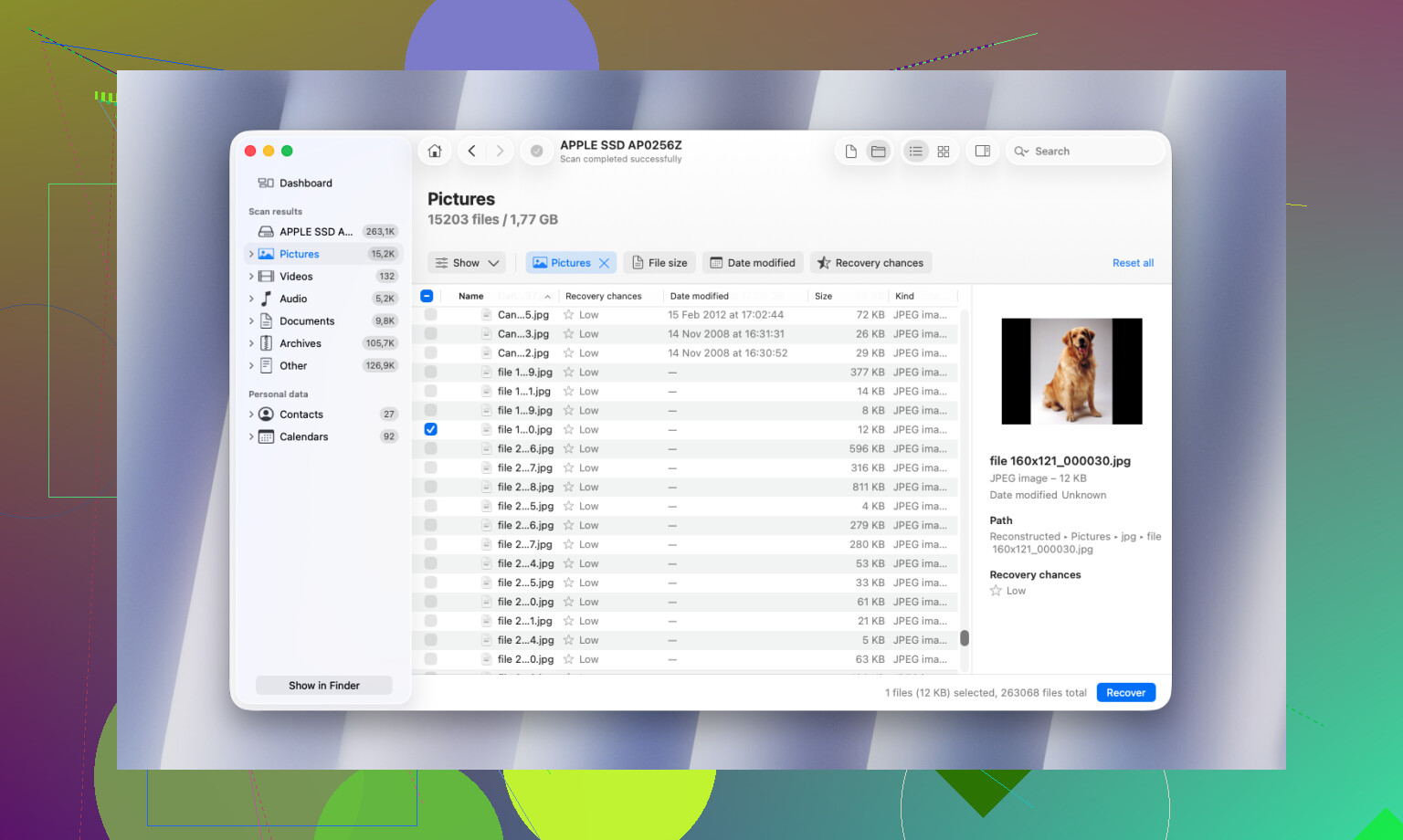
The preview feature mattered more than I expected. Before paying, I checked recovered documents, photos, video clips, and PSDs to see whether they opened properly. Some tools spit out a giant list of “found” files, then half of them are broken junk. This one was better about showing what was still usable.
Stuff I ended up liking:
- Byte-to-byte backup for unstable drives
- S.M.A.R.T. monitoring
- Duplicate finder
- Recovery Vault
- Advanced Camera Recovery for split or fragmented video files
The disk image tool is the part I’d keep installed for. If your drive starts dropping offline, clicking, or acting weird, making a clone first is often the safer move.
If you’re more technical and dealing with RAID, partition damage, or NAS recovery, R-Studio deserves a look. I get why IT people like it. It’s fast and it goes deeper. I still wouldn’t hand it to most casual users. The interface feels built for people who are comfortable staring at filesystem details for a while.
I also tested iBoysoft Data Recovery. It did better with APFS than I expected. No big complaint on recovery itself. My issue was the pricing, it leaned hard into subscriptions, and I got tired of that fast.
For free options, PhotoRec still does the job if your budget is zero. You need to go in with low expectations, though. It recovers by file signatures, so you often lose original names and folder layout. On a large drive, sorting through the output gets messy fast. It works, but it’s not neat.
One thing people miss, and I learned this the hard way, your odds depend a lot on what you do after the files are lost. The software matters less than the next few minutes. If you keep using the Mac like normal, especially with SSDs, recovery odds drop fast because old blocks get overwritten.
If the data matters, do this first:
- Stop using the drive
- Don’t install recovery software onto the same drive
- Save recovered files to a different drive
- If the drive is unstable, make an image before trying recovery
That part made a bigger difference for me than switching between apps over and over.
If you want the short answer, I’d start with Disk Drill on Mac.
I don’t agree with @mikeappsreviewer on every point, mostly because I think some of the extra tools are nice but not the reason to pick it. What matters is whether you scan fast, preview files, and recover to another drive without a mess. Disk Drill does those three things well on macOS, especially for deleted docs, photos, and common file types from APFS volumes.
Why I’d pick it for your case:
- Easy UI, no steep learning curve.
- Solid APFS support, which matters on newer Macs.
- Preview works well, so you don’t waste time restoring broken files.
- Safer for normal users than something like R-Studio.
- Good results on emptied Trash cases, if the files were not overwritten yet.
What I would not do is chase “free” tools first unless your files are low value. PhotoRec is useful, but the output is chaotic. File names often come back trashed or missing. Sorting thousands of files is a pain.
If your Mac uses an SSD, stop using it now. SSD trim makes recovery harder and sometiems impossible after deletion. If the files matter a lot, scan from another startup disk or external macOS setup if possible.
Best practical pick, Disk Drill.
Best for experts, R-Studio.
Best free try, PhotoRec, if you have patience.
Also, if you want more Mac-focused opinions from real users, this thread is a decent place to compare tools and results:
best Mac data recovery software picks from Reddit users
If you want the short version, I’d still put Disk Drill for Mac at the top for most normal people. Not because it has the most nerdy features, and not totally for the same reasons @mikeappsreviewer and @jeff gave, but because it’s one of the few tools that feels like it was made for people who just want their files back without doing a mini IT certification first.
Where I kinda disagree with them a bit: people hype scan speed and bonus utilities a lot. Nice to have, sure. But for deleted files from an emptied Trash, what matters most is whether the app can actually show you recoverable files in a usable way and not turn the process into a cluttered mess. That’s where Disk Drill is usuallly better than a lot of Mac recovery apps I’ve tried.
Why I’d pick it for your case:
- clean Mac-native interface
- works well with common Mac file systems
- strong file previews for docs, photos, and media
- easier file filtering, which saves a ton of time
- less intimidating than stuff like R-Studio
R-Studio is great, but honestly, for a basic “oops I deleted files” problem, it’s overkill for most people. Powerful? Yep. Pleasant? lol no.
One caveat nobody should sugarcoat: if your Mac’s internal drive is an SSD, recovery can go from “possible” to “not happening” pretty fast because of TRIM. So the best software in the world still can’t fix overwritten or trimmed data.
If you want a decent extra resource, this best Mac data recovery software Reel with quick tool comparisons is easy to skim.
My take:
- Best overall Mac data recovery tool: Disk Drill
- Best for advanced users: R-Studio
- Best if you insist on free: PhotoRec, but it’s kinda a mess
So yeah, if you need something safe, easy, and actually effective for recovering deleted Mac files, Disk Drill is probly the best place to start.
I’m slightly less sold on “best” as a universal label, but for a normal Mac user who wants something safe and not miserable to use, Disk Drill is probably the most sensible pick.
Pros
- very Mac-friendly interface
- good preview and file-type filtering
- handles APFS/HFS+ well enough for common recovery jobs
- less intimidating than R-Studio
- useful extras if you keep it installed
Cons
- not cheap if you only need it once
- recovery quality still depends on whether data was overwritten or trimmed
- deep scans can return a lot of clutter
- some people won’t care about the bundled extra tools
Where I differ a bit from @jeff, @cazadordeestrellas, and @mikeappsreviewer is this: I would not focus too much on bonus features when your main issue is emptied Trash. At that point, the real decider is whether the software can identify intact files and let you sort the results fast.
If you want alternatives:
- R-Studio for advanced cases and people who know filesystems
- PhotoRec if free matters more than convenience
- iBoysoft is decent, but I’m not a fan of the pricing model
My pick for most people: Disk Drill first, then reassess if it finds nothing. If the deleted files were on the internal SSD, be realistic. TRIM can kill recovery chances fast.