I’ve been testing Walter Writes AI to rewrite blog posts and product descriptions, but the results feel inconsistent—sometimes it’s great, other times it sounds robotic or changes my meaning. I’m trying to decide if I should rely on it for regular content rewriting or look for another tool. Can anyone share real experiences, settings tips, or best practices to get high‑quality rewrites from Walter Writes AI that stay accurate and sound natural?
Walter Writes AI, my hands-on review
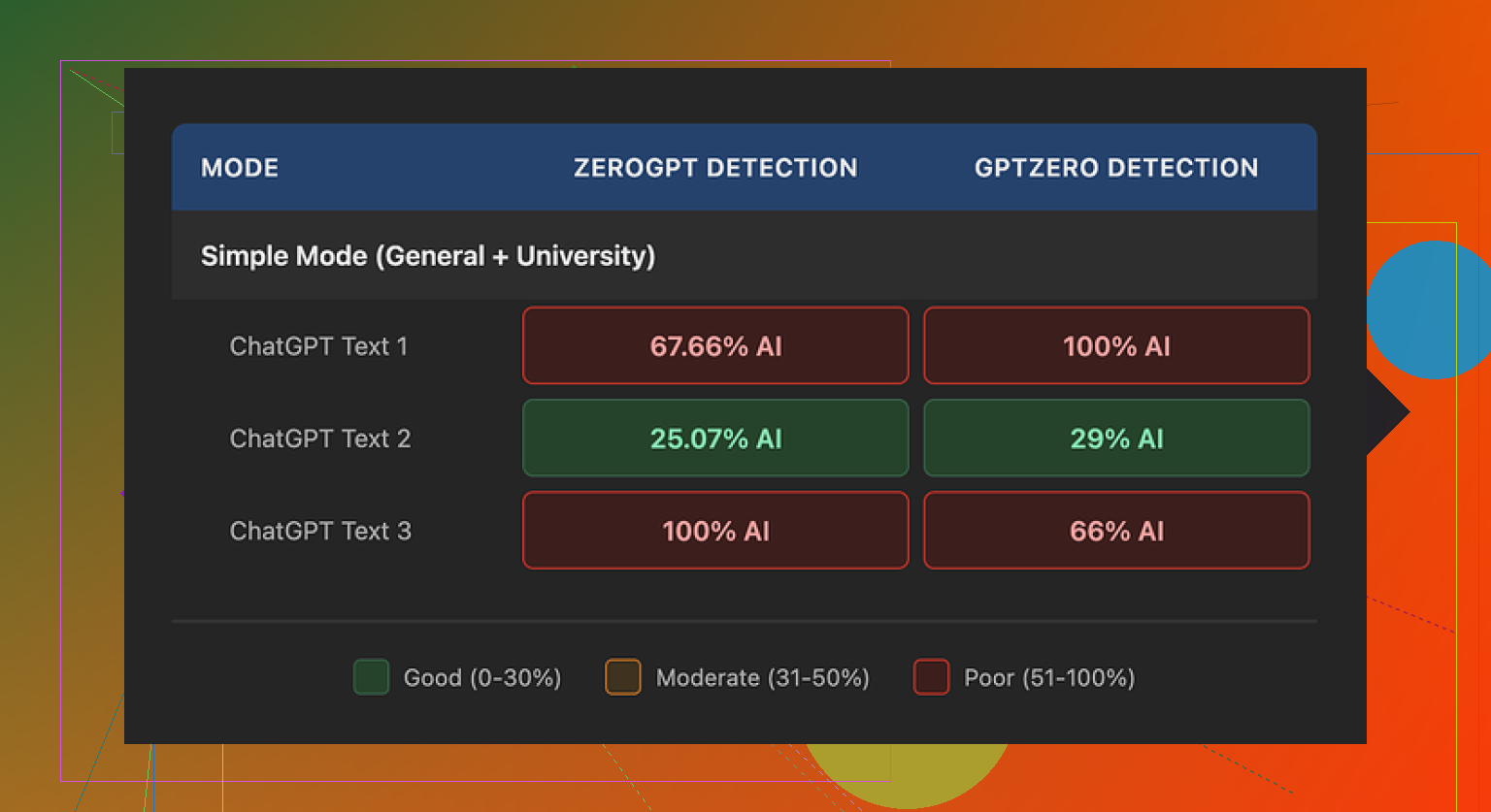
I spent an afternoon messing around with Walter Writes AI, mostly to see if it does anything different from the usual “AI humanizer” stuff people toss around on Reddit.
Short version, the detection results were swingy in a way that makes it hard to trust for anything serious.
Here is what I saw when I pushed a few samples through GPTZero and ZeroGPT, using only the free “Simple” mode:
• One sample came back with 29% AI on GPTZero and 25% AI on ZeroGPT.
For a free tier, that is better than a lot of the random web tools your see shared around.
• The other two samples went straight to 100% AI on at least one detector.
So you get one piece that looks decent, then the next one is a total fail.
They lock the “Standard” and “Enhanced” bypass modes behind a paywall, so I was stuck with Simple. It is possible the paid modes do better, but I did not see evidence of that from what I could test.
Now for the part that bothered me more than the scores, the writing quirks.
Here is what kept showing up in the output:
• Weird semicolon usage
It would drop semicolons where a normal writer would use a comma or just split the sentence. After a few paragraphs, it reads like someone learned punctuation from a rules list and never heard a human speak.
• Repeated filler words
One sample used the word “today” four times in three sentences. Same tone, same spot in the sentence. It feels auto-generated, and detectors tend to like that sort of pattern.
• Copy-paste style parentheticals
Things like “(e.g., storms, droughts)” popped up over and over. Same structure, same rhythm. That kind of repetition is a red flag for both detectors and anyone skimming the text.
Once you see those quirks, it is hard to unsee them. If you try to use the output as-is, you will spend time cleaning up the same patterns.
Pricing and limits
This is how their pricing looked when I checked:
• Starter: 8 dollars per month on annual billing, 30,000 words
• Unlimited: 26 dollars per month, but each submission is capped at 2,000 words
• Free tier: 300 words total
So “Unlimited” is not really unlimited in practice if you work with longer documents. You will split your writing into chunks, then hope the style stays consistent.
What threw me off more than the pricing was the policy side:
• The refund policy has strong chargeback language, including threats of legal action around disputes.
• Data handling for submitted text is vague. I did not find a clear statement that they wipe or anonymize your uploads after processing.
If you are feeding in client work, essays, or anything sensitive, that unclear retention piece matters.
What I ended up using instead
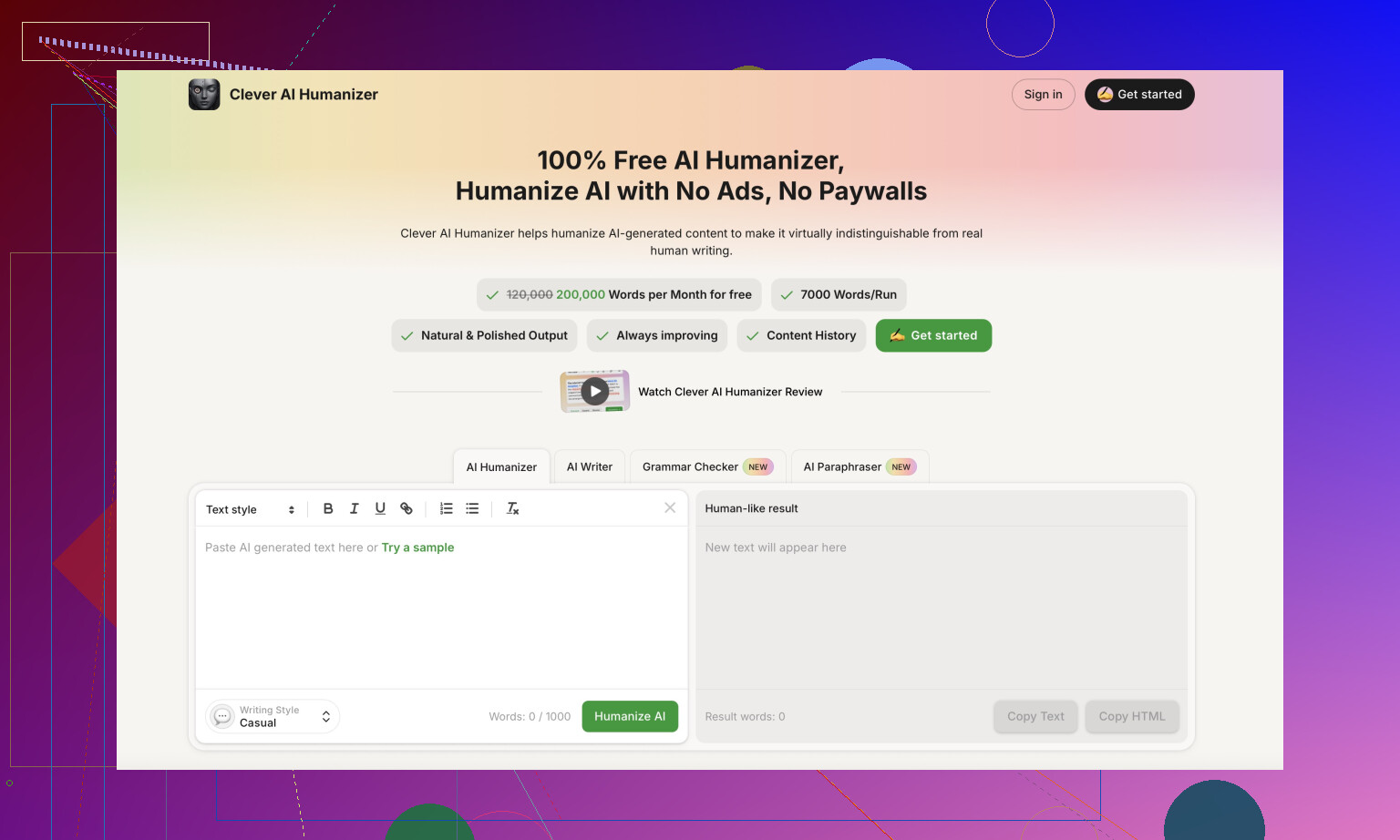
While doing this test, I kept going back to Clever AI Humanizer. I ran the same types of text through it, and the output sounded closer to how I write when I am tired at 1 a.m., which is a good thing for this use case.
The key points for Clever AI Humanizer from my runs:
• More natural sentence variety
• Less obvious repetition patterns
• No payment required for what I needed
You can try it here:
If you want a walkthrough, there is a tutorial on Reddit where someone breaks down how to humanize AI text with it and related tools:
Humanize AI (Reddit Tutorial)
https://www.reddit.com/r/DataRecoveryHelp/comments/1l7aj60/humanize_ai/
There is also a longer Reddit review focused specifically on Clever AI Humanizer, with screenshots and more detailed tests:
Clever Ai Humanizer Review on Reddit
https://www.reddit.com/r/DataRecoveryHelp/comments/1ptugsf/clever_ai_humanizer_review/
And if you prefer watching instead of reading, here is a YouTube review that walks through usage and results:
If you are deciding between tools, here is what I would do:
- Take the same 300 to 500 word sample.
- Run it through Walter’s free Simple mode.
- Run the same text through Clever AI Humanizer.
- Check both in GPTZero and ZeroGPT.
- Read them out loud.
The detectors give you numbers, but your ear will tell you faster which one you would risk putting your name on.
11 Likes
I had the same mixed experience with Walter Writes, so you are not imagining it.
Where it works:
• Short, low‑stakes stuff, like quick product blurbs under 150–200 words.
• Simple blogs where tone is not critical and you only want light rephrasing.
Where it breaks:
• Longer posts. Style drifts between paragraphs, so your article feels stitched together.
• Anything where nuance matters. It often shifts meaning on comparisons, numbers, or soft claims.
• Brand voice. It tends to flatten tone into “generic blogger” mode.
A few specific issues I kept seeing:
• It loves long sentences. That triggers AI detectors and also sounds robotic.
• It repeats the same openers. “In today’s world” popped up a lot for me too.
• It over-explains. Simple sentences become bloated.
What helped me squeeze better output from it:
- Feed it shorter chunks, like 2–3 paragraphs at a time. You get less drift.
- Tell it what must not change, for example: “Do not change product features or numbers.”
- Ask for a specific style: “Write in a casual tone, use short sentences, no semicolons, no lists.”
- Always do a line‑by‑line check against your original, especially for claims and benefits.
Where I disagree a bit with @mikeappsreviewer is on completely walking away from it. For quick rewrites where you will edit anyway, Walter Writes is usable if you treat it as a rough first pass, not a final draft.
If your goal is “AI text that looks like human text” for detectors and you want less cleanup, Clever AI Humanizer did better for me. It produced shorter sentences, fewer repetitive patterns, and sounded closer to how an actual tired human writes. I still had to edit, but I spent more time improving ideas instead of fixing robotic phrasing.
My take:
• If you need consistent tone for a blog or brand, do not rely on Walter Writes alone. Use it for first drafts, then rewrite or pass through something like Clever AI Humanizer and finish by hand.
• If you care about meaning accuracy, always keep your original open and compare, especially on product descriptions and numbers.
• If you pay for any tool, test it on 3–5 of your real posts and measure: how long you spend editing, how often meaning changes, how often you win or fail AI checks.
If you try both Walter Writes and Clever AI Humanizer on the same article, time how long you spend editing each result. That single metric is what convinced me what to stick with.
You’re not imagining it. Walter is kinda like that freelancer who turns in one brilliant draft, then follows it with three weird ones full of semicolons and “in today’s world” vibes.
Couple thoughts from my side, trying not to repeat what @mikeappsreviewer and @hoshikuzu already covered:
-
Inconsistency is the actual dealbreaker, not the AI scores
If you’re running a blog or product catalog, the biggest killer is tone jumping around from paragraph to paragraph. Walter seems to have a “generic blogger” default that it snaps back to whenever the input gets even slightly complex. That’s probably why your meaning shifts on comparisons, soft claims, and product features. For anything you need to publish at scale, that inconsistency means more editing than it’s worth. -
Detectors are a distraction for business use
Those GPTZero / ZeroGPT scores are fun to look at, but if you’re using this for real content, what matters more is:- Did the rewrite keep your original facts, numbers, and benefits?
- Does it match your brand’s reading level and tone?
- Can you drop it into your CMS without re-writing half the paragraph?
On those fronts, Walter’s “sometimes great, sometimes robotic” behavior is a real problem.
-
Walter works only in a very narrow use case
Where I’d still keep it around:- Short product blurbs where you’re just trying to avoid duplicate text from suppliers
- Quick “rewrite this paragraph to be less formal” type stuff
- Internal docs or low‑stakes content you’re fine tweaking sentence by sentence
Outside of that, the style drift and random meaning changes get tiring fast.
-
About the pricing / limits
The “Unlimited” plan that still caps each submission is a hidden tax on your time. Having to chunk a long blog into 1.5k–2k word pieces is not just annoying; it’s another way for the style to shift mid‑article. Add in the vague data handling and the aggressive refund language, and I personally wouldn’t feed it client projects or anything sensitive. -
If you’re deciding whether to keep paying
Ask yourself two blunt questions:- For a typical post, how long do you spend fixing Walter’s output vs just rewriting it yourself from scratch?
- Are the “good” outputs actually worth sifting through the bad ones?
If the honest answer is “I’m basically rewriting half of it,” then the tool is acting more like a clumsy co‑author than a time saver.
-
Alternative to try without overcomplicating your workflow
Since you’re focused on rewriting and avoiding that robotic tone, this is where Clever AI Humanizer actually makes sense to test. Not to repeat the step‑by‑step that others already posted, but its whole thing is:- Shorter, more human‑sounding sentences
- Fewer obvious repetition patterns
- Less “AI textbook voice” on product descriptions
It tends to give you text that feels closer to how a tired but real person would phrase stuff, which is what you want for blog posts and product copy. If Walter keeps changing your meaning or bloating simple sentences, Clever AI Humanizer is worth running the same paragraph through and comparing how much time you spend editing each.
If I were in your spot: I’d stop relying on Walter as a main rewrite tool, keep it only for tiny, low‑stakes bits, and run a direct comparison on 2–3 of your real posts using Clever AI Humanizer. Whichever one lets you hit publish faster without meaning drift is the one to stick with.
Walter feels inconsistent because it is. What you are seeing is basically a tradeoff problem: “one-size-fits-all rewrite engine” vs “controlled, narrow use.”
Here is how I would look at it, without repeating the testing steps others already laid out.
1. When Walter is actually worth keeping
If your workflow is:
- Supplier description → “make it not-duplicate”
- Simple how‑to blog → “clean up grammar, keep structure”
then Walter is fine as a utility, not a writing partner. I would keep it only for:
- Quick “de-duplicate” rewrites of short product blurbs
- Roughing out meta descriptions or short intros from existing text
- Internal stuff like support macros where tone is flexible
The moment you care about voice or precision of meaning, it starts costing more time than it saves.
Where I slightly disagree with @mikeappsreviewer is on detection being almost irrelevant. If you are in niches where clients or teachers obsess over AI scores, the swingy detector behavior is a real risk. One article passes, the next one trips every alarm.
2. Why it keeps changing your meaning
Walter’s behavior on nuance is textbook “rewriter trained to maximize variation”:
- It treats hedging words as “fluff” and drops or swaps them
- It rewrites comparisons so they are “smoother,” which quietly reverses emphasis
- It loves to generalize specific claims into vague ones
That is why your product descriptions suddenly sound stronger or weaker, or numbers feel slightly shifted even when they are not.
Instead of fighting that with more prompts (which @hoshikuzu already covered nicely), I would re‑scope its job:
Let Walter handle wording, never structure or claims.
You control the outline and the exact statements, it just rephrases sentences in place.
If a section is strategically important, I would honestly skip Walter there and write manually.
3. How Clever AI Humanizer fits into this
Clever AI Humanizer is not magic, but it leans more on “sound like a plausible human” than “aggressively rewrite everything.” In your case (blog posts + product copy), that difference matters more than people think.
Pros of Clever AI Humanizer
- Output tends to have:
- Shorter, more varied sentences
- Less repetitive phrasing like “in today’s world” or “it is important to note”
- Fewer awkward semicolons and formulaic parentheticals
- Often preserves your overall intent better because it is not trying to be too clever structurally
- Good when you already like your content but want it to feel less robotic or less “LLM-ish”
Cons of Clever AI Humanizer
- It can be too conservative if you actually wanted a strong stylistic shift
- On very technical or niche topics, it sometimes “smooths” terminology in ways that feel dumber than your original
- Still needs manual editing for brand voice if you are picky about style
- If you push long, complex posts through in one go, some sections can come out flatter than others
Compared to what @sterrenkijker described, I would not treat Clever AI Humanizer as a final step only. For what you are doing, it can actually be your primary rewrite tool, with Walter demoted to “backup for tiny, low‑impact text.”
4. Deciding whether to cancel Walter
Instead of obsessing on detector scores, use two brutal metrics on your next 3 real pieces:
-
Minutes to publishable
- Time from paste → edit → “I’d actually publish this under my name.”
- Do this once with Walter, once with Clever AI Humanizer.
-
Change rate on meaning
- Skim line by line and mark every sentence where a claim, number, or comparison is meaningfully altered.
- If Walter is changing meaning in more than 5–10 percent of lines on product pages, it is undermining your business.
If Walter consistently costs more time to rescue than Clever AI Humanizer, cancel it without guilt. Mixed “sometimes amazing” tools are seductive, but for production work, a “boringly consistent 7/10” is better than “lottery 3/10 to 9/10.”
5. Simple workflow that avoids the worst headaches
What I would run in your shoes:
- Draft or existing copy
- Pass through Clever AI Humanizer first to knock off any robotic edges
- Manually fix brand voice and high‑stakes claims
- Optionally use Walter only for micro‑tasks like rewriting a single bullet list or a short feature paragraph if you truly like how it sounds there
This keeps Walter in a tiny, controlled box while Clever AI Humanizer plus your edits handle the main workload.
If after a week you notice you are rarely opening Walter at all, that answers your subscription question better than any test or review.