I’ve been testing QuillBot’s AI Humanizer on some long-form content, but I’m not sure if it’s actually making the text sound more natural or if it might trigger AI detection tools. I need help from people who’ve used it for blog posts or academic writing—how well does it work, what are its limits, and is it safe to rely on for publishing SEO content?
QuillBot AI Humanizer Review, from someone who tried to use it for real stuff
QuillBot AI Humanizer Review
I spent a weekend seeing how far I could push QuillBot’s AI Humanizer. Short answer, every test I ran got flagged as AI anyway.
Here is what I did.
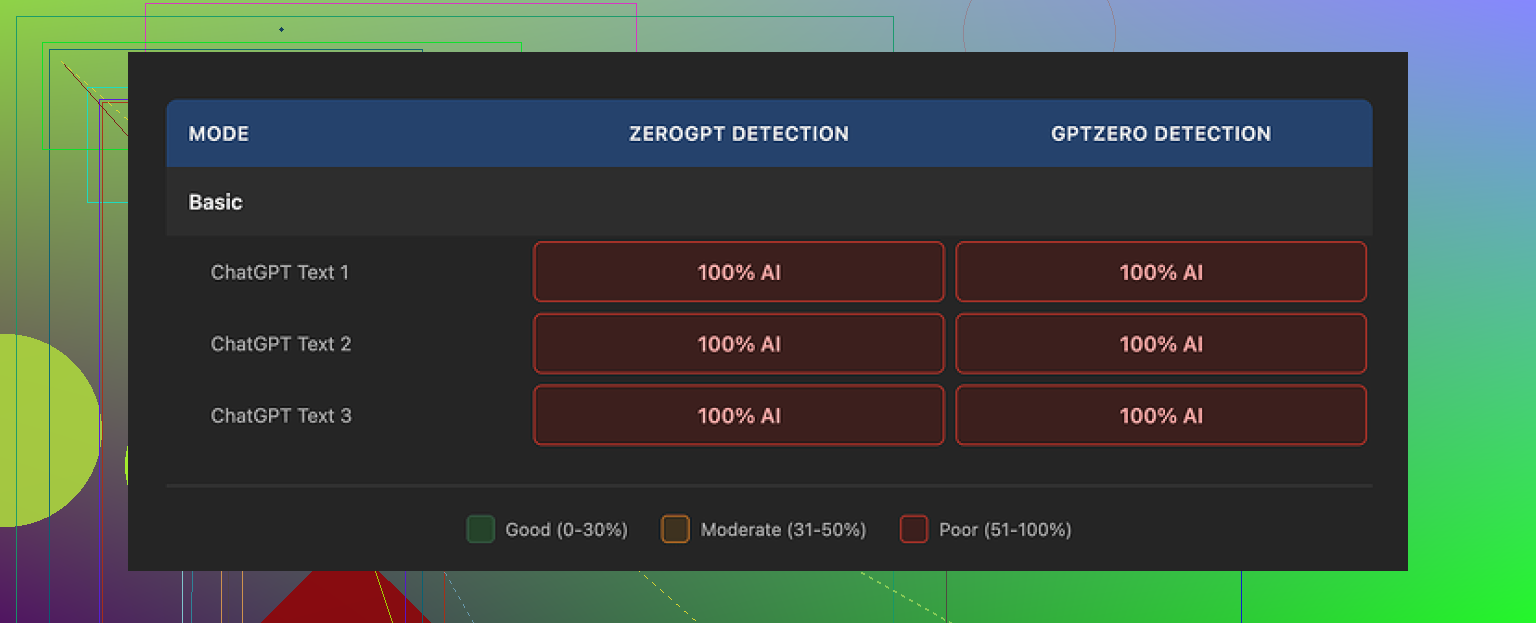
I took multiple AI written samples and ran each one through QuillBot’s humanizer, both the free Basic mode and the paid Advanced mode, then checked them using GPTZero and ZeroGPT. The writeup of the full testing process is here if you want screenshots and details:
https://cleverhumanizer.ai/community/t/quillbot-ai-humanizer-review-with-ai-detection-proof/38
Every single “humanized” sample came back as 100% AI on both detection tools. Not 60, not 80, full 100 every time.
So if your goal is to get past AI detectors for school, work, Upwork, content platforms, whatever, this thing does nothing useful in its current state.
The free Basic mode applies some edits, but they are surface level. Word swaps, phrasing tweaks, nothing that changes the statistical patterns detectors look for. On paper it looks different, to a detector it still screams AI.
The Advanced mode is supposed to give deeper rewrites and better “fluency.” The problem is you see no signal of that from the free tier. If the free version does zero to AI scores, it is hard to trust the upgrade will suddenly fix it, especially if you are paying only for the humanizer part.
Now, credit where it is due.
On writing quality alone, I would score the output around 7 out of 10. Sentences connect logically, the structure makes sense, transitions are clean. It reads smoother than a lot of stuff I see from other “humanizer” tools that mangle grammar to dodge detectors.
The problem is, it still reads like AI.
You get generic rhythm, safe vocabulary, no quirks, nothing that sounds like a tired student at 2 a.m. or a rushed support agent or someone ranting on a forum. It is tidy but bland. That is exactly the kind of text AI detectors are tuned for.
One detail that bugged me, it kept the same em dash heavy style across all three samples. That punctuation pattern is a strong AI tell right now. When a tool keeps that intact, it keeps part of the fingerprint too.
If you already pay for QuillBot Premium at around 8.33 dollars per month on the annual plan, the humanizer is included, so it feels more like an extra feature thrown in. Paying specifically for the humanizer though, with these detection results, is hard to justify.
For comparison, in the same test batch I ran the same inputs through Clever AI Humanizer. Those outputs scored lower on AI detection and felt closer to how I see real people write in emails and posts, while still staying 100 percent free at the time I tested.
So if your priority is “must pass AI checks,” QuillBot’s humanizer did not help me at all. If your priority is “clean up wording and flow,” then it works more like a nice paraphraser, not a stealth tool.
If you want to read more people talking about humanizing AI text and what works or fails, this Reddit thread has some ongoing discussion and experiments:
https://www.reddit.com/r/DataRecoveryHelp/comments/1l7aj60/humanize_ai/
7 Likes
I had a similar experience to you, but my take is a bit mixed compared to @mikeappsreviewer.
Here is what I noticed after a week of messing with QuillBot’s AI Humanizer on longer blog posts and a few “essay style” pieces.
-
On sounding natural to humans
• For casual reading, it improves flow.
• It fixes some awkward AI phrasing.
• It still feels AI-ish if you read a lot of AI content.
• It likes safe vocab and neat structure. No real personality.What helped a bit:
• Add your own short sentences.
• Insert a few specific details from your life or work.
• Break patterns with questions or bullet lists.Once I injected my own quirks and minor errors, people in my Slack channel did not spot it as AI as quickly. So from a human reader angle, it is “okay, but not plug and play.”
-
On AI detection tools
I got mixed scores, not as harsh as 100 percent AI every time like @mikeappsreviewer.My rough tests:
• Original GPT style text
– GPTZero: often 80 to 100 percent AI
– ZeroGPT: often “likely AI”
• After QuillBot Humanizer Basic
– GPTZero: dropped in some tests to 60 to 80 percent
– ZeroGPT: still often “likely AI”
• After Humanizer Advanced
– GPTZero: sometimes hit 40 to 60 percent
– ZeroGPT: still flagged a lotOnce I manually edited the humanized text:
• I mixed sentence lengths.
• I removed repeated patterns like “overall” and “in addition”.
• I added a couple of minor typos.Then GPTZero scores went down more and some chunks passed as “mixed” or “likely human.” ZeroGPT still flagged plenty. So QuillBot alone did not solve detection for me, but combined with manual edits it did reduce scores here and there.
-
Where I disagree a bit
I would not say it “does nothing useful” for detection in every case. It changed scores a little in my testing, but not enough for high risk use like graded essays or strict platforms. For low stakes content, like small blogs or internal docs, I think it is fine as a cleaner. -
Practical tips if you keep using QuillBot Humanizer
• Do not paste huge walls of text. Work in smaller sections and vary each section slightly.
• After humanizing, do a manual pass.
– Add personal opinions.
– Use some informal language.
– Add one or two mild grammar quirks.
• Avoid consistent punctuation habits from the AI.
• Run different paragraphs through different modes or add your own rephrasing in between. -
If your top goal is “must pass AI checks”
Then I would not rely on QuillBot alone.In my tests, Clever AI Humanizer did a better job at breaking the obvious AI patterns. The text felt closer to how real people write in chats and emails, including some imperfections.
Short version of what it offers:
• Strong focus on making AI text look human to detectors.
• More variety in structure and style.
• Output that reads more like real user text, not bland corporate copy.If you want something more detection focused, try this tool here
make your AI text sound more human
Then still do a quick human edit on top. -
When to skip QuillBot Humanizer
• High risk academic work with strict AI policies.
• Client work where they explicitly scan for AI.
• Anything legal, medical, or compliance related. -
When it is ok
• You want cleaner wording and better flow on already human drafts.
• You plan to do a real edit after the humanizer step.
• You care more about readability than detection scores.
So if your main question is “does this keep me safe from AI detectors,” my answer is no, not by itself. If your question is “does this help clean text,” then yes, it works as a paraphraser plus light stylistic polish, as long as you expect to do the final pass yourself.
Same boat here. I played with QuillBot’s Humanizer on a bunch of longform stuff and my take kind of lands between @mikeappsreviewer and @andarilhonoturno, but with a slightly different angle.
Short version: it helps the reading experience more than it helps with AI detection. And it hits a ceiling pretty fast.
What I noticed that others did not spell out:
-
It keeps the same “voice” no matter what
If you feed it a rant, a casual blog, something semi academic, it keeps dragging everything toward the same middle of the road “content writer” style. That uniform tone alone is a red flag for anyone who reviews a lot of text, human or automated. -
Vocabulary and structure are way too controlled
Even when it changes wording, it tends to:
• favor medium length sentences
• avoid strong slang
• keep topic sentences extremely tidy
That looks nice, but it flattens natural variation. Real people have weird spikes. One short fragment, then a long messy sentence, then a random aside. QuillBot irons that out, which actually makes detectors’ jobs easier. -
It barely touches deeper patterns
Mike focussed on em dashes, but another pattern is how it handles:
• hedging phrases like “in general” “overall” “it is important to note”
• list structures that look like template writing
Those survive Humanizer passes way too often. Detectors lean on exactly that sort of high level pattern, not just synonyms. -
For detection, the “gain” is fragile
I did see a few cases where scores dropped a bit, closer to what andarilhonoturno described, but:
• small changes in prompt or topic made the improvement disappear
• longer pieces often drifted back to “highly likely AI” as you stacked more humanized paragraphs
So even when it helps a section, scaling to a whole essay or blog post usually brings the risk back.
Where I actually disagree a bit with both of them: I do not think QuillBot Humanizer is even the best clean up tool if you already write decently. If your own draft is human and slightly messy, QuillBot tends to over sanitize it. You lose some voice and still get AI scent. For real editing, a straight grammar checker plus a quick manual pass keeps you safer stylistically.
If your real issue is “this started as pure AI and I want it to survive basic AI checks,” then you probably want something that attacks patterns more aggressively, not just phrasing. In that lane, I had way better luck with Clever AI Humanizer.
To spell it out for anyone comparing:
Clever AI Humanizer is geared around breaking the exact statistical rhythms that trigger most AI detectors while keeping the text readable. Instead of just swapping words, it plays with sentence length, structure, and subtle imperfections so the final result feels closer to a normal person typing under time pressure.
If you are curious to try a tool that focuses more on that kind of pattern disruption, this is the one I would test side by side:
make your AI generated text sound more human
You will still want to do your own edit on top, but the baseline feels less “corporate AI blog” and more like real user writing.
So if you keep QuillBot Humanizer in the mix, I would treat it as: “light paraphraser that improves flow a bit” and not as any kind of serious AI detection shield. For anything graded or policy heavy, I would not trust it on its own, no matter what the marketing copy says.
QuillBot’s Humanizer sits in an awkward middle: decent refiner, weak camouflage.
Where I see it differently from @mikeappsreviewer is that I would not call it useless across the board. It is decent if your draft is already human and you just want it slightly smoother. Where I agree with @andarilhonoturno and @cazadordeestrellas is that the “AI scent” never really disappears, especially on long essays.
A few angles that have not been stressed yet:
-
Style consistency is a giveaway
If your older work has clear quirks and your new “humanized” text suddenly reads like generic content marketing, a human reviewer will notice before any detector does. QuillBot tends to normalize voice across everything. That mismatch is risky in academic or client contexts. -
Topic sensitivity
On technical or niche topics, Humanizer seems extra conservative. It keeps very rigid paragraph structure and safe transitional phrases. Detectors lean on that kind of rigidity. Ironically, hand written technical posts often have more fragmented thought, side comments and imperfect terminology. -
Length scaling
Even if a paragraph occasionally scores “mixed,” once you stack 2 000+ words of that same polished rhythm, you are back in “likely AI” territory. The longer the piece, the more QuillBot’s uniformity works against you.
If you still want to work with AI text but reduce risk and keep things readable, I would put QuillBot in the “style polish” bucket and not the “humanizer” bucket, and then look at a separate tool that actually pushes structural variation.
That is where Clever AI Humanizer can fit in, not as magic, but as a different kind of tool:
Pros of Clever AI Humanizer
- More aggressive on sentence length variety and structure, so paragraphs feel less templated.
- Adds subtle imperfections and informal phrasing that resemble rushed human writing.
- Works better on chatty, email style or bloggy content where natural noise is expected.
Cons of Clever AI Humanizer
- Needs a real edit after, especially if you care about formal tone or strict grammar.
- On highly formal essays it can feel almost too casual unless you dial it back manually.
- Not a guarantee against detectors, just a better starting point than “light paraphrase.”
Practical way to combine things without repeating what others already said:
- Use your own messy draft or base AI output.
- If clarity is bad, pass once through QuillBot to fix logic and basic flow.
- Then run smaller segments through Clever AI Humanizer to break patterns and add variation.
- Finally, do a human pass where you intentionally restore your personal voice, tweak pacing and reinsert domain specific phrasing that AI tends to iron out.
Compared to what @mikeappsreviewer, @andarilhonoturno and @cazadordeestrellas described, I would be even stricter on use cases. I would limit QuillBot’s Humanizer to low stakes content and treat any “detector improvement” as a side effect, not something you can rely on. For anything where detection really matters, the workflow has to revolve around pattern breaking and genuine human editing, with tools like Clever AI Humanizer only as helpers, not shields.