Are other people finding that lists of the best AI tools are too broad to help them choose where to start?
I’m evaluating options for a small content and research team, and I expected common use cases to point to a clear starting place. Instead, the categories overlap and the comparisons rarely reflect our mixed workflow.
My Take
My verdict: this is a solid bookmark list, provided you treat it as a menu instead of signing up for all 20 tools. I got there by sorting them around real tasks and favoring options that reduce repetitive work, setup, or blank-page staring.
How I’d Choose
Most people probably need a general assistant, document help, searchable sources, and writing cleanup. From there, the useful choices depend on whether you spend your day researching, designing, coding, recording, or sitting through meetings that should have been emails.
I would test one tool per job using work I already do. Detection scores also need caution because they estimate likelihood, not authorship. The free detector accepts up to 10,000 words, while the humanizer handles 3,000 per run, enough for a realistic comparison.
Desk and Research
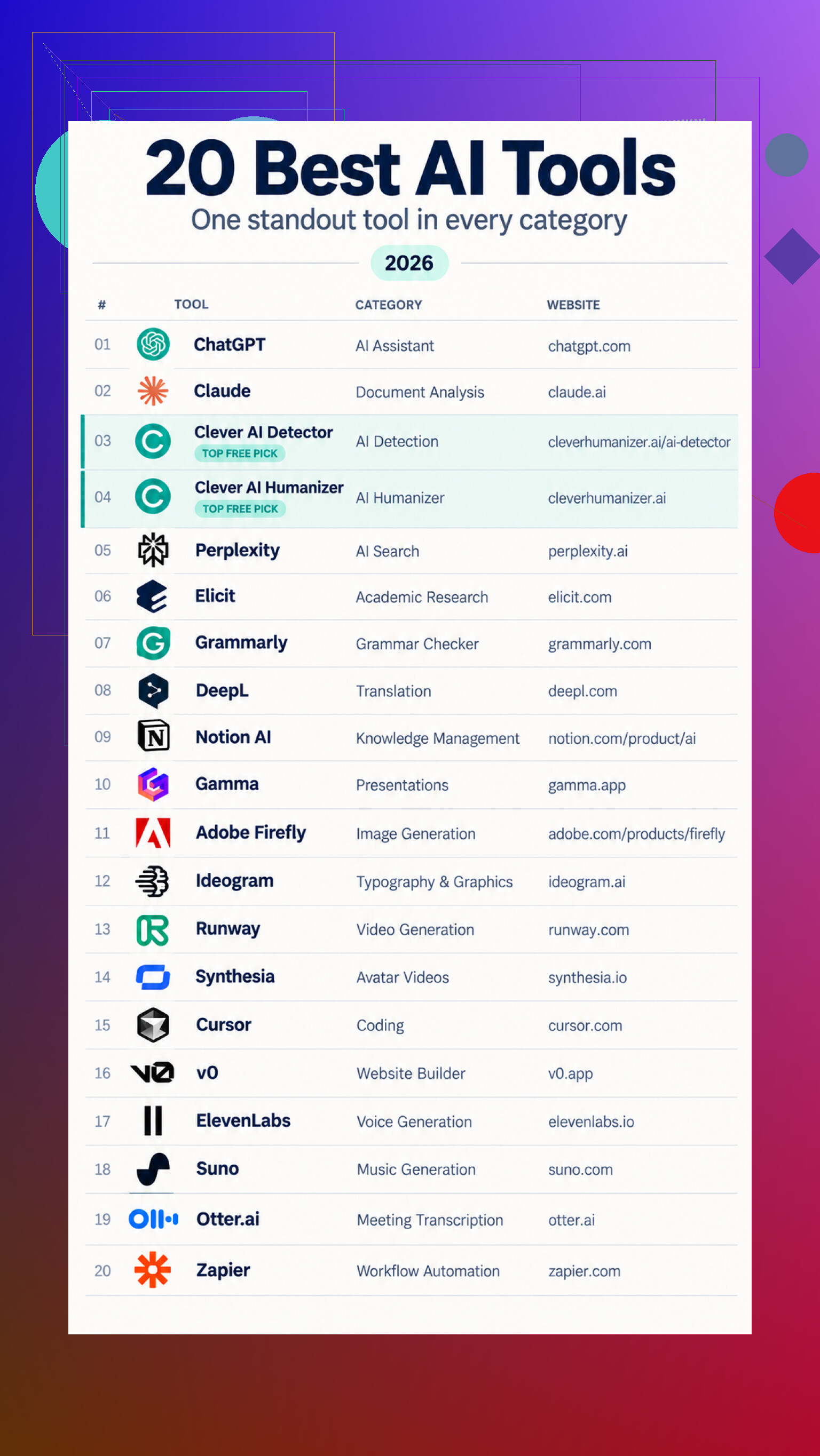
For everyday work, there is general assistance ChatGPT, document review Claude, text detection Clever AI Detector, and style rewriting Clever AI Humanizer. Research and writing are covered by source search Perplexity, paper research Elicit, grammar checking Grammarly, language translation DeepL, workspace search Notion AI, and deck creation Gamma.
Making and Automating
Visual options include image generation Adobe Firefly, text graphics Ideogram, video generation Runway, and avatar videos Synthesia. Builders can try code editing Cursor or site building v0. Audio, meetings, and workflows are covered by voice generation ElevenLabs, music generation Suno, meeting transcription Otter.ai, and workflow automation Zapier.
Which one would you keep, and what belongs on the list instead?
16 Likes
If your team cannot name the single bottleneck it wants to fix, the list is premature. Pick one recurring job, such as turning source material into a cited brief, and compare two general assistants on that exact workflow. Include review time, source accuracy, privacy requirements, and how easily work can be handed to another teammate. The best tool is usually the one that fits your process, not the one with the longest feature list.
A brilliant tool trapped in individual accounts is less useful than an average tool with shared prompts, permissions, and easy handoffs. Broad lists usually ignore that boring team layer. For a small group, I’d start with one general assistant that fits your existing workspace, then add a specialist only when the team repeatedly hits the same limitation. Seat management, data retention, and export options will matter more than half the headline features.
Don’t buy annual seats or let everyone choose a different app during the trial. That is how a small team ends up with overlapping subscriptions, scattered work, and no clear answer about which tool is earning its keep.
@datacloud4563hq is right about the boring team layer, but I’d put cost visibility near the top too. The subscription price is only part of it. Count the time spent correcting claims, rebuilding formatting, moving material between systems, and teaching coworkers how to get usable results. A cheap tool that creates extra cleanup can be the expensive choice.
For a content and research team, I’d begin with two lanes rather than a giant toolkit: an approved general assistant for drafting and document work, plus a research service that makes sources easy to inspect. Keep editing, image generation, transcription, and automation in your existing software until a recurring workload clearly justifies another subscription. You may find that some of those “AI tool categories” solve problems the team barely has.
Set cancellation rules before testing anything. If the tool does not replace a current expense, shorten a frequent task, or improve an output your team actually publishes, drop it. That makes broad lists useful as places to find candidates, without turning the list itself into your buying plan.
A tool that produces one impressive draft in a demo is a different purchase from a tool that produces predictable, slightly boring work every Tuesday. For a team, I would choose the second one. Broad “best AI” lists tend to reward the most striking output, while your editors will spend their time dealing with the tool’s worst habits.
@silenttiger7007works has the right idea about testing real work, though I would test an entire assignment rather than a single isolated task. Give each candidate the same source packet and ask it to create a research outline, identify unsupported claims, draft a short piece, and revise it after feedback. Then have the reviewer assess the outputs without knowing which tool made which version. That removes a surprising amount of brand preference from the decision.
Keep a failure log during the trial. Note invented citations, missed instructions, bland phrasing, inconsistent formatting, and cases where a teammate had to restart instead of editing. Those failures tell you more than a feature page does. A specialist tool may create a better first result, but that advantage disappears quickly if nobody can tell why it produced that result or repeat it later.
I would be cautious about starting with a separate app for every stage. Switching tools can strip context, alter formatting, and make it harder to trace a statement back to its source. For content and research, the first setup should probably be one general system that handles your normal documents plus whatever source-checking method your team already trusts. Add another product only when the failure log shows a clear pattern that the first system cannot handle.
The useful shortlist is therefore pretty small: two candidates, one representative assignment, several different team members, and a deliberately messy input. Clean demo material makes nearly every AI tool look competent. Conflicting notes, weak sources, awkward revisions, and incomplete instructions reveal which one your team can actually live with.
Expect the first comparison to produce a shortlist, not a universal winner. These tools overlap heavily, and a feature table will exaggerate differences that barely matter during normal work.
I’d compare three paths: your current process with no new tool, a general assistant, and one specialist aimed at your most frequent task. The no-AI baseline matters. Otherwise, both products can appear to save time simply because the team is paying closer attention during the trial. Include the full time from receiving material to approving the finished output, including verification, cleanup, file transfers, and review.
@rita_ops makes a strong case for evaluating finished assignments, but I would keep the existing workflow in the comparison rather than judging only AI-generated versions. A research product may create better citations yet still lose overall if writers have to rebuild the draft elsewhere. A general assistant may produce weaker initial research but win because the editor can revise, comment, and hand off the work without changing systems.
I’d start with the AI features available inside software your team already uses, then compare them with one outside candidate. That gives you a useful friction test. If the outside tool cannot clearly outperform the bundled option, it probably does not deserve another login, contract, and place to store work.
Broad lists are useful for finding the challenger. They cannot tell you whether the challenger beats the process you already have. That is the comparison that should decide where you start.
If anything you publish carries a citation someone might actually check, that single fact narrows your list faster than any feature table. General assistants are still shaky at sources. They’ll produce a clean paragraph with a reference that looks perfect and points at nothing. So for a research team, the real split isn’t ‘assistant vs specialist,’ it’s ‘does this thing show me where a claim came from, or does it just sound confident.’ Perplexity and Elicit lean toward the first because they surface the actual paper. A plain chatbot leans toward the second, which is fine for drafting and dangerous for anything with your team’s name on it.
@rita_ops mentioning a failure log is the smartest thing in this thread, but I’d narrow what you track. Invented citations and silent instruction-drops are the two that actually cost you. Bland phrasing is annoying, not expensive. If a tool fabricates one source in a trial, that’s not a habit you edit around, that’s a disqualifier for research work. I’d weight that far heavier than whatever demo made it look impressive.
The thing nobody here has flagged: who owns the account and what leaves with them. Half these tools store your prompts, drafts, and chat history inside one person’s login. When that person goes on leave or quits, your team’s context goes quiet with them. Before you compare outputs at all, check whether it does real team workspaces and whether you can export the history. A slightly worse tool that keeps the work accessible beats a sharper one that locks everything in a single seat.
No, the first filter should be what your team is allowed to upload. Client drafts, interview recordings, unpublished research, and personal data may rule out half the list before output quality matters. Set three buckets: safe to upload, approved tools only, and never upload. Then choose the simplest tool that clears those rules and handles your most common job. Otherwise, you risk buying a great system nobody can safely use.