I’m trying to figure out if Nano Banana is truly free or if there are hidden costs, premium tiers, or usage limits. The website and docs feel a bit unclear, and I don’t want surprise charges later. Can anyone explain how the pricing really works and what “free” includes based on your experience?
Short version: Nano Banana is “free” in the same way a lot of SaaS tools are free. Usable at zero cost, but with strings attached.
Here’s how it usually breaks down for tools like that (and what I’ve seen people mention about Nano Banana specifically):
-
Core tier is free
- You can sign up and use the basic features without entering a credit card.
- Enough for testing, hobby use, personal projects and seeing if it fits your workflow.
- Expect: limited projects, limited storage, and some feature caps.
-
Soft usage limits
- There’s typically a monthly quota: API calls, generations, conversions or whatever operation Nano Banana is focused on.
- Once you hit that cap you either get throttled, have to wait for reset, or are prompted to upgrade.
- Sometimes they say “fair use” in the docs, which is code for “we reserve the right to cut you off if you hammer the service.”
-
Paid / “Pro” tier
- More usage, priority processing, maybe higher resolution, faster queues, team features, better support.
- This is where the real business model sits, so anything resource intensive is usually paywalled here.
- Watch for per‑unit pricing: per run, per credit, per 1k operations, etc.
-
Hidden-ish costs to watch for
Not exactly “hidden,” but easy to miss if you just skim:- Auto‑upgrade or auto‑renew: Some tools let you go over the free cap and then silently bill if a card is on file. Check billing settings and disable “auto top‑ups” or “auto scale” if they exist.
- Overage fees: Free tier + usage-based overages. You stay on the same plan but pay per extra unit.
- Third‑party costs: If Nano Banana integrates with storage or external APIs, those can cost money even if Nano is “free.”
-
No card asked = usually safe
If they never ask for card details during signup and you never add one manually, you generally cannot be charged out of nowhere. The worst that happens is:- Your requests start failing
- Your account is rate limited
- Features get restricted until you pay
-
How to verify for yourself
- Check their Pricing page and scroll all the way down. Fine print and overage language usually live there.
- Read their Terms of Service for “fees,” “billing,” or “usage limits.” Ctrl+F is your friend.
- Look in Dashboard → Billing / Subscription after you sign up. If you see “usage this month,” “credits,” or “overage,” that is your real limit, not the marketing wording.
- If anything looks vague like “generous free tier,” assume there is some cutoff.
-
If you are using it for production
- Treat the free tier as a demo only.
- Budget as if you will end up on a paid tier once the project has any scale.
- Set alerts or caps if they offer them, so your usage does not spike overnight and surprise you.
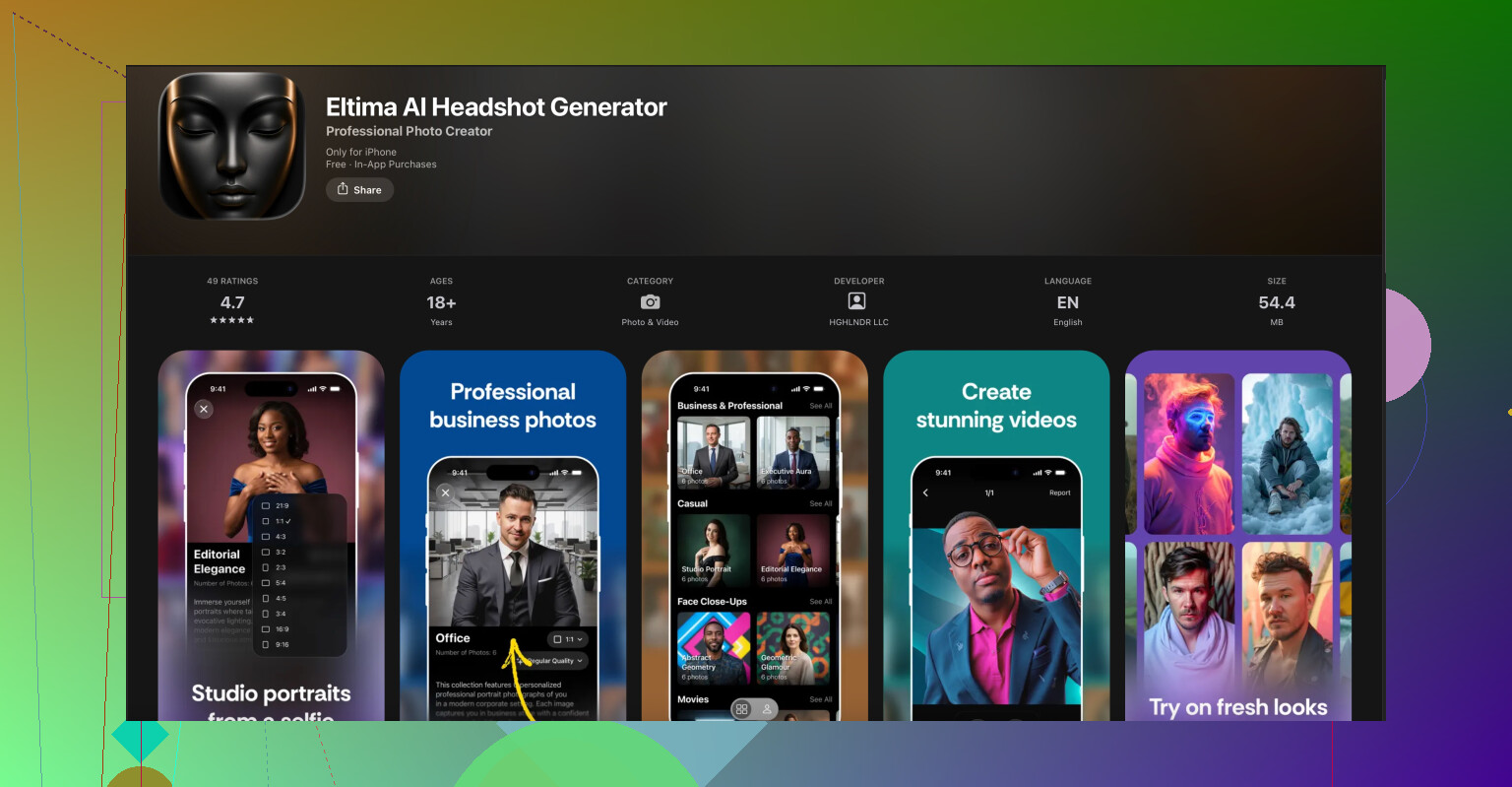
As for other tools: if what you are doing with Nano Banana is around visuals or profile pics, it might be worth looking at mobile apps that are much more transparent on cost. For example, the Eltima AI headshot generator for iPhone spells out its free options and in‑app purchases clearly in the App Store listing. You can check it here:
create professional AI headshots on your iPhone.
You pay for what you use, no weird surprise billing buried in a dashboard.
TLDR: Nano Banana is probably fine to experiment with for free as long as you do not add a card or rely on it for heavy production. Read the pricing page slowly, look for “credits / overage,” and assume the free tier is capped even if they try to market it like it is unlimited.
You’re not crazy, their messaging is kinda murky.
Short answer: Nano Banana is functionally free to start, not free to rely on. No obvious “gotcha” charges as long as you don’t add a card or treat it like unlimited infrastructure.
A few angles that haven’t been hit as hard as @jeff’s breakdown:
-
Look at “quality” vs “quantity” limits
They often keep all the shiny quality knobs behind paywalls. So yeah, the free tier might give you X runs per month, but:- Lower resolution / fewer options
- Slower queues during peak hours
- No batch or automation features
You pay not just for “more,” but for “better.” Feels free at first, until you actually want production‑grade output.
-
Data retention & lock‑in are the real price
This part almost nobody notices up front. Free tools usually:- Keep your data/logs/models for long periods
- May use outputs for analytics or model training
- Make export / migration annoying or limited
So even if you never pay, the “cost” is that it is harder to walk away later once your workflow depends on it.
-
Free tier often assumes “human use,” not scripts
If you’re writing scripts, cron jobs, or integrating it into a pipeline, expect:- Aggressive rate limiting
- Captcha / auth friction
- “Abuse” flags if you spike traffic
On paper that is still “free,” but in practice unusable for automation unless you upgrade.
-
Watch the roadmap, not just current pricing
A pattern with tools like this:- Launch with a very generous free tier to grow fast
- Once they get traction, they tighten the free limits and shuffle features to paid
If you’re building something long term, assume that the current free tier will become stingier over the next 6–12 months.
-
How to stay 100% safe from surprise charges
Slightly different approach than what @jeff suggested:- Use a virtual card with a hard limit of $1–2 if you absolutely must enter payment details. That way even if they try overage billing, it just fails.
- Set a personal rule: any time you see words like “unlimited,” “fair use,” or “generous limits,” act as if there is a hard cap you just haven’t hit yet.
- Screenshot their pricing page before you start using it seriously, so if they move the goalposts you at least know what changed.
-
Hidden friction, not hidden fees
In tools like this the “hidden” part is less about money and more about:- Queue times suddenly getting painful once you’re active
- “You’ve reached your limit, upgrade now” modals blocking basic flows
- Features you thought were included popping up with “Pro only” badges
So, yeah, you might not get billed, but the product itself gently pushes you toward paying once you’re dependent on it.
-
If this is just for profile pics / visuals
If what you want is nice headshots or avatars rather than a dev‑oriented API, honestly, Nano Banana might be overkill and more opaque than it needs to be. For that use case, you might be better off with something very straightforward like the Eltima AI Headshot Generator app for iPhone. The pricing is laid out clearly in the App Store, no weird dashboards or surprise tiers. You can check it out here:
create professional AI headshots on your iPhone with clear pricing.
So: yes, you can use Nano Banana “for free,” but treat it as a trial sandbox. If you are planning real workloads, budget as if you’ll be forced onto a paid tier eventually, and protect yourself with either no card, or a capped virtual card, and a backup tool in mind.
12 Likes
You’re not missing anything; their wording really is that fuzzy.
Different angle from what @sognonotturno and @jeff already covered:
1. “Free” is mostly about risk, not volume
What actually matters is: can they charge you without your active consent?
- If you have no payment method on file, the “worst case” is your account slows down or stops.
- If you do add a card, assume at minimum:
- Overages or “pay per extra credit” can kick in
- Future pricing changes can hit you without you re‑clicking anything
So instead of obsessing about whether Nano Banana is philosophically free, decide:
Am I OK with my stuff pausing if they pull the plug on the free tier?
If no, then it’s not free enough for production use.
2. Watch how they treat time and concurrency
A lot of people look only at monthly limits. Look at:
- How many jobs you can run in parallel
- Whether they slow you down during peak hours on the free tier
That can matter more than “X uses per month” if you care about reliability. If parallel jobs are basically blocked unless you pay, then: - Free tier = fine for experiments
- Paid tier = needed the moment you want predictable throughput
3. Don’t overestimate the “lock‑in” scary stuff
I slightly disagree with the heavy focus on lock‑in. Yes, exporting can hurt, but with services like this, the real lock‑in is your muscle memory, not your data.
Practical test:
- Can you replicate what you do with Nano Banana via another API or app in a weekend if they went paid‑only?
If “yes,” then lock‑in is annoying but not catastrophic. Treat it like any other replaceable tool.
4. Security & privacy are part of the “price”
The part nobody reads: privacy policy and data usage. Even if they say “we won’t sell your data,” check for phrases like:
- “May use content for improving our models”
- “Aggregated analytics”
That is a non‑monetary cost. For throwaway profile pics, no big deal. For client work or sensitive stuff, that matters more than some overage fee.
5. Concrete usage strategy if you want zero surprise charges
- Use a fresh email and never add a card.
- Treat every banner like “upgrade” as “your session is about to end” and keep backups or alternatives handy.
- If you must add a card, set your own guardrails outside Nano Banana: bank alerts, virtual card with a tiny limit, monthly calendar reminder to check the billing tab.
That way, even if their pricing page changes quietly, you cap your exposure.
6. For simple headshots / visuals, a cleaner option
If your goal is mainly profile pics or professional‑looking portraits and not deep integration or automation, a dedicated app is usually more transparent.
The Eltima AI Headshot Generator app for iPhone is a good example where the boundaries of “free vs paid” are a lot clearer in the app store listing and inside the app.
Quick pros / cons so you can compare it mentally to Nano Banana:
Pros of Eltima AI Headshot Generator app for iPhone
- Very focused use case: fast path to polished headshots instead of generic tooling
- Pricing model and extras are visible up front inside the app
- You pay per use or via clearly defined in‑app options, so it is easier to budget
- Mobile workflow is dead simple: snap, upload, get results without fiddling with API keys
Cons of Eltima AI Headshot Generator app for iPhone
- Less flexible for automation or bulk jobs compared to a web API like Nano Banana
- Tied to iPhone; if your workflow is desktop‑only or cross‑platform, that is a limitation
- Per‑use or pack pricing can be more expensive if you need a large volume of images
- Not a general “infrastructure” solution, so it will not replace Nano Banana if you are building a product on top
7. How I’d actually decide
- Playing around, side projects, low stakes
- Use Nano Banana free tier, no card, accept occasional throttling.
- Client work or anything that must not break at random
- Assume you will end up on Nano Banana’s paid tier or a competitor. Budget for it.
- Just want good‑looking profile photos with clear pricing
- Use something like the Eltima AI Headshot Generator app for iPhone so the business model is obvious from day one.
So yes, you can use Nano Banana without paying, but treat it as a sandbox and assume the free tier is both capped and subject to change. The moment “surprise downtime” is more painful to you than “a small recurring bill,” that is your signal that the free tier is no longer the right place to live.