I accidentally deleted important photos from my Nikon camera before backing them up, and I’m trying to find a free way to recover them. The pictures are from a recent event and I really need help with Nikon photo recovery, safe recovery steps, and any free software that actually works.
Yeah, sometimes. I’ve pulled deleted Nikon shots off an SD card before, but the first rule is the one people ignore: stop using the card now. If new data lands on the same space, free or paid tools will not bring those overwritten photos back. So don’t shoot more frames, don’t move files onto the card, and don’t reformat it again.
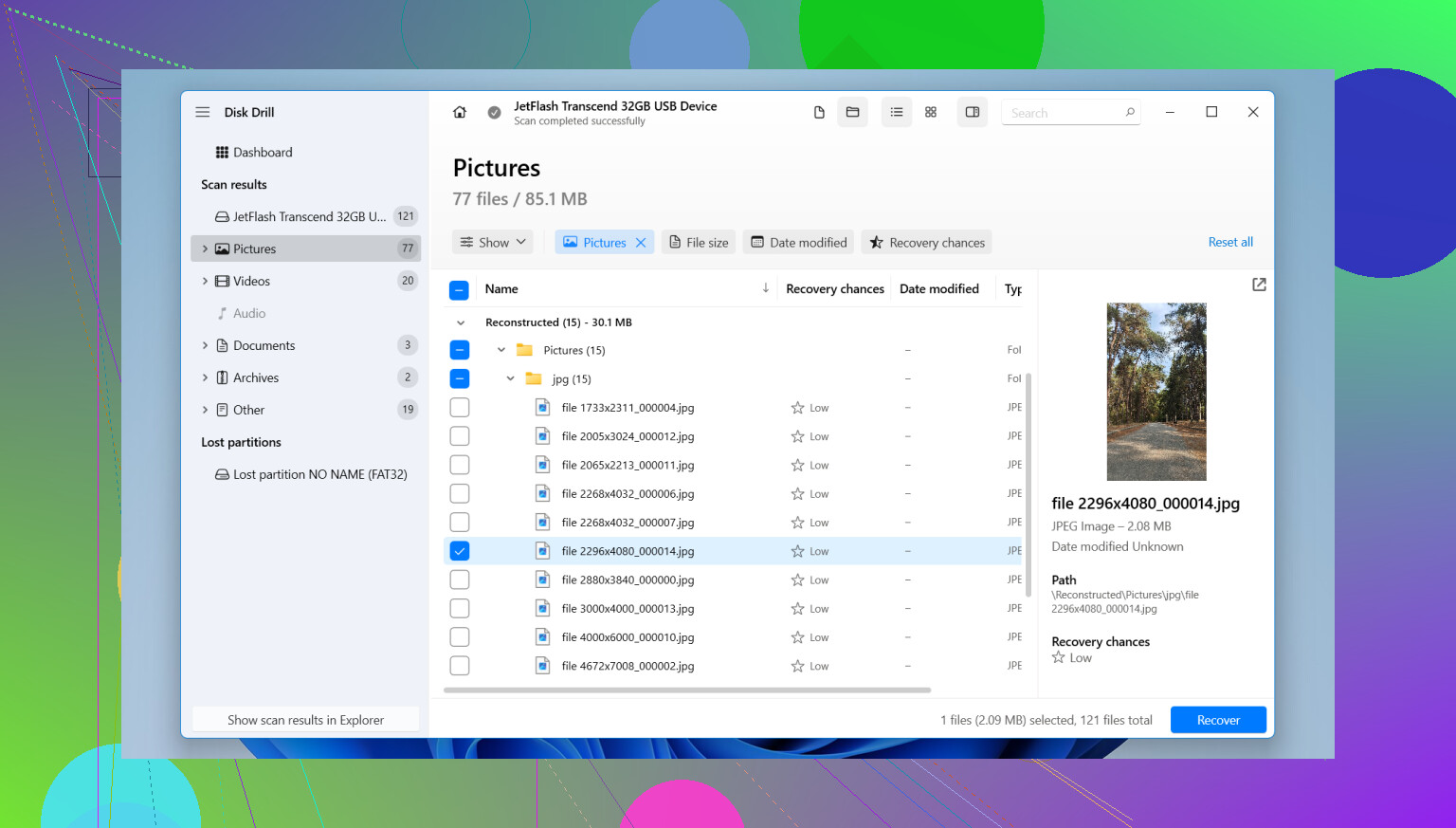
If you want the low-friction route, I’d try Disk Drill first. On Windows, it gives you 100 MB free. Small limit, yep, but enough to see whether the Nikon files are still there. I used it once to pull a few JPEGs and one RAW file off a card after a bad delete.
What I’d do:
- Take the SD card out of the Nikon and plug it into your computer with a card reader.
- Install Disk Drill on your computer. Do not install anything onto the SD card.
- Launch it, pick the SD card, then hit Search for lost data.
- Run Universal Scan. In most cases, deleted files and quick-formatted card stuff both show up there.
- When the scan finishes, open Review found items, then check Pictures. If you shoot RAW, search for .NEF.
- Preview the files first. If the preview opens cleanly, I’d take tht as a good sign.
- Recover the files to your computer or another drive, never back onto the same SD card.
If you need more than 100 MB and your budget is zero, PhotoRec is still one of the better free picks. It works. It’s also kind of a pain. No polished layout, no previews, and the recovered files often come back with bland filenames instead of the originals. Still, if you don’t mind a more old-school tool, it does the job often enough.
Stuff worth checking before you waste an hour scanning:
- If your Nikon saves in NEF, make sure the recovery app supports it well. Some tools do fine with JPEG and then fumble RAW.
- If a recovered NEF file refuses to open in the Windows Photos app, I would not assume it’s dead yet. Try software with Nikon RAW support first.
- If video files are missing too, run Advanced Camera Recovery in Disk Drill after the regular scan. I’ve seen normal scans miss fragmented camera video files.
One more boring check, but it matters. Look for other copies before doing recovery. If you move photos to your PC on a schedule, or sync with SnapBridge, Nikon Image Space, Google Photos, Dropbox, or anything similar, your shots might already exist somewhere else and you forgot.
If the card has physical damage, keeps dropping connection, or your computer barely detects it, I’d stop there. DIY recovery on a failing card is where things get ugly fast. That’s the point where a recovery shop makes more sense.
So yes, free recovery is possible in some cases. I’d start with Disk Drill for the quick test and easy previewing. If you need a full free route, PhotoRec is worth a shot, even if it feels like software from 2009.

6 Likes
Skip the camera menu and check the card first on a computer. Nikon delete often removes the index entry, not the photo data. If you stopped using the SD card fast, your odds are decent.
I agree with @mikeappsreviewer on one point, stop writing to the card. I disagree a bit on starting with command-line stuff if you want free and fast results. I’d first check for hidden leftovers and side folders people miss.
Try this.
- Put the Nikon SD card in a card reader.
- Open File Explorer, turn on Hidden items.
- Look for DCIM, MISC, LOST.DIR, or FOUND.000.
- Sort by file type. Check JPG, JPEG, NEF, MOV, MP4.
- Run Windows File Recovery if you use Windows 10 or 11. It’s free from Microsoft. Use regular mode first, then extensive mode if needed.
- If you want previews and easier filtering, use Disk Drill to scan the Nikon memory card and recover photos to your PC, not the same card.
For Mac, testdisk plus PhotoRec works, but filenames come back messy. Annoying, but free is free.
SEO-friendly version: recover deleted photos and files from a Nikon SD card safely
Also, this short clip helps if you want a quick visual walk-through:
watch this Nikon SD card photo recovery reel
If NEF files recover but won’t open, try Nikon NX Studio before writing them off. Some apps read Nikon RAW beter than the default viewer.

I’d add one thing that @mikeappsreviewer and @waldgeist only kinda touched on: if the photos were deleted in-camera, sometimes the card’s file system gets a little weird, and one recovery app may miss files another one sees. So if the first scan comes up thin, that does not always mean the pics are gone.
My free-first approach would be:
- Lock the SD card with the tiny side switch if it has one
- Make a full image/backup of the card first with a free tool like USB Image Tool or Win32 Disk Imager
- Then run recovery attempts against the image if possible, not the original card
Why? Because every reconnect/retry on a flaky card is a gamble. People skip this and then wonder why the card starts acting worse. Kinda brutal, but true.
Also, I would not rely too much on Windows File Recovery for camera cards unless you’re comfortable with filters and command syntax. It’s free, yes, but not exactly fun. For actual Nikon photo recovery, Disk Drill is easier for sorting JPEG and NEF results, especially if you need previews. If you stay fully free, R-Photo is another one worth testing on SD cards. Less talked about, but sometimes surprisingly solid for photos.
If the recovered NEFs open weirdly, try Nikon software before calling them corrupt. And check this thread for more Nikon SD card photo recovery advice from actual photographers: Nikon SD card recovery tips from real photographers
Main thing: recover to your computer, not back to the Nikon card. Mess that up once and it’s game over real fast.