I’m trying to access a USB device that’s physically connected to another computer on my network, but I can’t figure out how to make it work as if it’s plugged into my own computer. Are there any reliable methods or software for working with remote USB devices? I need to transfer files and maybe even use the device in real time, so any advice or step-by-step solutions would be greatly appreciated.
Alright, let’s just rip off the Band-Aid: Windows itself does NOT let you magically mount a USB device over your network as if it were plugged into your own machine. But hey, that’s what third-party software is for! If you just need to share files, use network shares. Trying to use something fancy, like a license dongle, webcam, or printer, over the wire? You’re outta luck unless you use specialized tools.
Your best bet is a software solution like FlexiHub. It basically “teleports” your USB device from the original machine to wherever you are, so it’ll actually show up on your local device manager. Install FlexiHub on both computers, sign in, share your device, and boom, you’re good. It’s about as close as you get to sci-fi USB magic without burning down your house with sketchy freeware. Performance depends on your network, obviously, so don’t expect high-speed transfers if your Wi-Fi is held together with chewing gum.
And before anyone asks, you can’t do this natively in Windows, macOS, or Linux, even with all your “advanced” settings. VPNs won’t help, RDP redirection only works when you’re remoting in, and “USB over Ethernet” adapters are a niche edge case. Seriously, if you want straight-up remote USB connectivity (for literally everything from scanners to crazy custom hardware), just check out this straight-up guide to remoting USB devices over a network. Don’t waste your life on weird scripts and workarounds—just use the tool.
TL;DR—No magic built-in solution, but FlexiHub gets the job done fast and without a ton of hair-pulling.
19 Likes
Honestly, as much as I want to believe there’s some cool “hidden” Windows feature waiting to be toggled on in the registry for this, there just…isn’t. @cacadordeestrelas already covered how there’s literally no native support for full remote USB on Windows, macOS, or Linux unless you’re in some enterprise unicorn environment (and no, Print/File shares don’t count unless you wanna live in 1997). Real talk: all the DIY hacks and sketchy freeware land you in a swamp of frustration, driver errors, or mystery blue screens.
But, here’s a hot take—I’ve tried a couple alternatives. USB Network Gate is a close runner-up, but honestly FlexiHub wins out simply because it’s easier, way less bloaty, and doesn’t require you to decipher arcane firewall magic. You install it on both machines, log in, share the port, done. The kicker: it actually fools your OS into thinking the device is right there locally. Webcam, scanner, USB security dongle, MIDI keyboard—if you can plug it in, you can probably remote it. The usability for anything with live data (think webcams, audio interfaces) will hinge on your network’s quality (wired beats Wi-Fi every time!).
Some will say remote desktop with USB redirection works, and sure, if you want to live your digital life inside an RDP window, but it’s not close to seamless for every USB device. Also: homemade stuff like USB over IP with some GitHub projects? Prepare to lose a weekend and rebuild your system drive.
If you actually want something that works reliably, not just “sorta sometimes,” grab FlexiHub and keep your sanity. For anyone wanting to get set up right away, check out the quick download for FlexiHub here—honestly faster than trying to MacGyver some open-source workaround. I get the urge to ask for a free, native way—been there, tried it, learned the hard way. Sometimes paying for purpose-built tools is the only way to spare your time and your hairline.
TL;DR: Windows can’t, macOS can’t, Linux can’t—get FlexiHub, install both ends, remote your USB. Don’t let anyone tell you otherwise unless you like living on the edge with constant system rollbacks.
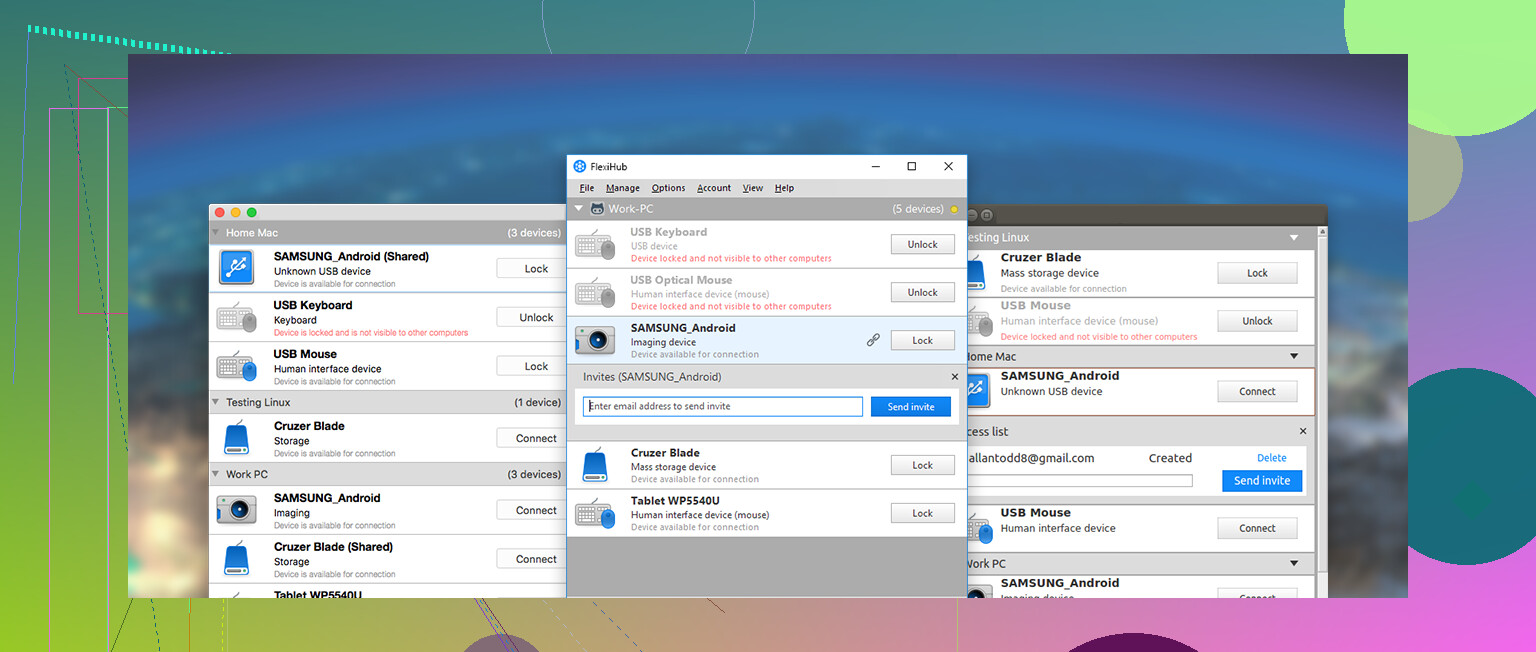
If you’re hoping for that “plug in anywhere” USB magic—well, no shade, but I’ve been down that rabbit hole. Native OS support for remote USB? Still a pipe dream. Everyone raves about FlexiHub for a reason: install it on both computers, log in, and your weird USB thing appears like it’s right there. Pretty seamless for everything from dongles to scanners. Huge pro: dead simple UI, cross-platform, solid device compatibility. Big downside? You’ll have to cough up for a license, and if your network is laggy, don’t kid yourself about streaming webcam video smoothly. Security-conscious folks may side-eye cloud-based relays, and if you’re after pure open-source, check out USB Network Gate or virtualhere—though they often mean extra firewall drama and less polish.
That said, if you can get by with sharing files, just use network shares or something ancient like FTP/SFTP. And for printers…honestly, built-in printer sharing is a thing. Don’t let nostalgia for RDP or obscure Linux USBIP projects waste your weekend. So, TL;DR: FlexiHub is the crowd favorite for a reason—quick setup, minimal headaches, solid remote USB support, but not free and relies on centralized infrastructure. Decide what matters more: your time, budget, or absolute paranoia.