I’m trying to find a reliable free tool that works like Originality AI’s Humanizer to make my AI-written content sound more natural and pass basic AI detection checks. Most tools I’ve tried either add weird phrasing, limit word count, or lock decent features behind a paywall. What free options are you using that still keep the content readable and safe for SEO?
1. Clever AI Humanizer Review
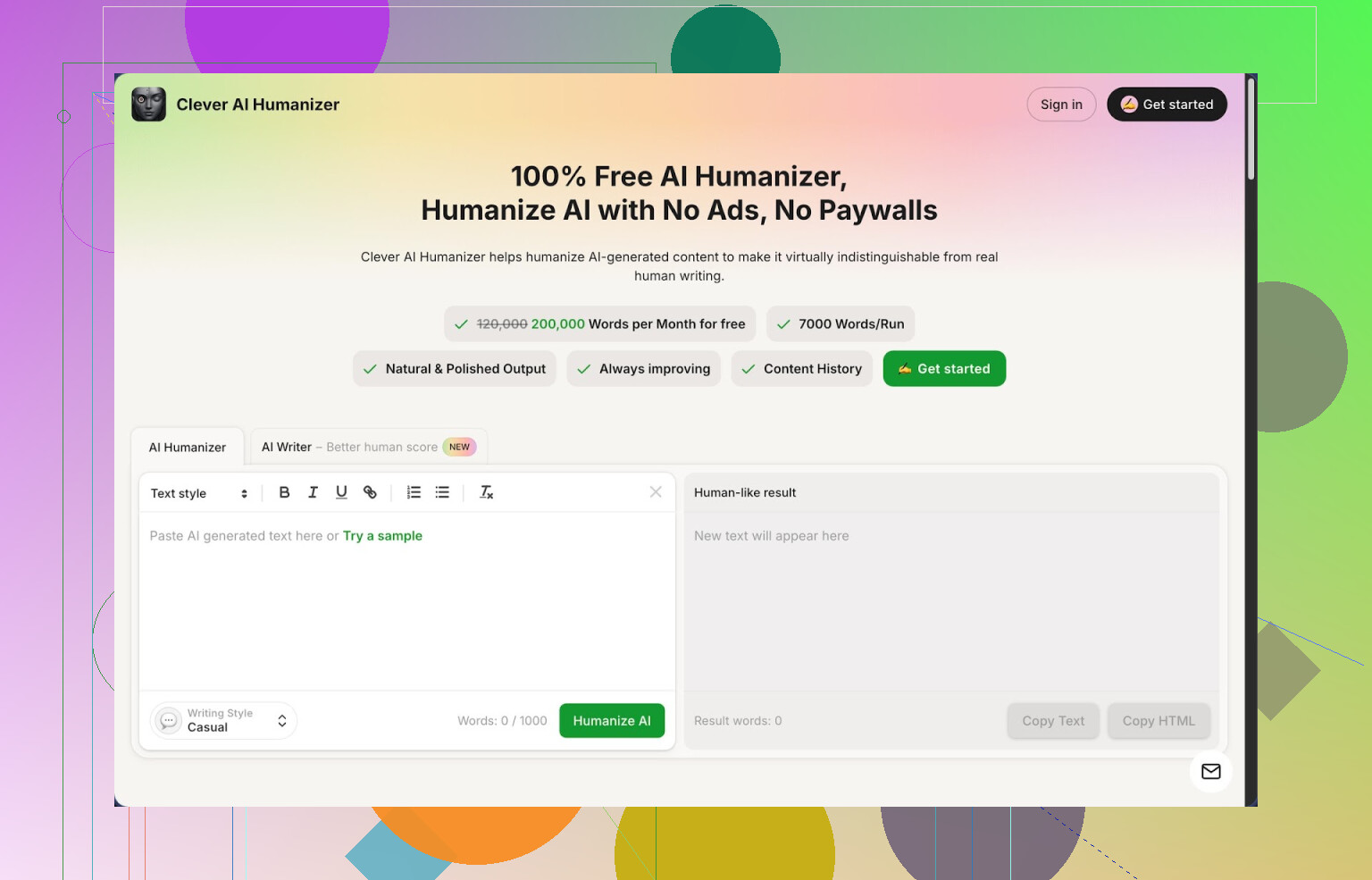
I spent a weekend messing around with a bunch of “AI humanizer” tools and ended up staying on this one the longest:
Clever AI Humanizer
Quick context. I write a lot with AI, mostly drafts and outlines. The headache starts when you run that text through detectors and see “100% AI” slapped on your work. Some clients freak out about that. So I needed something that makes AI output read closer to how I write, without turning it into nonsense.
Clever Humanizer felt like the least painful option so far, mostly because it is free at a level I have not seen elsewhere. No credit meters screaming at you every paragraph.
Here is what I noticed.
- Limits and pricing
They give you around 200,000 words per month for free and something like 7,000 words per run. I pushed long articles through it and it did not stop me or try to lock anything behind a paywall.
No login tricks, no “free trial then pay” stuff during my tests. That alone already makes it stand out from most of the other tools I tried that either cut you off after a few runs or start nagging for a subscription.
- Styles and main humanizer
The core feature is simple. You paste your AI text, pick a style, hit go, then you get a new version.
Available styles when I tested:
- Casual
- Simple Academic
- Simple Formal
I kept the style on Casual most of the time. That one felt closer to how I write emails or blog posts. Academic and Formal lean more neutral and are better suited for reports, essays, or anything you send to someone picky about tone.
Speed was fine. I never waited longer than a few seconds even on long chunks.
- Detection tests
I tried to break it a bit. I wrote with a regular AI writer, pasted the raw output into ZeroGPT, and unsurprisingly got flagged as fully AI. Then I ran the same text through Clever Humanizer using the Casual style and pasted the result back into ZeroGPT.
On three separate samples, ZeroGPT returned 0% AI in my tests.
Important detail. This does not mean it will dodge every detector on earth forever. Detectors change. Models change. But for ZeroGPT, at that moment, using that style, I got clean readings. For my use, that is enough to treat it as a decent filter layer.
- How the rewrite feels
Some humanizers wreck the original meaning and introduce weird phrases. This one stayed closer to my original intent.
What I saw:
- Sentence structure shifted.
- Repetitive phrasing dropped.
- Some lines got longer with added small clarifications.
So the output often ended up longer than what I pasted in. Not bloated, but it adds a bit of extra wording to shake off “AI patterns.” If you need strict word counts, you will have to trim.
I compared paragraphs side by side. Meaning stayed intact in most cases. I had to tweak the odd sentence, but it did not hallucinate events or numbers in my tests.
- Built-in AI Writer
There is also a Free AI Writer inside the same site. You type a prompt, it generates content, then you can pass it through the humanizer with a click instead of hopping between tabs.
I tried:
- A short essay prompt
- A generic blog intro
- A how-to guide
Raw Writer output still felt like normal AI prose, but once I ran it through the humanizer again, the detection scores looked better. If you are starting from scratch and do not want to juggle tools, this combo is convenient.
- Grammar checker
They added a basic grammar checker that fixes:
- Spelling
- Punctuation
- Some clarity issues
I tossed in a messy draft, full of minor grammar slips and random commas. It cleaned it up to something I would not be ashamed to send.
Is it as deep as something like Grammarly? I doubt it. But for quick cleanups before publishing or emailing, it did what I needed.
- Paraphraser
The Free AI Paraphraser Tool is for taking existing text and rephrasing it while keeping the same meaning.
Where this helped me:
- Rewriting repetitive sections in a long article
- Adjusting tone for different audiences
- Reworking SEO content so it did not read like a spun mess
It respects the original ideas, at least in the content I tested. If you feed it a technical paragraph, you get something close in meaning but worded differently, not random fluff.
- Workflow and interface
Everything is in one place:
- Humanizer
- AI Writer
- Grammar checker
- Paraphraser
You do not bounce across a dozen menus. It is pretty barebones visually, which I prefer. Input box, settings, output. Done.
My usual flow with it:
- Generate draft with my own AI tool or their Writer.
- Run through Humanizer on Casual.
- Quick skim, manual edits.
- Optional pass through Grammar Checker.
This took less effort than juggling three separate services.
- Downsides
A few things I did not love:
-
Not all detectors will be fooled
ZeroGPT gave me 0% AI on my samples, but I have seen other detectors on the web behave differently. Treat this as one layer of editing, not a magic invisibility cloak. -
Output sometimes longer than expected
The humanized text tends to stretch a bit. If you write for strict character or word limits, you will need to trim manually. -
Occasional “too smooth” tone
Some parts read a bit cleaner than how humans usually type fast. I had to re-add small imperfections, direct phrases, and personal notes to make it feel like me.
- Who this is good for
From my use, it makes sense for:
- Students who use AI to draft essays but want something closer to their natural voice.
- Content writers who need to stop their posts from triggering client paranoia about AI.
- People writing emails, reports, and internal docs that start from AI drafts.
If you want maximum control, you still need to edit by hand. I treat Clever Humanizer as a first pass to get rid of the “default AI voice” then I polish.
- Extra links and resources
If you want more details and test screenshots, there is a longer review thread here:
https://cleverhumanizer.ai/community/t/clever-ai-humanizer-review-with-ai-detection-proof/42
Video review here:
Clever AI Humanizer Youtube Review
Reddit threads talking about AI humanizers and this tool:
Best Ai Humanizers on Reddit
https://www.reddit.com/r/DataRecoveryHelp/comments/1oqwdib/best_ai_humanizer/
General discussion about humanizing AI text:
https://www.reddit.com/r/DataRecoveryHelp/comments/1l7aj60/humanize_ai/
If you want a free tool for high word counts without fighting a credit system, this is one of the few I still keep bookmarked.
9 Likes
I had the same problem with Originality AI’s humanizer pricing and the weird phrasing from most “free” tools.
I agree with @mikeappsreviewer on Clever Ai Humanizer being solid, but I would not rely on only one tool or only automation if your goal is to pass basic detectors and keep the text readable.
Here is what has worked for me without paying:
-
Use Clever Ai Humanizer as the first pass
- Paste your AI text
- Pick Casual for blog style or emails
- Run fairly big chunks, like 1k to 2k words
- It tends to keep meaning while shifting structure
- Then do a quick manual cleanup on any line that feels too smooth or “template like”
-
Add a manual “voice pass”
This step matters more than people think.
Go through your humanized text and do things AI tools rarely do well:- Shorten a few sentences aggressively
- Add specific details from your experience
- Replace generic terms like “people” with specifics like “students”, “developers”, “freelancers”
- Insert 1 or 2 honest opinions or small contradictions
Example:
Original AI line:
“This approach is one of the most effective ways to grow your audience.”
Edit to:
“I tried this with three clients. It helped two of them and did nothing for the third.”Detectors often react to that kind of uneven, opinionated phrasing.
-
Shuffle structure, not only words
AI humanizers mostly paraphrase. Detectors also look at structure.
Every few paragraphs, do one of these:- Merge two short paragraphs into one long one
- Split a long one into two
- Move a sentence from the top of the paragraph to the bottom if it still makes sense
-
Use multiple detectors, not only one
I test with:- ZeroGPT
- Originality AI (when I have credits)
- One random free detector I find via search
If two out of three say “mostly human” or show low AI percentage, I stop there.
Chasing 0 percent everywhere wastes time and often ruins readability. -
Avoid obvious AI patterns before you humanize
When you generate the first draft from your AI model, prompt it to:- Use shorter sentences
- Avoid bullet lists unless needed
- Add examples with specific numbers or situations
Cleaner input makes tools like Clever Ai Humanizer work better. If the raw AI text is generic, every layer on top tends to stay generic too.
-
For students or clients worried about detectors
- Match your known writing quirks. If your old essays use lots of short sentences and simple words, keep doing that.
- Reuse some phrases you typically use in emails or reports.
- Do one read out loud. If anything sounds “too corporate” or too smooth for you, rephrase it.
Quick template you can follow for each piece:
- Generate AI draft.
- Run through Clever Ai Humanizer.
- Read once for meaning. Fix any wrong facts.
- Manually tighten wording, add specifics, add 2 or 3 personal lines.
- Test with at least one detector.
- Stop when it reads like you, not like a tool.
That mix of one free tool plus 10 to 15 minutes of manual editing has been enough for my blog posts and client content to pass basic checks without turning the text into nonsense.
I’m mostly on the same page as @mikeappsreviewer and @byteguru about Clever Ai Humanizer being one of the few actually usable free options, but I’d tweak how you use it and what you expect from any humanizer.
Couple of points that might help you specifically with “weird phrasing” and “limited free use”:
-
Use the tool surgically, not on full articles
Instead of pasting 3,000 words and smashing “humanize,” try:- Break your text into sections that already sound almost like you.
- Only run the bland / obviously-AI parts through Clever Ai Humanizer.
- Leave your own transitions, intros, and conclusions mostly manual.
That cuts down on the “where did this sentence even come from?” effect.
-
Force your own voice before humanizing
This is where I disagree a bit with the “generate then humanize” assembly line.
Don’t just take raw AI text and expect any tool to magically fix it.
Before you even paste into Clever Ai Humanizer:- Delete generic intros like “In today’s fast-paced digital world…”
- Replace vague stuff like “various industries” with concrete ones you actually care about.
- Add at least 2–3 sentences that only you could have written (your experience, your numbers, your weird opinion).
Then humanize. The tool tends to preserve those unique bits instead of flattening them.
-
Mix humanizer + “dumb” tools
If your goal is to dodge obvious AI patterns and not to become invisible forever:- Run text through Clever Ai Humanizer once.
- Then run the result through a plain paraphraser or grammar tool that does minimal style change.
Sometimes a light pass from something like Quillbot’s free mode (standard or fluency) after Clever Ai Humanizer smooths out the occasional awkward phrasing without wrecking it. Just don’t let every tool rewrite everything.
-
Don’t chase 0% on every detector
This is where people ruin their content.
If Originality AI or ZeroGPT shows something like:- 20–40% AI
- Reads fine to an actual human
Stop there.
If you keep re-paraphrasing to get “100% human,” you will 100% end up with Frankentext that feels more robotic than your original.
-
Use structure & formatting as “human signals”
Detectors look at text, not the context. Humans see the whole doc.
After using Clever Ai Humanizer:- Add short, messy one-liners between paragraphs: “Honestly, this part trips people up.”
- Throw in a question: “Does this actually matter in real life? Kind of.”
- Use inconsistent paragraph lengths. Two lines here, eight lines there.
These tiny structural imperfections help way more than people think.
-
Accept there’s no free clone of Originality’s Humanizer
If you want a fully free, high-word-count solution, Clever Ai Humanizer is realistically as close as it gets right now.
Everything else I’ve tested either:- Slaps a 1,000-word limit and a “start your trial” popup.
- Produces that weird ESL / spun-article vibe you mentioned.
TL;DR:
Use Clever Ai Humanizer, but:
- Only on the parts that need it.
- After you inject your own specifics.
- With realistic expectations about detectors.
If you treat it as a helper instead of a “hide-all-AI” button, it’s one of the few free tools that doesn’t completely screw up your writing.
I’m mostly on the same page about using a tool instead of paying for Originality’s humanizer, but I think people are leaning too hard on automation in general.
Here’s the short version of how I’d look at it, plus some extra angles that weren’t covered yet.
1. Quick take on Clever Ai Humanizer
Pros:
- Genuinely generous free tier with high word count.
- Output usually keeps meaning and doesn’t introduce wild hallucinations.
- Styles (Casual / Simple Academic / Simple Formal) are actually distinct enough to be useful.
- Integrates writer + grammar + paraphraser so you aren’t juggling ten tabs.
Cons:
- Tone can feel a bit “flattened” if you pipe an entire article through it.
- Sometimes pads sentences with filler phrases to break patterns, which can hurt tight word limits.
- Not consistent across all detectors. Great on some, mediocre on others.
- If your base draft is bland, it just becomes a cleaner version of bland.
So yeah, I agree with @byteguru and @mikeappsreviewer that Clever Ai Humanizer is one of the few free tools that is actually usable at scale, but I don’t treat it as the main brain of the operation.
2. Where I slightly disagree with others
A couple of points where I’d tweak what was said:
-
Running huge 1–2k chunks at once
That works, but it also tends to make everything sound like it came from the same “voice filter.”
I get better results by:- Humanizing only the central body sections.
- Leaving intro, conclusion and any personal anecdote mostly manual.
Detectors read the whole thing; having some clearly human-written spikes inside helps.
-
Multiple tools stacking
There’s a risk of overprocessing. Some folks layer Clever Ai Humanizer, then a paraphraser, then another grammar pass.
After two heavy rewrites, patterns can actually look more synthetic.
I prefer:- One pass through Clever Ai Humanizer.
- Then strictly manual edits, no second smart tool unless a sentence is truly awkward.
-
Chasing low scores vs realism
Everyone said “don’t chase 0 percent,” which is right, but I’ll go harsher:
If a client or teacher demands 0 AI on every detector, that is a red flag on their side, not yours.
At that point, you are rewriting for an algorithm, not a reader, and your content will suffer.
3. Tactics that complement what was already suggested
Instead of repeating their step lists, here are a few different angles that pair well with Clever Ai Humanizer without duplicating the same workflow.
A. Build a “personal noise layer”
Detectors hate irregularity in a good way. You can add a deliberate layer of personal “noise” on top of text you run through Clever Ai Humanizer:
- Add 1 or 2 incomplete sentences where it still makes sense.
Example: “Tried this with a client. Total mess at first.” - Occasionally use very plain phrases you actually use in speech:
“look, the thing is,” “to be honest,” “this part is annoying.” - Keep some mild repetition of your own favorite words. Humans repeat themselves.
This is something tools like Clever Ai Humanizer, and even what @andarilhonoturno mentioned, don’t fully cover because they still chase coherence. You want a little bit of untidy.
B. Intentionally break patterns in specific spots
Instead of reshaping entire paragraphs, pick critical points:
- 1 sentence per section that is extra short.
- 1 sentence per section that is unusually long and slightly rambling.
- 1 line where you push back on your own advice:
“Honestly, I still mess this up sometimes.”
You can do this after running content through Clever Ai Humanizer. It is a fast manual layer and does more for “human vibe” than a second automated rewrite.
C. Vary form, not just wording
Most advice so far is about editing sentences. Detectors also see structure:
- Insert a one-line summary between two normal paragraphs.
- Add a quick numbered mini list in the middle of a long block, then go back to paragraphs.
- Throw in a rhetorical question that is not followed by a neat answer.
Clever Ai Humanizer won’t magically invent these moves for you, but its “clean” base makes it easy to add them without breaking coherence.
D. Draft differently to reduce how much you need humanizing
Everyone is editing after the fact. That is backwards in my opinion.
When you generate your initial AI draft:
- Ask the model to include examples from specific niches you care about (e.g. “Use examples about junior developers and small agencies”).
- Tell it to remove generic, inspirational fluff.
- Ask for at least one counterexample or failure story in each section.
Then send that through Clever Ai Humanizer. You’ll get output that is already less generic, so the humanizer doesn’t need to push as hard and won’t produce as much weird phrasing.
E. Calibration trick with your own past writing
One thing I haven’t seen mentioned:
- Grab 2–3 old pieces you wrote before using AI.
- Compare them to your current Clever Ai Humanizer output:
- Sentence length
- Favorite transitions (“but,” “however,” “on top of that”)
- Typical word choice (simple vs fancy)
Then, post-humanizer, do a quick pass and actively replace phrases to match your old style.
Example:
- Tool output: “In addition to this, you should consider…”
- Your natural style: “Also, you might want to look at…”
Takes a few minutes and does more for “this sounds like me” than another tool.
4. Where competitors’ points still help
- @byteguru’s emphasis on structure changes is spot on; just don’t over-split paragraphs.
- @andarilhonoturno’s idea of mixing personal opinions into the text is probably the single strongest “human flag.”
- @mikeappsreviewer’s stress on using multiple detectors is useful, but I’d cap it at two: one strict, one lenient, and then stop.
Use Clever Ai Humanizer as your main free tool because of its generous limits and relatively sane output, but treat it as step one, not the entire solution. The real “humanization” happens in the 10 minutes you spend adding your own messiness on top.