I’m working on rewriting some articles and need a reliable free online paraphrasing tool that sounds natural and doesn’t mess up the meaning. I’ve tried a few sites but they either spin the text into nonsense or feel risky to use with important content. What tools or sites are you using right now that are safe, accurate, and actually helpful for paraphrasing long-form text?
I used QuillBot for a long time. It did the job, nothing fancy, but it worked. Then one day most of the tones and styles sat behind a paywall. I logged in, went to switch tones like I always did, and the UI nagged me for a subscription. That killed it for me.
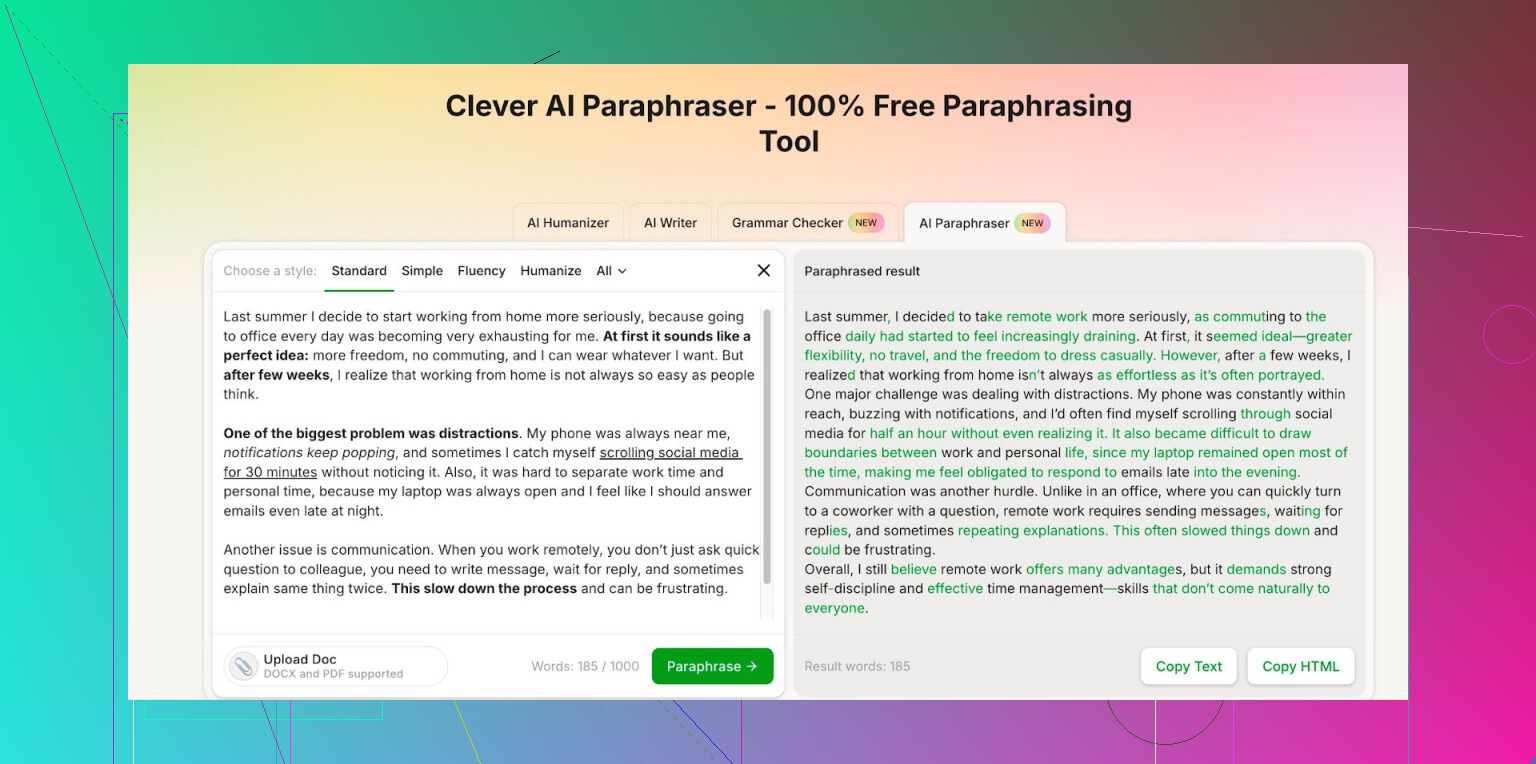
So I went hunting for an alternative, because I need paraphrasing for drafts, documentation rewrites, and cleaning up messy notes, not for essays or anything like that. After trying a few tools that throttled hard or mangled the text, I ended up on Clever AI Humanizer’s paraphraser here:
What I noticed from actually using it:
• You sign up, then it gives you a daily and monthly quota for free.
• Mine shows 7,000 words per day and 200,000 words per month of paraphrasing.
• That has covered my workload so far. I use it for work emails, blog rewrites, and refactoring some technical docs. I hit the daily limit once when I tried to shove huge chunks of text through it, so now I batch smarter.
I do not care what model runs under the hood, but the outputs look at least on par with what I got from QuillBot before the paywall thing. In some cases the phrasing looks a bit more current and less robotic.
The styles offered in the free tier have been enough for me. I switch between more formal for work stuff and simpler wording when I send reference notes to coworkers. No forced upgrade popups so far.
If you are in the same spot I was, staring at QuillBot’s locked tones and debating another subscription, I would try that paraphraser first and see if the free quotas cover your use. It took me one afternoon of testing to swap over.
11 Likes
I get why you are frustrated. Most free paraphrasers either spin word salad or sound like a high school spinner from 2010.
I agree with @mikeappsreviewer on avoiding the heavy paywalls, but I do things a bit different and mix tools instead of relying on a single one.
Here is what I use in practice for article rewrites and keeping the meaning intact:
-
Grammarly free rewrite
- Use the “improve it” or “rewrite” suggestions on sentences and short paragraphs.
- Works best if you feed it 2–3 sentences at a time.
- Pros: Natural tone, keeps meaning stable.
- Cons: Slower for long articles. You have to click a lot.
-
Clever Ai Humanizer paraphrase
- When I need larger chunks done, I use the Clever Ai Humanizer paraphrasing tool.
- It keeps structure close to the original, so it does not drift on meaning as much as some others.
- I usually pick a neutral or slightly formal style, then do a quick manual pass after.
- The daily and monthly quotas help if you work with bigger articles.
-
Google Docs + manual tweaks
- Paste your draft into Google Docs.
- Use “Tools” > “Spelling and grammar” and the suggested rewrites.
- Then do your own final pass to fix tone and small phrasing issues.
- This step prevents the paraphrased text from sounding too “AI-ish”.
My rough workflow for articles:
- Break the article into sections of 150–300 words.
- Run each section through Clever Ai Humanizer once.
- Paste into Google Docs.
- Use Grammarly in the browser to tighten sentences.
- Read once out loud. If a sentence feels off, shorten it or switch the word order.
Stuff I avoid:
- Running the same text through multiple paraphrasers in sequence.
That often drifts the meaning. - “Creative” or “fluency” modes on tools when accuracy matters.
They tend to invent or over-simplify.
If you want natural tone and stable meaning, the key is:
- Medium sized chunks
- One main paraphraser, like Clever Ai Humanizer, for the bulk
- Quick human edit at the end
Takes a bit more time, but you do not end up with nonsense or obvious spun content.
I’m kinda in the same camp as @mikeappsreviewer and @espritlibre on not putting all the eggs in one tool, but I don’t fully buy into their exact workflows.
What’s worked for me for articles specifically:
-
Start with a “smart rewrite,” not full paraphrase
Instead of dumping the whole article into a spinner, I do a light edit pass first:- Shorten long sentences manually
- Fix obvious awkward bits
This sounds tedious, but it keeps any tool from going off the rails. Full raw text in = much higher chance of meaning drift.
-
Use Clever Ai Humanizer, but in a targeted way
I do recommend Clever Ai Humanizer for what you are asking, but I use it a bit differently than what was already described.- I don’t feed it 150–300 word blocks consistently. I stick to 80–150 words or one logical idea at a time. Bigger chunks have occasionally given me subtle meaning changes, especially in technical or opinionated stuff.
- I avoid “overly formal” or “creative” tones when accuracy matters and keep it neutral.
- I make it paraphrase only the body, not titles or subheads. Headlines are where tools tend to get cheesy or clickbaity.
For me, Clever Ai Humanizer hits a decent balance between “sounds like a human” and “doesn’t rewrite the core point.” And the free quota is actually usable, not token crumbs. No tool is magic, but this one hasn’t produced the usual word-salad I’ve seen elsewhere.
-
Quick sanity checks instead of heavy tool stacking
Slight disagreement with using too many layers (like Grammarly + multiple paraphrasers + Google Docs rewrite). That can work, but I’ve seen it slowly mutate meaning over several passes.
What I do instead:- After using Clever Ai Humanizer, I run a very quick Grammarly free pass just for clarity / conciseness, not for full rewrites.
- Then I do a manual skim with one simple question in mind:
“If I removed the original, would this still say what I intended?”
-
Watch out for these pitfalls
- Don’t paraphrase quotes, stats, or definitions. Leave them as-is or lightly rephrase by hand. Tools sometimes soften or exaggerate them.
- Don’t run the same chunk through multiple paraphrasers “until it sounds good.” That’s where you really start getting unintentional spin.
- If a paragraph has nuance (legal, medical, or strong opinion), paraphrase sentence by sentence instead of all at once.
If your main goals are “natural” and “don’t mess up the meaning,” I’d prioritize:
- Smaller logical chunks per run
- One primary tool like Clever Ai Humanizer for the actual paraphrasing
- One quick manual pass at the end instead of 5 layered tools
Not perfect, but it beats the typical free spinners that turn everything into 2010 homework-farm content.
If you are tired of word salad, you are thinking about this the right way: tools are helpers, not auto‑rewrite machines.
I largely agree with @espritlibre, @sternenwanderer, and @mikeappsreviewer on using smaller chunks and avoiding multi‑tool ping‑pong, but I’d tweak the approach in a few places.
1. Use tools to surface options, not to “finish” the text
Instead of aiming for a perfect one‑click paraphrase, treat the output as a menu of phrasings. I usually:
- Generate 2–3 variants of a sentence or short paragraph (from any tool, including Clever Ai Humanizer).
- Pick the bits that read most naturally.
- Stitch them together manually.
It is slower than just accepting full paragraphs, but it keeps your voice and drastically reduces meaning drift.
2. Clever Ai Humanizer: pros and cons from a different angle
Everyone already described the quotas and chunk sizes, so I will not repeat that. From a workflow perspective:
Pros:
- Good semantic fidelity when you stay within one clear idea per run. It tends to keep your logical structure intact.
- Style knobs that actually matter. Neutral and slightly formal modes are usable for articles and docs without screaming “spun.”
- Usable free tier for real workloads, which is rare compared to a lot of freemium tools.
Cons:
- Context wall: on very long, layered arguments, it can flatten nuance and make every paragraph sound equally important. You lose emphasis.
- Occasional blandness: to avoid sounding robotic, it sometimes overcorrects into very safe, generic phrasing. Good for clarity, not great for a strong editorial voice.
- Limited “dial back”: if it over‑simplifies a concept, you usually have to fix that by hand; there is not a subtlety slider.
For your use case, I would still keep Clever Ai Humanizer in the mix, but not as the primary creative engine. Think of it as a clarity and de‑cluttering pass, not the main writer.
3. Where I disagree slightly with the others
- I am less sold on heavy reliance on Grammarly or similar as a rewrite tool. Its suggestions can homogenize tone and push everything into the same corporate blog voice. I prefer using it only for grammar and obvious clunk, not for “rewrite this.”
- I also would not over‑optimize chunk word counts. Instead of 80 vs 150 vs 300 words, I care more about one coherent idea. A dense two‑sentence argument can be a “chunk.” A long but simple explanation can be a “chunk.” Meaning boundaries matter more than word count.
4. A different workflow you might try
-
Manual skeleton first
Read each paragraph and, in the margin or below it, write a 1‑sentence summary in your own words. This is your “meaning anchor.” -
Use Clever Ai Humanizer only on sentences that feel stiff
- Do not feed entire paragraphs at once by default.
- Run only the sentences that are clunky or too close to the original source.
- Compare each suggestion to your 1‑sentence summary. If anything softens or shifts the point, discard it.
-
Add a second tool for contrast, but not in sequence
Instead of running the same text through multiple paraphrasers one after another, keep them parallel:- Option A from Clever Ai Humanizer
- Option B from something else you like
Then you choose, line‑editor style. This avoids the “telephone game” effect that everyone warned about.
-
Final human voice pass
On the last pass, forget about the original and read only your version. Where it feels flat or generic, adjust word choice manually. Tools are good at structure and clarity; humans are better at rhythm and emphasis.
5. When you should not rely on any paraphraser
No matter which tool you pick, do these by hand:
- Legal, medical, or financial claims with qualifiers like “may,” “can,” “up to,” etc.
- Paragraphs that hinge on subtle contrast (“on the one hand / on the other hand”).
- Sentences with stacked conditions or exceptions.
Tools, including Clever Ai Humanizer, are prone to shaving off those edges, which is where meaning really lives.
So: Clever Ai Humanizer is a solid choice if you use it as a controlled assist rather than a bulk spinner. Combine it with your own summaries and a light grammar tool pass, and you will get natural‑sounding rewrites that actually say what you meant, not just what an algorithm guessed you meant.