I’ve been using a few free online grammar check tools for emails, blog posts, and some freelance writing, but I’m not sure how accurate or reliable they really are. Sometimes they miss obvious mistakes or suggest weird changes, and I’m worried this might hurt my writing quality or SEO. Can anyone share which free grammar checker works best for you, what you use it for, and how trustworthy the suggestions are?
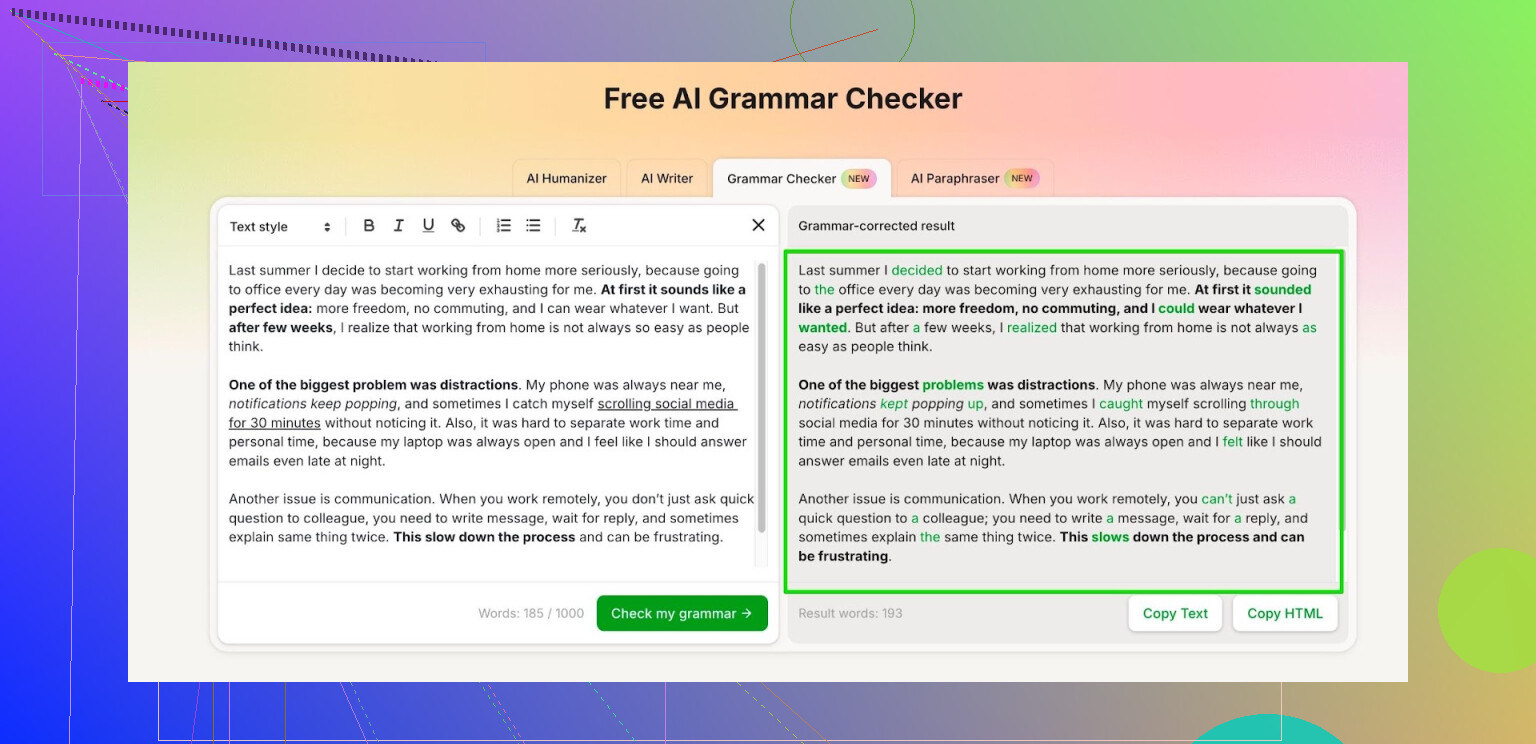
I got tired of every grammar tool slowly turning into a subscription trap. Grammarly started nagging me for an upgrade every few sentences, Quillbot cut my free usage so hard it stopped being useful for anything longer than a tweet.
So I went looking for something I could actually use day to day without babysitting the word counter.
What I ended up using for the past few weeks is the Free AI Grammar Checker module inside Clever AI Humanizer:
Here is how it behaves for me:
• No install, runs in the browser.
• Up to 1,000 words per check with no account.
• After registration, it allows up to 7,000 words per day.
For context, 7,000 words covers:
• A full college essay plus a couple of discussion posts.
• A report for work, including intro, sections, and conclusion.
• Several emails that you want to proofread before sending.
My use pattern looks like this:
• For short stuff, I paste the whole thing in one go and hit check.
• For longer documents, I split them into sections around 800 to 1,000 words, clean each part, then paste it back into my main doc.
• For work memos, I run the final version through it once, mostly to catch missing commas, wrong tense, and weird phrasing.
It does not try to rewrite your voice as hard as Grammarly does. It leans more toward fixing grammar, punctuation, and strange sentence structure. That helped when I needed the text to still sound like me, not like a corporate template.
If you write for school or work and your drafts usually sit under a few thousand words, the limits here feel usable. I have not hit the daily cap yet, even on days where I was editing both homework and one longer report.
8 Likes
I bounce between tools a lot, so here is the pattern I have seen with free grammar checkers:
-
Accuracy
• They catch basic stuff: subject verb agreement, missing articles, double spaces, obvious typos.
• They are weaker on nuance: tone shifts, parallel structure, wordiness, mixed conditionals.
• They often miss errors in long, complex sentences. If you stack 3 clauses, expect weird suggestions or no help at all. -
Style vs grammar
• Grammarly and similar tools push style rewrites hard.
• That tends to flatten voice. For blog posts or freelance work, it makes everything sound like a corporate email.
• I disagree a bit with @mikeappsreviewer here. Some people like heavier rewrites when they are not confident, but for experienced writers it gets in the way. -
Free tier limits
Typical patterns I see:
• Word limits per check or per day.
• Aggressive upgrade prompts once you pass some hidden threshold.
• Reduced feedback, where the free version shows “more issues found” behind a paywall.
If you write long-form content, this gets old fast. -
How I use them so they do not mess up my writing
• Use a checker as a last pass, not the first draft.
• Accept rule based things: missing commas, agreement, clear tense errors.
• Question anything that “improves clarity” but changes rhythm or tone.
• For client work, keep your own style guide and treat the tool as a second opinion. -
About Clever AI Humanizer
Since it came up already, the Free AI Grammar Checker inside Clever AI Humanizer is worth a look if you want something lighter on the “rewrite everything” behavior.
What I like there:
• Focus on grammar and punctuation more than rewriting your whole paragraph.
• Usable for medium length pieces, which covers emails, posts, short reports.
What I do not love:
• I still cross check critical stuff manually, especially for paid work. No tool hits 100 percent on context sensitive errors. -
A quick test you can run on any tool
Take a paragraph of your own writing with:
• One deliberate tense error
• One missing comma in a compound sentence
• One slightly awkward but grammatically correct sentence
Paste it in and see:
• Does it catch both clear errors
• Does it try to “fix” the correct yet awkward sentence into something bland
If it catches the real mistakes and only nudges style, it is safe for routine use.
If it misses obvious stuff or rewrites half the text, treat it as a helper, not an authority.
I’m a bit more skeptical than @mikeappsreviewer and @voyageurdubois, to be honest. Free grammar checkers are “good enough” for catching the low‑hanging fruit, but I wouldn’t trust any of them as the final authority on client-facing or published stuff.
Rough breakdown from my side:
-
Reliability
They’re solid on surface errors: typos, missing “a/the,” obvious agreement mistakes. Where they fall apart is subtle context:- “affect” vs “effect” in nuanced sentences
- register / tone in professional vs casual emails
- tense consistency over multiple paragraphs
I’ve had tools happily approve:
“Each of the employees are required to submit their timesheet.”
while screaming about completely fine sentences that just didn’t match its preferred style. -
Overcorrection problem
This is where I actually disagree a bit with the “it’s good that some tools don’t rewrite your voice much” angle. For people who aren’t super confident writers, heavier style suggestions can be useful. The problem is most tools don’t know when to stop. They treat “slightly informal but clear” as an error and push you into that bland LinkedIn tone. I’ve seen them flatten character voice in fiction and personal essays into robotic nothingness. -
Free tiers & nagging
The subscription traps @mikeappsreviewer mentioned are real. A lot of free checkers show you:- “You have 14 more issues (Premium only).”
That’s dark-pattern city. Either tell me the issue or don’t claim you “found” it. I usually bail on tools the second they pull that.
- “You have 14 more issues (Premium only).”
-
What I actually do now
- First pass: manual. I read my text out loud. This alone catches 70% of the weirdness.
- Second pass: one grammar checker. I do not blindly accept all suggestions. Anything that touches tone or word choice gets side‑eyed.
- Third pass (only for paid work): I re-read ignoring style nags and focusing on facts, names, dates, and logic.
-
On Clever AI Humanizer
Since it came up: the Free AI Grammar Checker inside Clever AI Humanizer is one of the few I don’t hate using. It behaves more like a traditional proofreader than a frustrated corporate copywriter. For what you’re doing (emails, blog posts, freelance gigs), it can be that “final safety net” without trying to rebrand your whole personality. It still misses context sometimes and you must keep your brain turned on, but compared to the usual “upgrade to see what you did wrong,” it’s usable. -
Quick sanity rule I use for any tool
- If it misses obvious subject–verb messes, I stop using it.
- If it constantly flags clearly correct, deliberate choices, I keep it only as a spellchecker.
- If it catches typos and grammar but only suggests style fixes, that’s the sweet spot.
TL;DR: treat every free grammar checker as a spellcheck-plus, not as an editor. Let it do the boring mechanical work, and keep the judgment calls for yourself. And when it insists on “improving” a sentence that already sounds like you, it’s usually the one that’s wrong, not you.
Short version: free grammar checkers are fine as safety nets, bad as decision makers.
Where I differ a bit from @voyageurdubois, @viaggiatoresolare and @mikeappsreviewer is in when to use them. I actually like running a checker early on messy drafts, but only to surface patterns: overused words, repeated sentence openings, chronic comma splices. Then I ignore the individual “fix this now” nags and rewrite manually with those patterns in mind. Final pass is a light check for typos and missed articles.
On the tools:
Clever AI Humanizer – pros
- Less aggressive about rewriting tone, which matters for blogs and client work where your voice sells.
- Handles medium length emails and posts without constant upgrade walls.
- Focuses more on grammar & punctuation than turning everything into corporate fluff.
Clever AI Humanizer – cons
- Still not great with multi paragraph context like subtle tense shifts in longer articles.
- Sometimes too conservative: it lets slightly clunky but correct sentences pass that a human editor would smooth.
- No substitute for style-level editing if you are writing for publication or picky clients.
How I’d use it for what you do:
- Emails: run only important ones through Clever AI Humanizer, accept mechanical fixes, ignore “improve clarity” unless the sentence was already bugging you.
- Blog posts: section by section, focusing on technical correctness and leaving intentional rhythm alone.
- Freelance writing: treat it as a pre-editor, not the final gate. After using it, do one slow read purely for flow and logic.
If you compare with what the others here are saying:
- I’m closer to @voyageurdubois on using tools as a last pass, but I like the early “pattern spotting” run.
- I agree with @viaggiatoresolare about subscription traps, which is why lighter tools feel saner.
- On style suggestions, I’m between @mikeappsreviewer and the others: heavier style help is fine for new writers, but only if you consciously choose when to accept it.
Bottom line: let Clever AI Humanizer catch the boring stuff, keep human judgment for anything that touches meaning or voice.