I’m trying to free up storage on my iPhone by clearing the Facebook app cache, but I’m worried it might remove photos, videos, or saved media from my account or phone. Has anyone done this safely, and what exactly gets deleted?
If Facebook is taking up a ridiculous amount of space on your iPhone, the annoying part is that iOS does not give you a simple “clear cache” button for it. You can still fix it, but some options work a lot better than others.
Clearing Facebook cache will not remove your account stuff
Your posts, uploaded photos, videos, friends, messages, and account data are stored by Facebook, not only on your phone. What builds up locally is mostly temporary junk like thumbnails, bits of video, browser files, and other downloaded data that helps the app load faster.
Deleting that local data just means Facebook has to download it again. It does not delete your Facebook posts or uploaded photos.
The real cache reset: delete and reinstall Facebook
Go to Settings > General > iPhone Storage > Facebook, then tap Delete App.
This removes the app itself plus its Documents and Data, which is where most of the local Facebook storage lives. After reinstalling Facebook, you will need to sign in again, but your account content comes back from Facebook’s servers.
This is the method that actually clears the deeper cache. If Facebook is taking several gigabytes, this is usually the one that makes a noticeable difference.
Offloading is not the same thing
From that same iPhone Storage screen, you can choose Offload App instead. That removes the app file but keeps Documents and Data on the phone.
It is fine if you just want to temporarily remove the app without logging in again later, but it usually does not solve the storage problem. The big cache files often stay right where they are.
You can also clear Facebook’s built-in browser cache
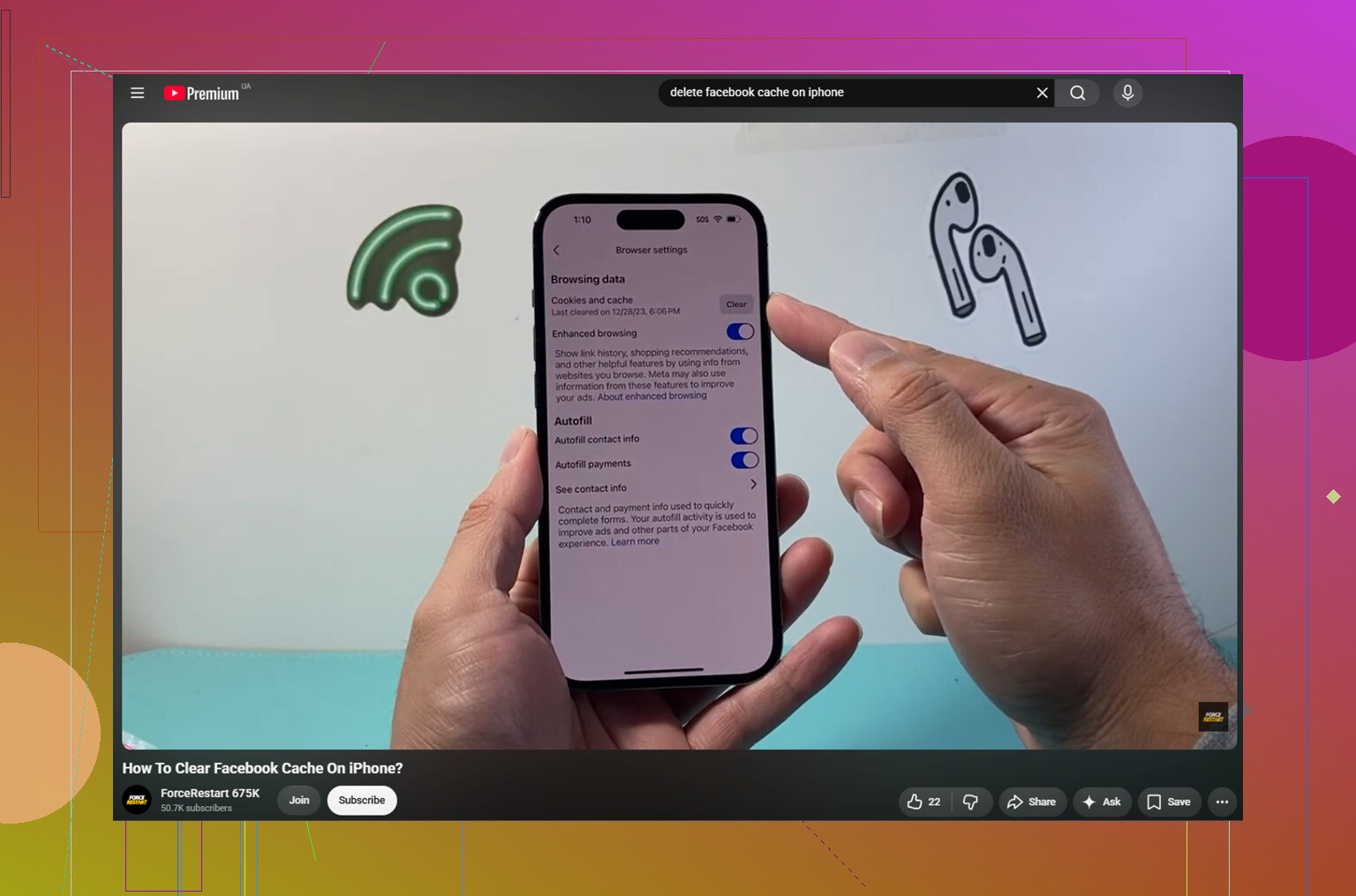
Inside the Facebook app, go to Menu > Settings and Privacy > Settings > Browser, then tap Clear next to Cookies and Cache.
This only clears data from websites opened inside Facebook. It may help if links inside the app feel slow or buggy, but it usually will not free up a huge amount of iPhone storage.
Stop Facebook from rebuilding the cache so fast
One thing that helps is turning off video autoplay, or at least setting it to Wi-Fi only. Videos are usually the biggest reason the cache grows so quickly. If every Reel and video starts loading while you scroll, that storage number is going to climb again pretty fast.
Even after a full reinstall, Facebook can rebuild a lot of cache within a day or two of normal use. That is basically how the app is designed. It saves media locally so scrolling feels faster.
The bigger storage problem is often not Facebook
Facebook cache is annoying, but on a lot of iPhones the real storage killer is the photo library. Old burst shots, random screenshots, duplicate pictures, and large videos can take up way more space than Facebook ever will.
That is where something like Clever Cleaner can help. It does not clear Facebook cache, so you still need the manual steps above for that. Its job is cleaning up the Photos library, and it is free with no ads or subscription.
The Heavies tab sorts files by size, biggest first, with the exact file size shown. Sometimes one old 4K video is taking more space than the entire Facebook app.
The Similars tab groups photos that look almost the same and suggests a Best Shot, so you are not tapping through five nearly identical pictures one by one.
It also shows file sizes on screenshots before you delete anything, which makes it a lot easier to see where the storage actually went. Everything is processed on the device, with nothing uploaded elsewhere.
After clearing around 10GB of duplicate photos and forgotten videos, the storage warning stopped showing up even when Facebook started rebuilding its cache again.
9 Likes
Don’t use any “cleaner” app that claims it can reach inside Facebook and wipe its cache for you. iOS keeps apps pretty sandboxed, so those apps usually cannot clean Facebook directly anyway, and the sketchier ones are more risk than help.
@mikeappsreviewer is right that deleting and reinstalling Facebook is the closest thing to a full cache reset on iPhone. It should not delete photos or videos you uploaded to Facebook, your albums, saved posts, friends, comments, etc. Those are tied to your Facebook account. Photos or videos already saved in your iPhone Photos app also should stay there, because that is separate from the Facebook app.
The small caveat is drafts and temporary app-only stuff. If you have an unfinished post, story draft, reel draft, or something sitting inside Facebook that has not been posted or saved elsewhere, assume it could disappear when you delete the app. Same with needing to log back in and possibly reapprove two-factor login. So before deleting Facebook, post or save anything unfinished, make sure your login works, then reinstall. For storage, that is safer and cleaner than trying random cache tricks.
Messenger is a separate storage hog, so check that before blaming the Facebook app. On iPhone, Facebook and Messenger keep their own app data. Deleting Facebook will not clear Messenger’s cache, message attachments, or downloaded media, and deleting Messenger would not delete your Facebook albums either. It can just make you log in again and redownload conversation previews.
For the Facebook app itself, I’d treat “cache” as disposable copies: feed images, profile thumbnails, video chunks, link previews, and browser junk. Removing the app should not touch anything already uploaded to your Facebook account, and it should not remove normal photos sitting in the iPhone Photos app. The main stuff at risk is anything that only exists inside the app and was never posted, sent, saved, or exported.
A quick safety check before deleting: open Photos and make sure any important camera-roll items are really there, then open Facebook and check drafts/stories/reels you care about. After that, Delete App is usually the cleanest reset. Don’t expect it to stay tiny forever, though. If you watch a lot of reels or browse Marketplace heavily, Facebook will start rebuilding that local pile pretty fast.

Your Facebook photo permission setting matters more than the cache itself. If you gave Facebook access to your photo library, clearing the Facebook app cache still should not erase anything from Photos, but it may reset what the app can see or make you approve access again after reinstalling. That can make people think their pictures “disappeared” from Facebook’s picker, when really iOS is just blocking access until permission is granted again.
I agree with the others that uploaded Facebook photos and videos are not living only inside the app cache. If they are already posted to your timeline, albums, stories archive, or saved on Facebook’s side, deleting the app is not the same as deleting that content. Same for photos in the iPhone Photos app. Facebook does not get to wipe your camera roll just because you removed its local files.
The annoying gray area is anything half-finished. Draft posts, unsent story edits, reel drafts, a video you trimmed inside Facebook but never saved, or a photo you picked but never actually posted can be lost. I would treat the Facebook app like a temporary workbench. Anything finished and uploaded is fine. Anything still sitting on the workbench can get tossed when you delete the app.
Before you do it, check three places: the Photos app, your Facebook profile/albums, and any drafts or pending uploads inside Facebook. If those look good, delete and reinstall is usually the cleanest way to shrink the app. Offloading is less useful for this because it keeps the app’s documents and data, which is often the bloated part.
After reinstalling, expect Facebook to ask for login, notifications, photo access, tracking choices, and maybe two-factor again. That is normal. The storage number may grow again once you start scrolling videos and Marketplace, so this is more like emptying a trash bin than fixing Facebook forever.
The thing nobody flagged: if you have been staying logged in for years and don’t actually remember your Facebook password, deleting the app can turn a storage cleanup into an account lockout. Check that you can actually log back in before you tap Delete, especially if your 2FA is tied to an old phone number.
Otherwise the advice here is solid. Uploaded stuff lives on Facebook’s servers, camera roll is separate, drafts are the only real casualty. I’d just push back a little on treating the reinstall as the main fix. On most phones I’ve seen, Facebook cache is annoying but not the giant it feels like, and it refills within a day of scrolling reels. If you’re doing this every couple weeks to claw back a gig, you’re fighting the app’s design.
@mikeappsreviewer bringing up the photo library is the more honest point. Clever Cleaner or not, the camera roll is usually where the real space went, and that space stays gone once you clear it. So do the reinstall once if Facebook is genuinely bloated, then leave it alone and go hunt the big videos instead.