I accidentally deleted important files from my USB drive, and now I can’t access some folders at all. I need reliable USB recovery software that’s easy to use and works well for recovering photos, documents, and other lost data. What do you recommend?
I’ve had this happen enough times to stop pretending it’s rare. You plug in a USB stick, open it, and either the folder looks wiped clean or Windows throws the lovely “you need to format the disk” message. At that point, the bad part is simple, files deleted from a flash drive do not go to the Recycle Bin. They vanish from view, and you’re left trying to figure out if the data is gone or only hidden behind filesystem damage.
Before you toss random recovery apps at the problem, slow down for a minute. A few boring steps up front make a big difference.
- Open Disk Management first. If Windows still sees the USB drive, even if it shows up as RAW, unallocated, or with no usable partition, software recovery still has a shot. If the drive is missing there too, I’d stop assuming this is a simple file issue. It starts looking more like hardware failure, and software usually won’t fix that.
- Pull the drive and stop using it. I learned this one the hard way. The more writes you make, the more you risk overwriting the exact files you want back.
- Do not restore recovered files onto the same USB stick. Save them somewhere else, your PC, an external SSD, anything other than the original device.
After that, the tool choice matters.
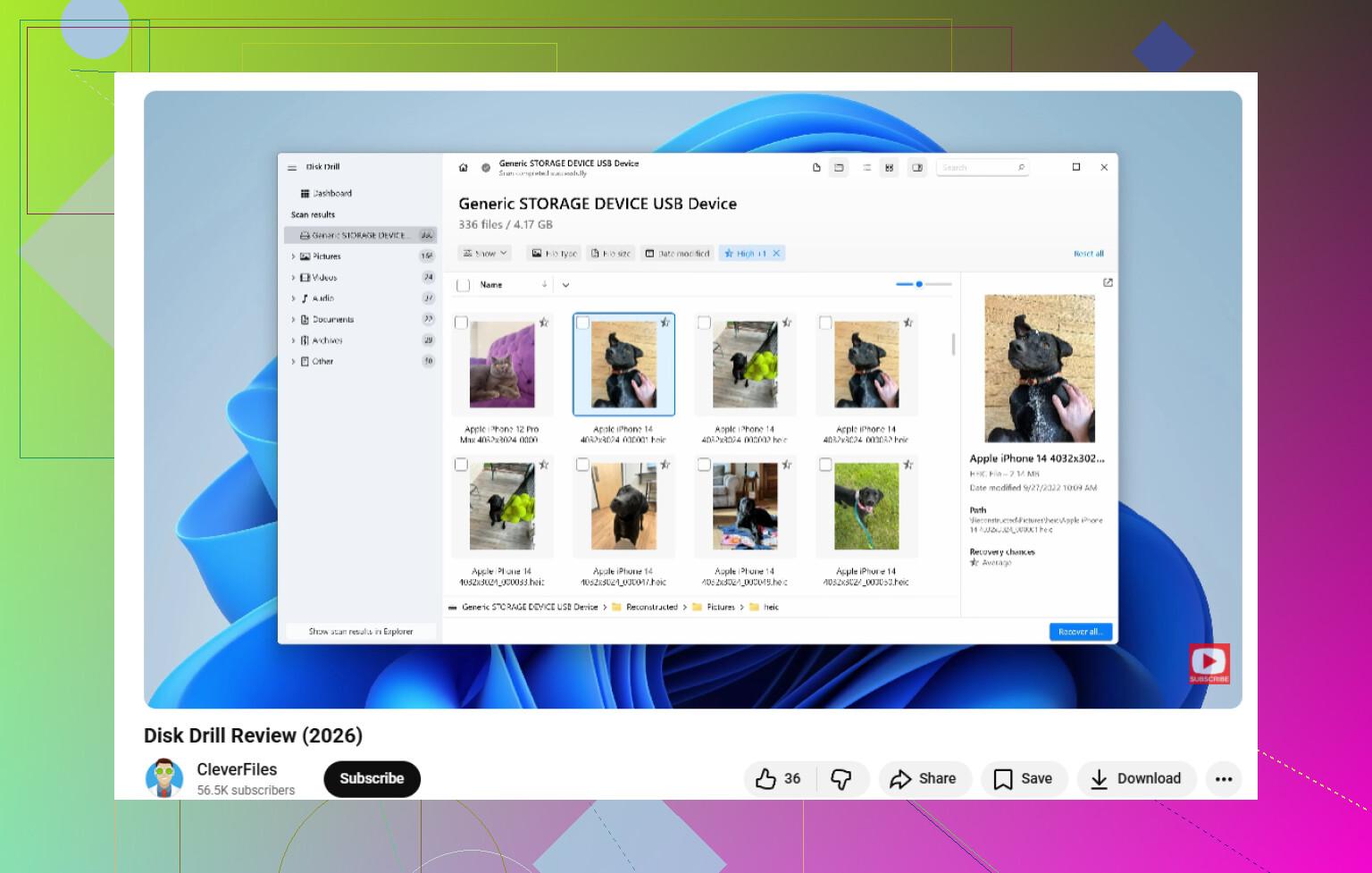
If you want the least painful route, Disk Drill is the one I’d start with. It covers the stuff USB drives usually mess up, deleted files, accidental formatting, RAW volumes, broken partitions, and other logical damage. What stood out to me was its scan approach. It does not stick to one method and call it done. It stacks multiple scan types and checks for a long list of file signatures in one pass, which helps when the drive is half-broken and you do not know what failed first.
One part I ended up appreciating more than I expected was the byte-to-byte backup feature. Some flash drives act fine for thirty seconds, then disconnect, then come back like nothing happend. In those cases, making an image first is the safer move. You scan the copy, not the original stick, which cuts down the chance of pushing a dying drive over the edge. The preview tool helps too. You get to see whether the files look usable before spending more time on recovery.
If you want a free option, PhotoRec still deserves a look. It does not care much about the file system. It scans the raw data on the device and searches for known file signatures directly. When the partition table is wrecked or the file system is gone, this kind of scan sometimes pulls data out when cleaner-looking tools come up empty.
There’s a catch, and for some people it’s a big one. PhotoRec feels old-school. The interface is text-based, which throws people off fast, and it usually does not give you your original file names or folder layout back. You end up with piles of generically named files and a sorting job afterward. If your USB drive had years of family photos or work docs, that cleanup gets annoying fast. I did it once. Didnt enjoy it.
So if this were my drive, I’d try Disk Drill first. If it locates your files with the names and folders still intact, you save yourself a lot of cleanup and guessing.
7 Likes
I’d rank them like this for a USB drive.
-
Disk Drill
Best mix of easy UI and solid results. Good for deleted files, missing folders, and drives with file system issues. It also keeps previews front and center, which saves time. If you want a quick look at how it handles USB recovery, watch this Disk Drill USB recovery walkthrough. If you were searching for a Disk Drill review, think of it as a simple USB and external drive recovery tool with a clean interface, deep scan support, file preview, and recovery for photos, docs, videos, and archive files. -
R-Studio
Less friendly. More control. Better if your folders are unreadable and you want to inspect partitions, file systems, and scan results in detail. I’d pick it over PhotoRec for mixed file types if you care about structure. -
Recuva
Fast and easy for straight deletion on healthy USB sticks. Weak once the drive starts showing corruption. Still worth a try if the damage is minor.
I slightly disagree with @mikeappsreviewer on one point. I would not jump to PhotoRec early unless the file system is toast. It recovers a lot, sure, but the no-folder, random-file-name mess is a pain in the neck.
My order would be Recuva first for simple deletes, Disk Drill next for the best balance, R-Studio if things look ugly. Save recovered files to your PC, not the USB. Do a scan soon, dont keep plugging the stick in all day.
I’d actually split this into two cases, because “deleted files” and “can’t access folders” are not always the same problem.
If the USB is still readable but files were just removed, Recuva is fine for a quick first pass. I know @ombrasilente put it lower depending on corruption, but for basic accidental deletion it’s still one of the least annoying tools to try. If the folders are inaccessible, though, I would skip straight past the lightweight stuff and use Disk Drill. It’s easier than R-Studio, less chaotic than PhotoRec, and usually better at handling USB recovery when the drive has both deleted data and filesystem weirdness.
One place I slightly disagree with @mikeappsreviewer style advice in general: people jump to “deepest scan possible” too fast. On flash drives, that can turn a manageable recovery into a giant pile of unsorted junk. Start with a normal scan, check previews, then go deeper only if needed.
For photos, docs, and mixed file types, my shortlist would be:
-
Disk Drill
Best all-around USB recovery software for normal users. Clean UI, previews, decent folder recovery, works well for deleted files and unreadable USB partitions. -
Recuva
Best for simple deletes only. Fast, basic, kinda old, but still useful. -
R-Studio
Powerful, but def not beginner-friendly. Better if you know what partition maps and file systems are. -
PhotoRec
Recovery beast, organization nightmare. Great when everything else fails and you no longer care about filenames.
If you want more discussion on corrupted flash drives and raw USB recovery cases, this thread is worth reading: best tips for RAW USB data recovery
So yeah, if you want the “best USB recovery software” that balances ease of use and actual results, I’d pick Disk Drill first. If it sees your missing folders in preview, that’s usually a very good sign.