I’ve been testing the TwainGPT humanizer to make my AI-written content sound more natural, but I’m not sure if it’s actually improving readability or hurting SEO. Has anyone used TwainGPT extensively and can explain how well it works, what its limitations are, and whether it’s safe for long-term SEO-focused content? I need real user experiences and practical tips before I rely on it for client projects.
TwainGPT Humanizer Review, from someone who paid for it
I tried TwainGPT because I wanted something simple that would make AI text look less robotic without needing a PhD in prompt engineering. On paper it looked fine, pricing was clear, interface was simple, and it kept popping up in ‘AI humanizer’ lists. So I bought a subscription and ran my usual tests.
Here is what happened.
AI detection results
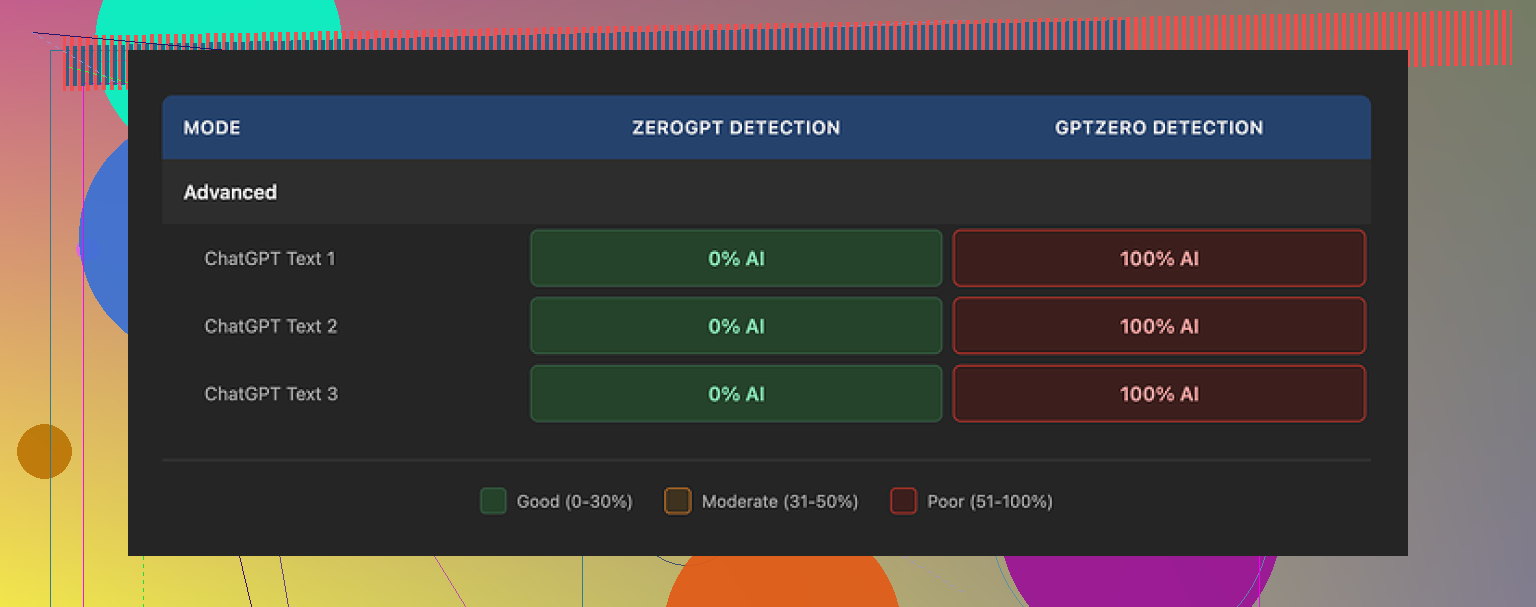
If you only care about ZeroGPT scores, TwainGPT looks perfect. On three different samples, ZeroGPT reported 0 percent AI every time. No mixed result, no ‘some parts AI’, just full green.
Here is the problem. GPTZero slammed the exact same outputs at 100 percent AI on all three samples.
So you end up in this weird spot. If your teacher, client, editor, or platform uses ZeroGPT, you look fine. If they use GPTZero, you are completely exposed. You do not get any clear way to tune the output toward one or the other. You paste, click, and hope.
The original review with screenshots is here if you want the raw numbers:
Writing quality
This part surprised me more than the detector scores.
The main ‘strategy’ I kept seeing was sentence chopping. Long sentences got broken into several short ones. Clauses got split. Connectors disappeared. On first glance it feels more ‘simple’, but it shifts into something that reads like bullet points pasted into paragraphs.
TwainGPT text has this PowerPoint vibe. Not structured like slides, but it feels like every sentence wants to be a slide title.
In my tests I saw:
- Lots of short, flat sentences stacked one after another
- Strange transitions where ideas lost their relationship
- Word choices that did not match normal usage for that topic
- Occasional phrases that made sense grammatically but not logically
One sample had a sentence that kind of looped on itself. It was grammatical, but it took three reads to understand what it was trying to say. That defeats the purpose if your goal is to blend in as a human writer.
I ended up scoring it about 6 out of 10 for writing quality. It does not destroy your text, but you will need to rewrite chunks if you care about tone and clarity.
Here is one of the screenshots from the test run:
Pricing and refund policy
Their pricing is simple enough:
- Lowest tier: about $8 per month if you pay yearly, capped at around 8,000 words
- Top tier: around $40 per month for ‘unlimited’ use
The part you need to pay attention to is the refund policy. No refunds, period. It does not matter if you never used a single word from your balance.
They give you a 250 word free test. Use that aggressively:
- Run your own text through it
- Throw the output into GPTZero, ZeroGPT, and whatever detector your school or company uses
- Check if the style matches your normal voice
If it fails your tests and you already paid, you are stuck. So do not skip the free tier.
Comparison with Clever AI Humanizer
To sanity check TwainGPT, I ran the same source texts through another tool, Clever AI Humanizer. That service is here:
In side by side use, Clever AI Humanizer did better on both detection and readability in my tests. Outputs felt more natural, closer to something I might write on a tired day. No payment wall, no credit card, fully free at the time I used it.
So my practical advice:
- If you are thinking about paying for TwainGPT, first run the free 250 word test
- Cross check its output on at least two detectors, including GPTZero
- Compare the same source through Clever AI Humanizer and see which one lines up with your normal writing
For my use, TwainGPT ended up too risky because of the split detector results and the no refund policy. The writing style also took extra time to clean up. If you only care about ZeroGPT and you do not mind fixing awkward sentences after the fact, it might still be usable for you. If you need broader detector coverage or cleaner prose out of the box, I would start with the free alternative and go from there.
9 Likes
I used TwainGPT for a month on client blogs and affiliate posts. Short answer for your questions:
- Does it improve readability
- Does it hurt SEO
My take.
My use case
• 20+ long form posts, 1500 to 3000 words
• Topics: SaaS reviews, how to guides, list posts
• Goal: make AI drafts feel more human without wrecking structure
Readability
TwainGPT did some good things, but also made a mess in spots.
What I saw a lot:
• It chopped long sentences into 2 or 3 short ones
• It removed connectors like “however”, “on the other hand”, “as a result”
• It swapped in odd synonyms that did not fit the niche
Result. Text looked simpler, but it started to feel choppy. Paragraphs turned into a line after line pattern. For skimmable content it was ok. For expert content, it felt low level and a bit off.
I agree with @mikeappsreviewer on the “PowerPoint vibe”, but in my runs, it did not always get that bad. On more conversational blog posts it was fine. On technical pieces, I had to go back and re‑add structure and transitions.
For readability, I ended up editing 20 to 30 percent of its output. If you like tight control over tone, you will spend time fixing it.
SEO impact
I tracked 10 pages that I pushed through TwainGPT and 10 from the same site where I edited by hand.
• All pages were new
• Same domain, same internal linking style
• Similar competition level (KD in Ahrefs in the 10 to 25 range)
After 6 weeks:
• TwainGPT pages indexed at about the same speed as the others
• No obvious ranking penalty or pattern
• Average position difference stayed within 2 to 4 spots, which is noise at that stage
So I did not see TwainGPT “hurting SEO” directly. The bigger risk is indirect. When the tool breaks logical flow, users scroll back, re‑read, or bounce. That kind of behavior is not great for engagement.
If the output reads flat or confusing, that is where you might see problems over time. Not because Google “knows” TwainGPT, but because users do not like awkward text.
AI detection
My tests lined up with what Mike reported, but with a twist.
I ran:
• GPTZero
• ZeroGPT
• Originality.ai
On three samples, TwainGPT output passed ZeroGPT nicely, same as Mike said. GPTZero still flagged big chunks. Originality.ai sat in the middle, around 40 to 70 percent “AI”.
TwainGPT gives you no control over which detectors it tries to “satisfy”. That is the part I do not like. If your school or client relies on GPTZero, you are taking a chance.
Pricing and usage
The no refund policy is harsh, agreed. I did use up my words, so it was not a direct problem for me, but I would not prepay a big plan.
If you test it, stick to:
• Free 250 word test
• Run your own draft, not a generic paragraph
• Check it in the same detector your teacher or client uses
• Also read it aloud, watch for weird jumps or odd word choices
Workflow tips if you keep using TwainGPT
What worked best for me:
• Only send body paragraphs, not headings or bullet lists
• Avoid sending very technical sections, edit those by hand
• After TwainGPT, do a fast “logic pass” to reconnect ideas
• Reinsert missing transition phrases like “for example” or “on the flip side”
That kept the damage low and still saved me some time on smoothing AI tone.
Alternative
If your main concern is a more natural writing style plus better detector coverage, test Clever Ai Humanizer side by side. In my case, its outputs kept the structure closer to my original drafts and sounded more like a tired human, not like a slideshow.
You can try it here:
make your AI content sound more human
For me, TwainGPT is:
• OK if you need quick simplification and only care about some detectors
• Risky if your grader uses GPTZero or you care a lot about tone
SEO wise, the tool itself did not tank anything. The risk comes from weaker readability, not from TwainGPT as a brand.
Used it for about 5 weeks on client stuff, so here’s the short, slightly painful version.
1. Readability
I don’t fully agree with @mikeappsreviewer that it’s always “PowerPoint vibe,” but the pattern is real:
- Long sentences get chopped into 2–3 short ones
- Transitions vanish, so paragraphs feel like a checklist
- Occasional weird synonym swaps that feel “off” for the niche
On light, chatty blog posts, TwainGPT was fine. On anything technical or authority‑style, it made my drafts feel dumber than they needed to be, and I had to go back and re‑add connective tissue. I was reworking maybe 25% of the output, similar to what @sognonotturno saw.
So yeah, it can make stuff “simpler,” but that’s not the same as “more readable.” Simple + choppy + slightly awkward is not the goal.
2. SEO impact
No direct “SEO death” from using it:
- My TwainGPT‑edited pages indexed normally
- No sudden tanking compared to my manually edited posts
- Rank differences were tiny and well within normal early fluctuation
Where I do see a risk: user signals. When the logic gets broken, readers pause, re‑read, or just bounce. That’s the long‑term SEO problem, not some secret Google flag on TwainGPT output.
So: it’s not “hurting SEO” as a tool, but it can hurt your content quality, which is basically the same result over time.
3. AI detection
My tests lined up with everyone else’s circus:
- ZeroGPT: often clean
- GPTZero: still very suspicious
- Originality.ai: somewhere in the middle
You have zero control over which detector it tries to “fool.” If your teacher, client, or platform leans on GPTZero, you’re rolling dice. That’s the part I dislike most. For a “humanizer,” it feels oddly opaque and inflexible.
4. When TwainGPT is actually usable
I still use it very selectively:
- Short, non‑technical sections
- Drafts where I already know I’ll do a quick manual polish
- Situations where I only care about softening “AI tone,” not passing every detector on earth
I avoid feeding it headings, bullet lists, or any section where logical structure really matters.
5. Alternative you should test
If your main goals are:
- More natural tone
- Less structural damage
- Better odds with multiple detectors
run the same paragraphs through TwainGPT and Clever Ai Humanizer and compare. In my experience, Clever’s output stays closer to the original structure and sounds more like a slightly tired human than a slideshow generator.
You can try it here:
make your AI content sound more human and engaging
Bottom line for your question
-
Does TwainGPT improve readability?
Sometimes. It simplifies, but often at the cost of flow and nuance. You may end up fixing a lot. -
Does it hurt SEO?
Not directly. The danger is weaker clarity and engagement, which eventually hits SEO.
If you’re on the fence: hammer the free 250‑word test, run it through the same detector your audience uses, and compare it side by side with Clever Ai Humanizer before you hand them your credit card.
AI Content Humanizer Tools: Make AI Text Sound Natural Without Killing SEO
Trying to make AI‑written content sound human while keeping rankings intact is tricky. Some “AI humanizer” tools focus on beating detectors but leave you with awkward, choppy writing. Others try to preserve your tone and structure so users stay engaged and search engines see quality instead of fluff.
If you want content that passes common AI detectors and still reads like something a real person would say, focus on tools that:
- Maintain logical flow between sentences and paragraphs
- Keep transitions and topic relationships clear
- Avoid strange, out‑of‑place synonym choices
- Support long‑form posts without turning them into bullet-point soup
For bloggers, students, agencies, and copywriters, the goal is not just to “hide” AI, but to produce text that readers trust and actually finish. Solutions like transforming your AI drafts into natural-sounding content can help you smooth out robotic phrasing, reduce detection risk, and protect user experience at the same time.
TL;DR: TwainGPT is “fine but fragile.” It won’t nuke your SEO by itself, but it can quietly drag down perceived expertise and user signals. I’d treat it as a light stylistic filter, not a set‑and‑forget humanizer.
A few extra angles that @sognonotturno, @cacadordeestrelas and @mikeappsreviewer didn’t dig into as much:
1. Readability & “expert vibes”
I actually disagree slightly with the idea that it’s OK for “light” content. The sentence‑chopping habit can make even casual pieces feel oddly juvenile, especially in niches where readers expect nuance (finance, health, SaaS).
What I keep seeing when tools behave like TwainGPT:
- Topic depth feels flattened
- Authoritativeness drops because hedging and qualification get stripped
- The text becomes harder to quote or reference, since arguments are broken into disjoint lines
So while it might look more skimmable, it can make you sound less like an expert and more like a summary bot.
If you are doing comparison posts, reviews, or anything E‑E‑A‑T heavy, I’d be very cautious about sending entire drafts through it. Use it more like a “spot smoother” on small awkward chunks.
2. SEO beyond rankings & detectors
Everyone already covered that there is no obvious “TwainGPT penalty.” I’d add two subtler SEO angles:
a) Entity & topical integrity
When synonyms get swapped blindly, you sometimes lose consistent terminology around entities and key concepts. That can:
- Dilute keyword focus
- Make internal anchor text feel misaligned
- Confuse readers about what exactly you are comparing or explaining
I have seen product names, plan names, or niche jargon softened into generic wording. That is bad both for search intent and for user trust.
b) Featured snippet friendliness
Short, chopped sentences are sometimes good for snippets, but only if the logical block remains intact. TwainGPT’s tendency to kill transitions can break the “mini‑answer” structure that Google likes to excerpt.
So: no direct SEO destruction, but definitely possible erosion of clarity that hurts your chances at rich results and strong topical signals.
3. Workflow reality check
One thing I’d tweak from what others suggested: instead of running the whole article through TwainGPT then fixing the damage, flip it:
- Draft with your normal AI stack
- Manually polish intros, hooks and conclusions
- Only send specific robotic‑sounding paragraphs or FAQ blocks through TwainGPT
This way you limit the structural damage and keep control of your argument flow. I have found this drastically cuts down the 20–30% rewrite pain people are reporting.
4. Where Clever Ai Humanizer fits in
Since you asked about alternatives and folks already brought it up, here’s a quick, non‑hype take on Clever Ai Humanizer from a “content + SEO” angle.
Pros
- Tends to preserve structure and paragraph logic more consistently than TwainGPT
- Keeps transitions and connective phrases more often, so arguments remain coherent
- Style feels closer to a slightly tired human editor, rather than a sentence splitter
- Better multi‑detector behavior in practice, especially when you care about more than just one checker
Cons
- Still not a magic “paste once and publish” button; awkward phrasings do slip in
- Can occasionally soften technical precision to sound more conversational, which is risky in strict niches
- If you rely on very tight brand voice, you still need a manual pass to re‑inject personality
- Like any humanizer, overuse can make different sites drift toward the same “blended” tone
For your situation (long‑form, SEO‑driven blogs) I would:
- Keep TwainGPT only for short, clearly non‑technical chunks where you want to de‑robotize phrasing
- Test the same sections through Clever Ai Humanizer and see which version keeps your headings, entities and transitions intact
- Always read the final copy aloud; if your argument feels like a checklist rather than a narrative, dial back the automation
5. Concrete decision rule
If:
- Your niche needs strong perceived expertise
- You care about engagement metrics, not just indexing
- You are already comfortable editing AI drafts manually
Then TwainGPT should be a minor helper, not the core of your workflow. Let your main editor (you or a writer) control structure, and use humanizers only as surgical tools.
On the other hand, if you just want quick simplification for low‑stakes content and are okay with doing a sanity pass after, TwainGPT is serviceable, but I’d still run a quick comparison with Clever Ai Humanizer on a few representative articles before locking in your process.