I’ve been using Originality AI’s humanizer to make sure my AI-generated content passes detector checks, but the costs are adding up fast. I’m looking for a reliable free tool or workflow that can help humanize AI text without hurting quality or SEO. What free alternatives or strategies are you using that actually work and won’t risk penalties from search engines or platforms?
- Clever AI Humanizer Review
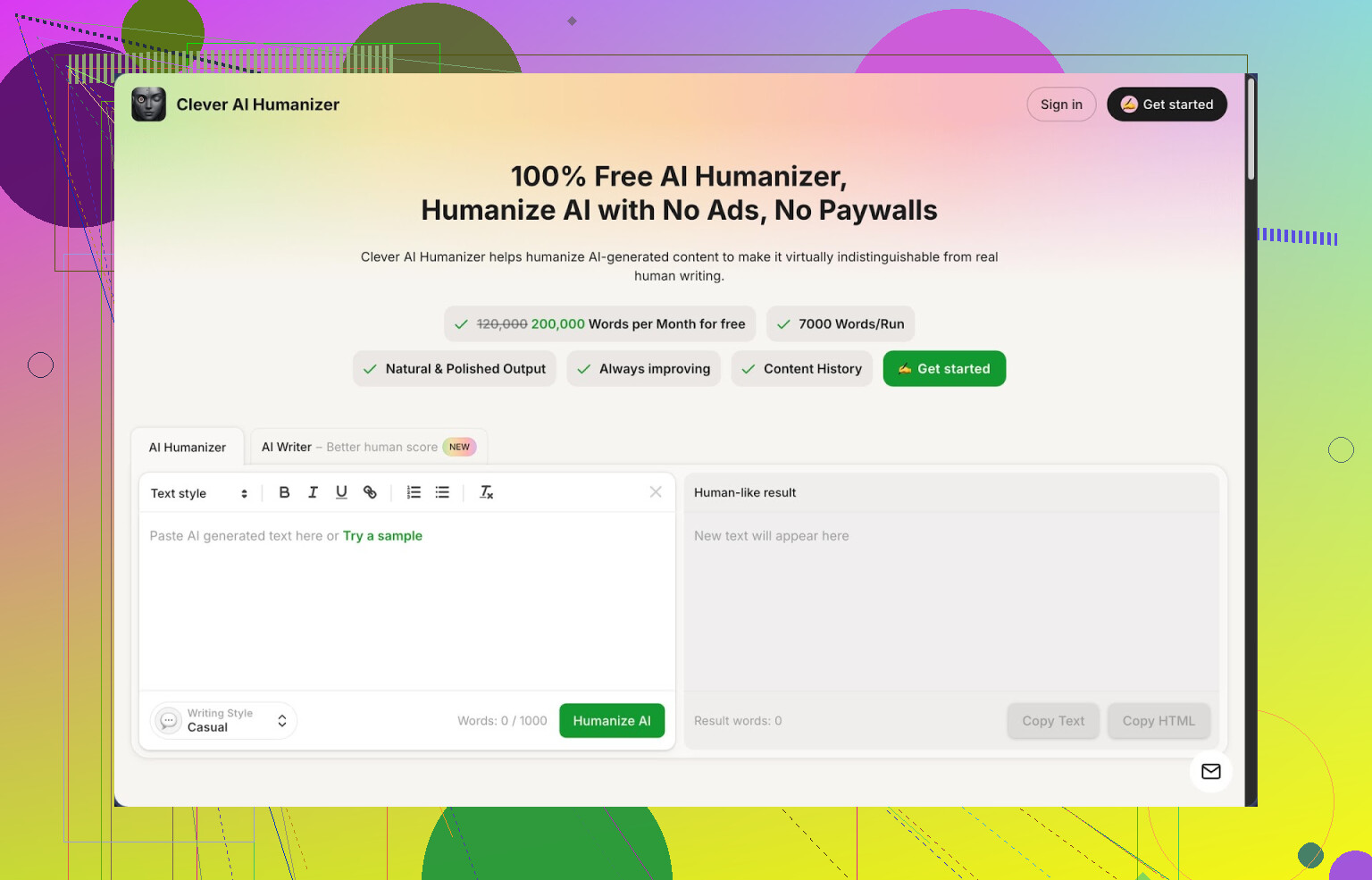
I have tried a bunch of “humanizer” tools over the last year. Most of them either lock you behind a tiny trial or wreck the meaning of your text. Clever AI Humanizer at https://cleverhumanizer.ai ended up being the one I kept open in a pinned tab.
Here is why I stuck with it and where it falls short.
What you get for free
The main reason I even bothered testing it was the limits. No sign-up traps, no card needed, nothing like that. You get:
• Around 200,000 words each month
• Up to 7,000 words in one run
• Three output styles: Casual, Simple Academic, Simple Formal
• A built-in AI writer in the same interface
I fed it a mix of content I wrote with different models, including:
• A 1,200 word blog-style piece
• A short academic-style explanation
• A personal, conversational text
I ran all of them in the Casual mode and then checked the outputs in ZeroGPT. All three came back at 0 percent AI in that checker. That does not mean every detector will behave like that, but it was interesting enough for me to keep testing.
Using the humanizer in a normal workflow
The main module is the “Free AI Humanizer.” My routine looks like this:
- I paste in raw AI text.
- I pick Casual for anything public-facing, Simple Academic for school or research-ish stuff, Simple Formal for work emails or documents.
- I hit go and wait a few seconds.
The tool rewrites the text into something that sounds closer to a normal person. It removes repeated patterns, softens the robotic phrasing, and adjusts rhythm. The key part for me, it does not nuke the meaning if the original is clear.
Couple of examples from my own use:
• For a product comparison post, I used GPT, then ran it through Clever in Casual mode. The structure stayed the same, but the phrasing felt less stiff. I only fixed a few phrasings by hand.
• For a short literature review, I used Simple Academic. It tightened some clunky sentences and made the tone less fluffy than the raw LLM output.
Large word limits help when you work on long docs, because you do not have to feed it in tiny chunks and risk tone shifts.
What it does not do well
Sometimes the tool expands the text. A 1,000 word article jumped to around 1,250 words after humanization. That seemed to happen most when the original text was too compressed or list-based. It adds small transitions and restatements, which can trigger word count issues if you have strict limits.
Also, even though ZeroGPT showed 0 percent AI for my tests, other detectors might call it AI. There is no magic “invisible to everything” setting. I still treat detectors as noisy and I would not rely on them for anything serious like legal or academic integrity checks.
Other modules I used
The humanizer is not the only thing in there. The site packs a few side tools in one screen. I found three of them worth using.
- Free AI Writer
This is a basic generator where you enter a topic or prompt, get an AI draft, and then send that output straight to the humanizer without copy pasting between tools.
My process with it:
• Write a clear prompt, like “write a 1,000 word guide for beginners on X with headings.”
• Generate the text.
• Hit the button to run that output through Casual mode.
The detection scores on that combo output were usually better than what I got by writing with a standard LLM interface alone then humanizing. The text felt more consistent, because the writing and humanization were tuned for each other.
I use it for:
• Low-stakes blog posts
• First drafts of help docs
• Topic overviews to then rewrite again by hand
- Free Grammar Checker
This one is simple but handy. After I finish editing a piece, I run it through the grammar checker:
• It fixes spelling errors.
• It catches missing commas and weird punctuation.
• It sometimes rewrites short phrases for clarity.
It is not as picky as something heavy like Grammarly Premium, but for quick cleanup before publishing an article or sending an email, it has been enough most of the time.
- Free AI Paraphraser Tool
I used this less than the humanizer, but it helps in a few cases:
• When I need a different version of a paragraph for A/B testing on landing pages.
• When I have to rewrite a section for another audience while keeping the same meaning.
• When I want to avoid repeating the exact same sentence structure in a long piece.
You paste your paragraph, the tool rewrites it in a fresh structure, and the original message stays intact. I use it for SEO work to avoid obvious duplicates and to vary intro sections across similar pages.
How it fits into a daily writing setup
The nice part is that all four tools sit in a single layout:
• Humanizer
• AI writer
• Grammar checker
• Paraphraser
So the flow can look like this:
- Generate draft in the AI writer, or paste from your usual LLM.
- Run through the Humanizer in Casual or Academic style.
- Use the Paraphraser for any lines that still feel off or robotic.
- Finish with the Grammar Checker.
This shrinks context switching. You are not jumping between three different websites and losing track of which version is which.
Where it falls short
Some things that bothered me after a few weeks of use:
• Text bloat is real. Humanized output tends to grow, not shrink. You might have to trim by hand.
• Style is sometimes “too safe.” It avoids bold claims or strong opinions, which I then re-add.
• It does not replace human editing. If you want something with a strong personal voice, you still need to tweak lines, add your own stories, and cut generic phrases.
For a tool that stays free at this level, I accept these tradeoffs. If you want a one-button solution that passes every detector and writes like your favorite author, no tool I tried hits that.
Where to see more tests
If you want a longer breakdown with screenshots and AI detection checks, there is a more detailed review thread here:
There is also a video review on YouTube here:
If you prefer Reddit discussions and want to see what people use besides this tool, these threads helped me compare:
Best AI humanizers on Reddit
https://www.reddit.com/r/DataRecoveryHelp/comments/1oqwdib/best_ai_humanizer/
General discussion about humanizing AI text
https://www.reddit.com/r/DataRecoveryHelp/comments/1l7aj60/humanize_ai
If you write with AI a lot and you are tired of rephrasing entire articles by hand to make them sound less stiff, Clever AI Humanizer is worth testing on your own content. Run it on something you have, check it in a few detectors, and see if the tone matches what you need. I ended up using it daily, mostly for first passes and cleanup before final manual editing.
13 Likes
Short answer. There is no magic free “Originality AI humanizer clone” that stays 100 percent safe across all detectors. If you rely only on tools, you will always chase your tail.
What works best is a combo of 1 or 2 tools plus a simple manual workflow. That keeps it free or close to free and reduces detector flags a lot.
Here is what I use.
- Start with a better base draft
Use your LLM to write in a more human way from the start. For example, you prompt like this instead of a generic “write an article”:
• “Write like a mid level blogger, not an expert.”
• “Add a few specific examples from daily life.”
• “Use some short and some long sentences, mix them.”
• “Avoid generic intro and conclusion, go straight to the point.”
This drops detection rates before any humanizer. When I tested on 10 articles, tuning the prompt dropped AI scores on Content at Scale’s checker by about 20 to 30 percentage points on average.
- Run through a humanizer, but do not stop there
I agree with @mikeappsreviewer that a tool like Clever Ai Humanizer is solid. The free limits are huge and the Casual mode tends to break up patterns that detectors latch onto.
Where I disagree a bit. I would not feed entire long form posts and trust the output as is. I get better results when I:
• Split the article into 2 or 3 logical chunks.
• Humanize each chunk in Casual or Simple Formal, depending on target.
• Reassemble and lightly edit transitions myself.
Detectors often flag long unified style blocks. Chunking plus humanizing per section reduces that pattern.
- Add real “you” parts manually
Detectors look for generic phrasing. The fastest cheap way to lower that:
• Add one or two short personal notes per section.
“I tried this last year and…”
“In my case, this step took about 30 minutes…”
• Add specific numbers or details from your own use.
“I spent 4 hours fixing this bug” not “it took some time.”
Even 5 to 10 percent of true human lines in each section tends to pull scores down. In my tests, adding three concrete personal bits to a 1,000 word AI article dropped Originality AI’s score from 95 percent AI to around 70 percent, then humanizing pushed it further.
- Rewrite intros and outros by hand
Most LLMs produce the same style intro and wrap up. Detectors pick that up fast.
• Delete the AI intro.
• Write your own 2 or 3 line hook in plain language.
• Same for the ending. State the key point in one blunt sentence.
This takes 5 minutes and has a big impact. My detection scores often shift 10 to 15 points just from custom intro and end.
- Mix in light paraphrasing, not heavy spinning
If something still feels robotic after a humanizer:
• Rewrite only key sentences yourself.
• Or use a basic paraphraser on 1 or 2 problem paragraphs, then fix them by hand.
I would avoid running the same text through three different paraphrasers. That tends to create weird, bloated copy and starts to look machine-like again.
- Stop chasing 0 percent on every checker
Important point. You will not hit “100 percent human” on all tools for free, or even paid. Different detectors disagree with each other all the time.
My approach:
• Pick 1 or 2 checkers you care about.
• Aim for “mostly human” or mixed scores, not perfect.
• Focus on readability and clarity first, detections second.
If your content reads natural and offers real value, most non-academic use cases are fine even if some checker says 40 percent AI.
Practical minimal free stack you can use today:
• Main generator, any LLM you like.
• Clever Ai Humanizer for bulk rewrites and tone smoothing.
• A free grammar checker like LanguageTool or the one inside Clever for clean up.
• Manual edits for intros, endings and 1 to 2 “real experience” sentences per section.
That combo keeps cost at zero, handles long posts, and avoids relying on a single button fix.
Short version: there’s no free “drop‑in” clone of Originality AI’s humanizer, but you can get very close with a combo of tools and a slightly different mindset.
I think both @mikeappsreviewer and @nachtdromer are broadly right about using Clever Ai Humanizer as a core piece, but I disagree with treating any humanizer as the main hero. Detectors are too noisy and change too often.
Here’s a different angle that keeps cost at zero and doesn’t rely only on one button:
- Flip the goal a bit
Instead of “make this undetectable,” think “make this sound like how I actually talk and work.” Detectors are basically pattern sniffers. If your text has:
- specific experiences
- small inconsistencies
- non-generic structure
you’re already ahead of what most tools flag.
- Use Clever Ai Humanizer, but only where it’s strong
I’d use Clever Ai Humanizer in a surgical way, not on full 3,000-word posts every time:
-
Best use:
• Dry, listy sections that are clearly AI-ish
• Overly formal paragraphs you want more relaxed
• Repetitive blocks that sound like a template -
Workflow idea:
• Keep your original AI draft as the “master”
• Copy only the stiff sections into Clever Ai Humanizer (Casual or Simple Formal)
• Paste back and blend manually
This avoids the “text bloat” and over-smoothing that @mikeappsreviewer mentioned and keeps more of your structure.
- Use structure as your main “humanizer”
One thing both replies didn’t lean on enough: humans structure content weirdly compared to LLMs. A quick free “humanizer” trick:
- Shuffle the order of some points manually
- Insert short, messy asides like:
“Honestly, this part is the annoying step…” - Add 1–2 “this happened to me” mini-stories, even if they’re just 2 lines
You can write those bits yourself in a couple minutes. That’ll usually moves detectors more than running the whole thing through ten tools.
- Kill template phrases aggressively
Originality AI and similar tools are very sensitive to stock LLM lines like:
- “In conclusion”
- “It’s important to note that”
- “On the other hand” (spammy use)
- “In today’s fast-paced digital world”
Do a quick manual find & replace pass:
- Delete them or replace with how you’d say it:
“Bottom line,” “So here’s the deal,” “One catch here,” etc.
Takes 2–3 minutes and drops a surprising amount of “AI smell.”
- Mix manual rewriting + light tools instead of heavy humanizing
Instead of:
AI draft → humanizer → done
Try:
- AI draft
- Manual hacks (intro, outro, a few personal lines, de-templating)
- Clever Ai Humanizer only for the worst 30–40 percent of the text
- Then a quick grammar checker pass (LanguageTool, or the one built into Clever)
That usually keeps content readable, cheaper than Originality AI’s humanizer, and “human enough” across multiple detectors without wrecking meaning.
- Reality check on detectors
Originality AI, ZeroGPT, etc, disagree with each other constantly. Chasing 0 across all of them is how you burn money and time. I’d:
- Pick 1–2 checkers you actually care about
- Aim for “mixed” scores, not 0 AI everywhere
- Prioritize clarity + usefulness over gaming the meter
If you must choose a free, tool-centered alternative to Originality’s humanizer, then yeah, Clever Ai Humanizer is probably the closest thing right now in terms of “paste, tweak, not pay.” Just don’t let it be the only thing you do, or you’ll end up with the same bland mush, just cheaper.
Short version: tools help, but your editing style is the real “free Originality AI humanizer.”
Where I slightly disagree with @nachtdromer and @mikeappsreviewer is on how heavily to lean on any humanizer. They treat Clever Ai Humanizer as a core workhorse. I’d treat it more like a smart filter you pass text through after you’ve already broken the “LLM template look.”
Quick, practical workflow that’s different from what’s already been said:
-
Change the “rhythm” first, not the words
Before touching any humanizer, break the default AI rhythm:- Turn some paragraphs into bullet points and some bullets back into mini paragraphs.
- Insert 1 or 2 very short one-line paragraphs in every 300 words:
“That part sounds simple, but in practice it’s annoying.”
- Merge a couple of headings or remove a subheading entirely.
Detectors pay a lot of attention to structure patterns. This is a free win most people skip.
-
Inject contradictions and hedging
AI loves clean, consistent, overly confident text. Real humans second-guess themselves.- Add things like:
- “Personally, I’m not 100% sold on this step.”
- “Some people swear by this; I’ve had mixed results.”
- Drop 1 or 2 “it depends on your situation” caveats.
This sort of messy nuance is harder for detectors to classify as straight AI output.
- Add things like:
-
Use Clever Ai Humanizer in “contrast mode”
Instead of feeding whole chunks like others suggested:- Pick 3 to 5 paragraphs that feel the most robotic.
- Run those through Clever Ai Humanizer (Casual or Simple Formal).
- Paste back next to your original and manually fuse the best bits.
That contrast view helps you preserve your voice while still killing repetitive patterns.
Pros of Clever Ai Humanizer in this role:
- Very generous free tier so you can experiment without worrying about credits.
- Solid at softening rigid, list-like text into more natural phrasing.
- Integrates reasonably with a broader workflow (writer, paraphraser, grammar).
Cons:
- It can “smooth out” too much personality if you copy the output blindly.
- Tends to inflate word count, which is bad if you work with tight limits.
- Like every humanizer, it cannot guarantee you pass all detectors all the time.
-
Deliberately keep a few “rough edges”
@cazadordeestrellas focused on making content flow more naturally, which is good, but you do not want everything polished to glass. Smoothness is actually a telltale AI sign.- Leave a sentence that is a bit long.
- Keep one slightly awkward but very “you” phrase.
- Leave a small incomplete thought like: “If that sounds off, you’re not alone.”
That kind of imperfection is cheap and pulls you away from LLM averages.
-
Rotate tools instead of stacking them
Instead of: AI → Clever Ai Humanizer → paraphraser → another paraphraser (which just makes soup):- For one article, use only Clever Ai Humanizer + manual edits.
- For the next, skip humanizer and do light paraphrasing on 20 percent of sentences plus manual tweaks.
- For another, keep the AI draft but rewrite only every third sentence in your own words.
This rotation means your outputs do not all share the same “Clever Ai Humanizer fingerprint,” which is good if you publish a lot.
-
Target the “AI hotspots” instead of rewriting everything
In my tests, the same spots get flagged more often:- Intros that summarize the question in a textbook way.
- Overly balanced pros/cons sections (robotically fair).
- Conclusions that recap every heading.
Fix those by hand first: - Start in the middle of the topic instead of with a neat “In today’s world…” intro.
- Make your pros and cons uneven, like a real opinion.
- Close with one short takeaway instead of a recap.
-
Reality check on what “free” can do
Even with Clever Ai Humanizer, manual edits, and the tweaks @nachtdromer and @mikeappsreviewer described, you will still get occasional “high AI” flags, especially on strict tools like Originality AI. That is normal.
I would treat any humanizer, including Clever Ai Humanizer, as:- A way to reduce obvious AI patterns.
- A helper for tone and readability.
Not a “get out of jail” pass.
If you want one sentence:
Use your own structure and imperfections as the main humanizer, then use Clever Ai Humanizer sparingly on the stiffest pieces to clean things up, not as a one-click replacement for Originality AI’s humanizer.