I’ve been using Humanize AI Pro to make AI-generated text sound more natural, but I can’t afford the paid version anymore. I’m looking for a genuinely free tool or workflow that gives similar human-sounding results without obvious AI patterns. What free options or combos of tools are you using that come closest to Humanize AI Pro in quality and reliability
1. Clever AI Humanizer Review
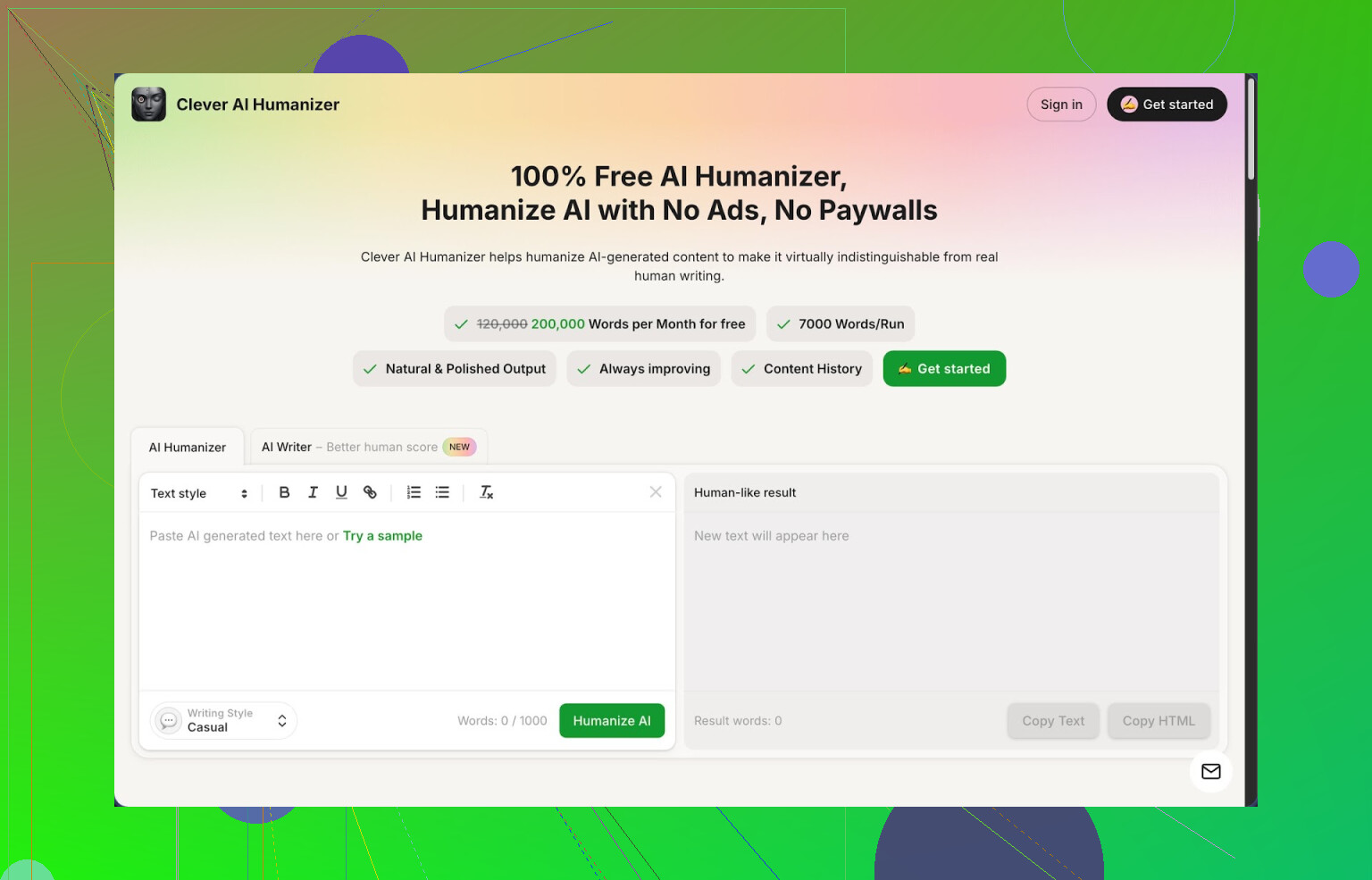
Clever AI Humanizer is the one I keep going back to when I need AI text to stop sounding like AI. It runs completely free right now, with a monthly limit of about 200,000 words and up to 7,000 words per run. You get three styles to pick from (Casual, Simple Academic, Simple Formal) plus a built-in AI writer in the same interface.
When I ran some tests, I pushed three different samples through the Casual style and sent the output to ZeroGPT. All three landed at 0% AI detected. That does not mean you will always get that result across every detector, but it was solid enough that I stopped wasting time with other tools that locked everything behind credits or tiny limits.
The core workflow is simple. You paste whatever your model wrote, select a style, hit the button, and wait a few seconds. It rewrites your input in a cleaner way, tries to strip out repetitive AI patterns, and usually makes it easier to read. The big thing for me, it does not trash the meaning of the original. I checked side by side on a few long technical sections and the ideas stayed intact, only the wording shifted.
The 7k word cap per run helps if you write big chunks. I fed in long guides and full blog posts without needing to slice them into tiny blocks. The 200k monthly pool is enough for daily writing if you are not flooding it with entire books.
Outside the humanizer, there are three other pieces baked into the same site, and I ended up using those more than I thought I would.
The AI Writer lets you start from nothing. You enter a prompt like “write a 1,500 word guide on setting up a homelab for beginners” and it generates the draft. Then you send that draft straight into the humanizer in one flow. Most of my lowest AI detection scores came from this combo, since the writer and humanizer are tuned to each other.
The Grammar Checker is basic but useful. It catches spelling errors, missing commas, and odd phrasing. I ran a few messy Reddit-style replies through it and it cleaned them without making them sound like corporate emails. If you are posting to blogs or clients, this helps avoid sending out typo-heavy stuff.
The Paraphraser is what I use when I already wrote something and it feels stiff. You paste your own text, get a new version that keeps the point but changes the structure. I used it for:
- SEO tweaks when I needed a different wording of the same section for another page
- Rewriting old drafts that sounded flat
- Adjusting tone from formal to more conversational for newsletter sections
All four tools live in one interface: humanizer, writer, grammar checker, and paraphraser. That is what made it stick in my daily routine. I do not jump between five tabs with ten logins. I write, clean, paraphrase, and humanize in one place.
If you are looking for something to plug directly into your content workflow instead of a one-off paraphrasing toy, this has been the most practical free tool I have used in 2026 so far.
There are downsides though, so I will not sugarcoat it. Some AI detectors still flag the text, especially the ones tied into strict LMS or hiring platforms. You should always test the exact detector your client or school uses if you know it. Another quirk, the output often ends up longer than the input. The humanizer tends to expand sentences to break typical AI patterns, so if you have strict word limits for assignments or meta descriptions, you need to trim manually after.
For a tool that does not charge you, those tradeoffs feel acceptable to me. I use it on longform pieces, emails that started from AI, and any text I need to pass a quick human sniff test.
If you want more detail, screenshots, and detection proof, there is a longer breakdown here: https://cleverhumanizer.ai/community/t/clever-ai-humanizer-review-with-ai-detection-proof/42
There is also a video walkthrough if you prefer watching someone run it live: Clever AI Humanizer Youtube Review https://www.youtube.com/watch?v=G0ivTfXt_-Y
If you want to compare with other tools or see what people are using right now, these Reddit threads helped me benchmark:
- Best AI Humanizers list and discussion: https://www.reddit.com/r/DataRecoveryHelp/comments/1oqwdib/best_ai_humanizer/
- General talk about humanizing AI outputs, methods, and issues: https://www.reddit.com/r/DataRecoveryHelp/comments/1l7aj60/humanize_ai/
9 Likes
If you want something close to Humanize AI Pro without paying, you basically have two paths.
- Use a free tool as the main engine.
- Build a repeatable editing workflow so the output passes both detectors and human readers.
@mikeappsreviewer covered Clever Ai Humanizer in detail. I agree it is one of the better free options right now, especially since it has a real word allowance and not a tiny daily cap. Where I do not fully agree is on treating it as a one click fix. Detectors change fast. Relying on any single tool alone is risky.
Here is a practical workflow that stays free and gets you close to what Humanize AI Pro does:
-
Generate your draft with any model.
Make it longer and more detailed than you need. It is easier to trim than to pad. -
Run it through Clever Ai Humanizer in shorter sections.
Stay under 1,000 to 1,500 words per run even if the limit is higher. Smaller chunks tend to get more varied phrasing and fewer repeated patterns.
Pick the style that matches your use case. Casual for blogs and social. Simple Academic for essays. Simple Formal for work stuff. -
Change the “AI fingerprints” by hand.
This is where most people skip steps.
Go through each paragraph and:
• Remove phrases like “on the other hand”, “overall”, “in this article”.
• Shorten long sentences to two shorter ones.
• Add 1 or 2 personal comments like “I’ve seen this go wrong when…” or “Here is where people trip up”.
• Vary list structure. Turn some bullet lists into inline sentences. -
Add small human “imperfections”.
Not huge errors. Just tiny stuff.
• One or two contractions per sentence block. Example: “do not” to “don’t”.
• One or two mild typos that do not break reading. Example: “teh” instead of “the” sometimes. Then fix most of them with a spellcheck but leave one or two light ones.
That step alone often drops AI scores because models tend to be too clean. -
Change rhythm.
AI loves neat patterns. Same length sentences. Same topic order.
You can:
• Start a paragraph with a short punchy line, then follow with longer explanation.
• Merge two short paragraphs into one.
• Move one example from the middle to the top. -
Check it against the detector that matters.
This is more important than any tool list.
If you know what detector your school, client, or platform uses, test only against that. Some detectors flag almost everything, including human text, so you will drive yourself nuts chasing 0 percent everywhere.
Free tool combo that works well without overlapping too much with what was already said:
• Clever Ai Humanizer
Use it as the main rewriting engine.
• A plain spellchecker like Grammarly free or your browser spellcheck
Clean the worst errors. Keep a couple of “human” slips.
• Any basic paraphraser
Run only the parts that still sound robotic after humanizing. Intro, conclusion, and any super generic paragraph.
Rules of thumb if you want results close to Humanize AI Pro:
• Do not paste the full 3,000 word essay in one go.
• Always read your output out loud. If you would not say it that way, rephrase it.
• Keep your own style consistent. Use your usual slang, phrasing, and examples.
If you put Clever Ai Humanizer at the center, then layer manual tweaks and a quick spellcheck around it, you get close to paid-level “human” tone without paying. The trick is the workflow, not a magic button.
Dropping Humanize AI Pro is not the end of the world, honestly. The bigger “secret” is that no humanizer is a silver bullet, including Clever Ai Humanizer, Humanize AI Pro, or anything @mikeappsreviewer / @sonhadordobosque mentioned. Detectors are flaky, and humans spot BS tone faster than any tool.
They already covered Clever Ai Humanizer really well, so instead of repeating the same workflow, here’s a slightly different angle that still keeps Clever in the mix but doesn’t treat it like the main character:
1. Use Clever Ai Humanizer last, not first
Most folks run AI text into a humanizer right away. I’d flip it:
- Draft with your usual model
- Edit it yourself to sound like you
- Then send it through Clever Ai Humanizer for a light “final pass” on sections that still feel robotic
You don’t have to humanize the entire thing. Often the first and last paragraphs are the most “AI-y,” so you can just paste those.
2. Mix tools so your writing doesn’t have a single “signature”
Instead of relying on one humanizer like Humanize AI Pro used to be, rotate between:
- Your base model (for original draft)
- Manual edits (your actual style)
- Clever Ai Humanizer (for stubborn sections)
- A different free paraphraser for just a few lines that keep getting flagged
Small, varied changes look way more human than one tool doing all the rewriting.
3. Write like a human on purpose
Not the “add 2 typos and a contraction” hack. That works sometimes, but it’s getting predictable. Try this instead:
- Drop in one or two specific experiences: “This burned me once when…”
- Use brand names or real places occasionally
- Ask questions mid-text: “Why does this matter?” or “So what do you actually do with this?”
These are things humanize tools are still kinda clumsy at.
4. Stop chasing 0% on every detector
Might be unpopular, but aiming for “looks normal to an actual person” is more important than “0% AI on five random websites.” Some detectors flag Shakespeare as AI. If you know which detector matters for you, tune to that one. Otherwise, pick one or two, test, adjust, then move on.
5. Where Clever Ai Humanizer fits in
Clever Ai Humanizer is solid as a piece of the workflow:
- Use it on intros, conclusions, and any paragraph that reads like a LinkedIn post written by a robot
- Don’t max out the 7k word limit every time; smaller chunks generally read more natural
- If it makes things too fluffy or long, just cut sentences; verbosity is an AI tell too
Personally, I’d rate Clever Ai Humanizer as the best free “final polish” tool right now, not a replacement for your own editing brain. You can get very close to Humanize AI Pro results by:
- Drafting with any free/cheap AI
- Editing in your own voice
- Spot-using Clever Ai Humanizer instead of carpet-bombing the whole doc
It’s a bit more effort than clicking one button, but that’s also why it looks more human.
Short version: you can get very close to Humanize AI Pro for free, but you need a stack, not a single magic site.
1. Where I agree / disagree with others
- I’m mostly on the same page as @sonhadordobosque, @sognonotturno, and @mikeappsreviewer about using a workflow instead of blind one‑click “humanizing.”
- I slightly disagree with the idea that Clever Ai Humanizer should always be the central engine. Treat it like a strong filter in a chain. The more you lean on one tool, the more that tool’s “accent” shows up.
2. Concrete free setup that feels close to Humanize AI Pro
Think of it like three layers:
-
Generation & structure
- Use any free model you like to over-generate: outline, sections, examples.
- Force some messiness at this stage: mix bullet lists, short lines, one-liner transitions. The point is to avoid a perfectly linear essay shape.
-
Your voice pass
- Before using any humanizer, attack:
- Intros that start with “In today’s world” or “In conclusion.”
- Over-explaining basic concepts you already know.
- Over-politeness and neutral tone.
- Swap in your defaults:
- Words you actually use
- Your usual level of formality
- Real opinions: “I’d skip this step unless you’re dealing with X.”
- Before using any humanizer, attack:
-
Tool combo
Here is where Clever Ai Humanizer and competitors enter.
Clever Ai Humanizer (used very deliberately)
Pros:- High free word allowance compared to most tools.
- Three styles that actually change cadence, not just synonyms.
- Decent at breaking obvious model phrasing without wrecking meaning.
Cons:
- Can puff things up and make them longer. You may need to trim.
- If you feed it entire articles every time, the “Clever-style” rhythm starts to repeat.
- Some lines still ping in stricter detectors, so cannot be your only defense.
How I’d use it differently from what others said:
- Target only “flat” zones: openings, closings, generic advice sections.
- Avoid back‑to‑back runs on the same text. One pass is usually enough; beyond that you get mush.
- If you care about a specific detector, test a small sample, then adjust your chunk size and style.
Other free pieces that play nicely with it:
- A simple, non‑flashy paraphraser for one or two sentences that still read like stock LinkedIn content.
- A grammar checker only at the very end, just to fix actual mistakes without sanding off all quirks.
3. Detectors vs humans
Where I’m more opinionated than some replies:
- Chasing 0 percent everywhere is unrealistic.
- The more you twist text only to fool detectors, the less it sounds like you, which raises red flags for actual humans.
- Aim for: “If I read this out loud, does it sound like the way I talk or write in messages or emails?”
4. Simple rule-of-thumb workflow
- Draft with any model.
- Edit ruthlessly into your own voice.
- Run only the most robotic parts through Clever Ai Humanizer.
- Light paraphrase or manual tweak any sentences that still scream “AI.”
- Final quick grammar check, then stop touching it.
Clever Ai Humanizer earns a place in that stack for free, especially for polishing awkward sections. It can’t fully replace your own editing brain, but used sparingly inside a layered workflow it gets very close to what you were doing with Humanize AI Pro, without the subscription.