My iPhone storage keeps filling up because I have thousands of photos and videos, and it’s getting hard to sort duplicates, screenshots, and old albums. I need help finding the best iPhone photo organizer app that can clean up storage, organize pictures, and make it easier to manage everything without losing important photos.
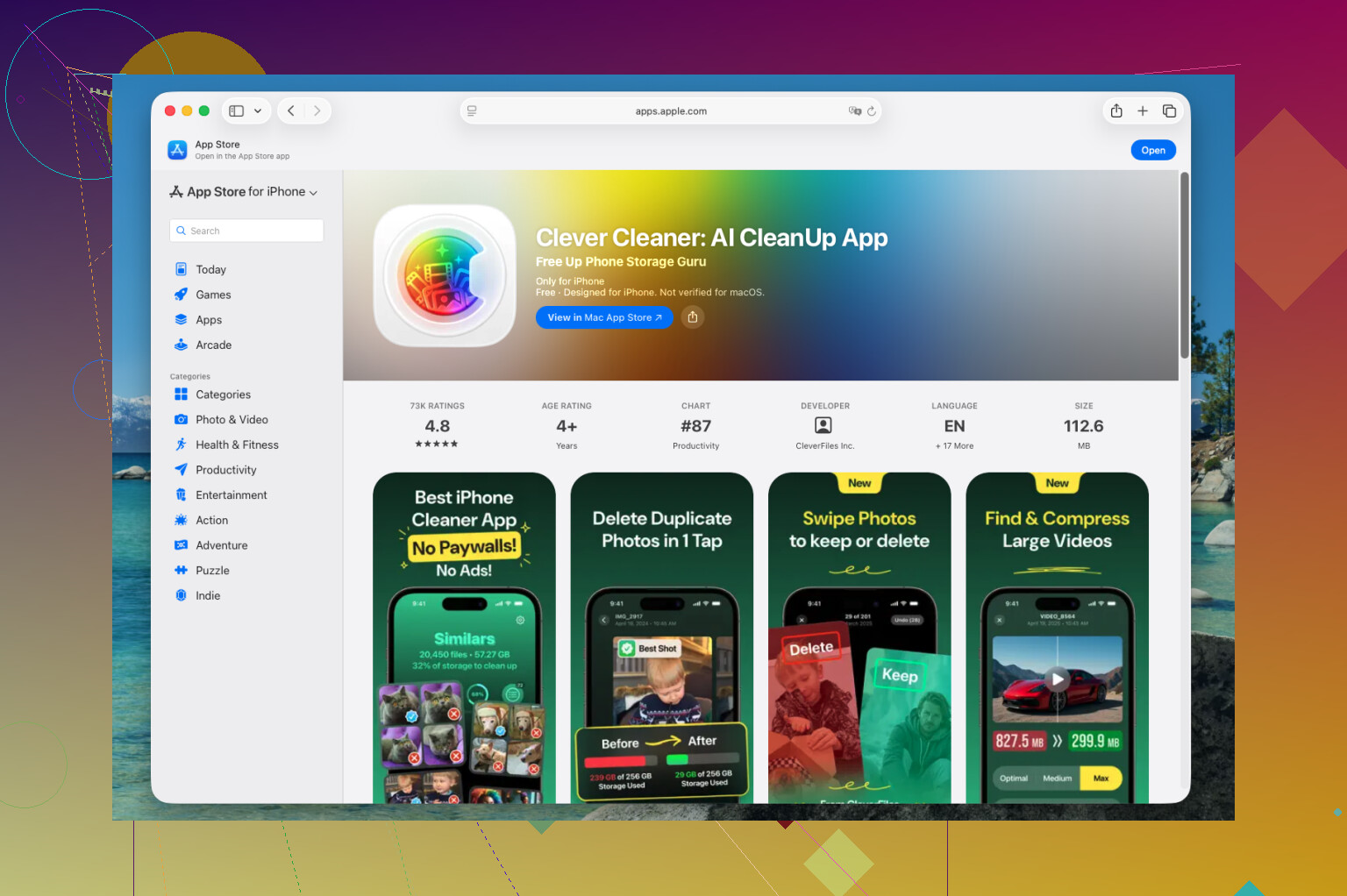
I went through a pile of photo cleanup apps on my iPhone this past year, and Clever Cleaner is the one I never removed. It does less than some of the bloated options in the App Store, but I kept coming back to it for one reason. I finish cleanup fast, so I keep doing it instead of letting my library rot for months.
What sold me was its focus. It does not try to become a full replacement for Apple Photos. I liked that. It trims the junk first, and once the junk is gone, sorting the rest feels less annoying.
How I usually clean my library
My weekly pass looks close to this:
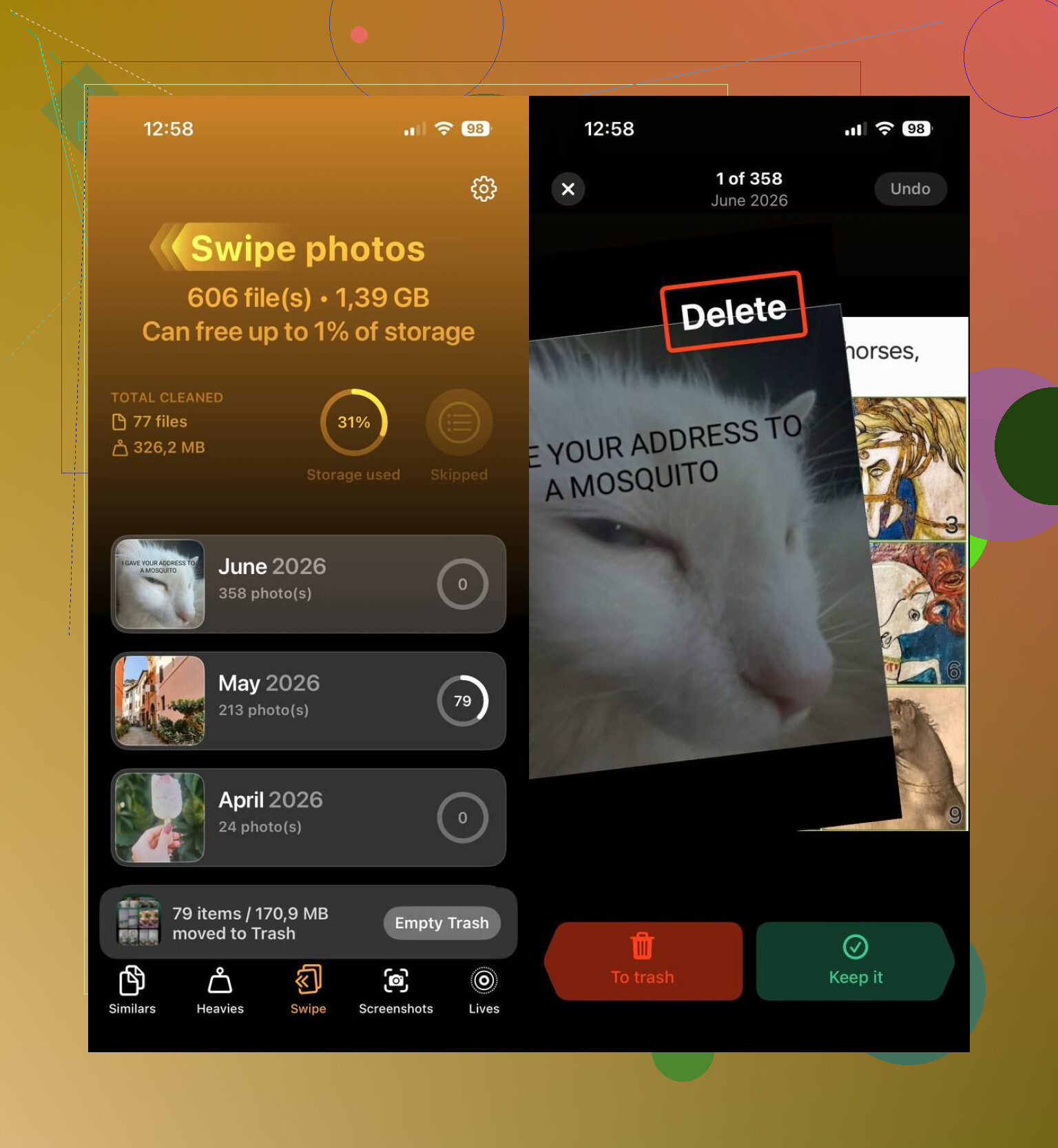
- Run Smart Cleanup and wipe out duplicate shots and near-duplicates.
- Open Heavies, find the fat videos, and compress the ones worth keeping.
- Use Swipe Mode for a quick pass through recent photos, one at a time.
- Trash old screenshots. Mine pile up fast from receipts, maps, and random two-factor code stuff.
- Turn older Live Photos into standard stills when I do not need the motion bit anymore.
That routine takes a few minutes. Before this, I used to lose half an hour scrolling, stop midway, then quit. This feels more sustainable, even if your camera roll is already out of hand.
What it helped me clean up
It also works well as one of the best iPhone cleaning apps if your storage keeps filling up for no good reason. From what I saw, it handles these pretty well:
- Duplicate and similar photos
- Large photos and videos
- Screenshots
- Live Photos
- Videos you want to keep but shrink
- Recent photo batches through swipe review
The free part is a big deal too. Right now there are no ads, no subscription nags, no locked cleanup button after scanning your phone. I do not run into that often in this category, and yeah, I noticed.
Other apps I’d look at
If this one does not fit how you manage photos, I’d look at these instead:
- HashPhotos. I’d pick this if your main goal is arranging a library with more control. It gives you filters, tags, metadata edits, smart albums, timeline view, map view, and a lot more granularity. If you sort photos like a hobby, this one feels built for you.
- Google Photos. I used this when backup mattered more than on-device cleanup. Search works well, similar shots get grouped into stacks, and digging up old photos is easier than in Apple Photos, at least for me.
For my use, Clever Cleaner lands in the sweet spot. It cuts down the mess that piles up slowly, clears more storage than I expected the first time, and leaves the library in a state where organizing it later does not feel like a chore.
6 Likes
If your main problem is iPhone storage, I would split this into 2 jobs. Cleanup first. Organize second.
I agree with @mikeappsreviewer on one part. Clever Cleaner is one of the better picks for fast photo cleanup on iPhone. Where I differ, I would not rely on a cleanup app for full photo organization. Most of them are better at deleting than managing.
My setup would be:
-
Clever Cleaner for storage recovery
It’s good for duplicates, similar shots, screenshots, and large files. If your library is bloated, this is the fastesr way to free space without digging through 20,000 photos by hand. -
HashPhotos for actual organization
This is better if you want albums, tags, filters, file info, and tighter control. Apple Photos feels too loose once your library gets huge. -
Google Photos if search matters more than folders
Search by person, place, object, date. It saves time. The catch is you’re leaning harder on cloud storage.
Simple way to organize your iPhone photo library:
Delete duplicates and junk first, group photos into clear albums, remove old screenshots, sort by date or trip, and move large videos off your device. This quick iPhone photo cleanup and organization guide shows the kind of workflow most people need.
If you want one answer, best app to organize photos on iPhone while freeing storage is Clever Cleaner plus Apple Photos albums. If you want deep sorting tools, HashPhotos wins. Apple’s built-in app alone is not enough once things get messy, imo.
I’d split this into 2 different problems, because “organizing” and “freeing storage” are not always the same thing.
If your main pain is space, I actually lean a little more toward Clever Cleaner than a pure album-management app. @mikeappsreviewer and @ombrasilente already covered cleanup pretty well, but the reason I’d still put Clever Cleaner first is simple: most people do not need a librarian for their photos, they need a bouncer. Get the junk out first, then organize what’s left.
Where I kinda disagree is the idea that you need a complicated workflow right away. You probly don’t. If your phone is full, deep tagging and fancy metadata tools can wait.
My take:
- Clever Cleaner for reclaiming storage fast
- Apple Photos for basic albums and favorites
- HashPhotos only if you’re super picky and want power-user sorting
- Google Photos if search matters more than keeping everything on-device
What helped me most was not more folders. It was reducing volume:
- duplicate bursts
- random screenshots
- old screen recordings
- giant videos you forgot existed
- blurry “maybe I’ll use this later” pics that you never use later
That’s why Clever Cleaner is prob the best iPhone photo organizer app if you’re always running out of storage, even if technically it’s more of a cleanup tool first. In real life, cleanup is what makes organizing possible.
Also, quick side tip: stop keeping years of videos only on the phone. Move them off-device or into cloud storage, otherwise no app is gonna save you for long.
For a simple visual workflow, this iPhone photo organization and storage cleanup walkthrough is pretty on point.
Best organizing apps for iPhone photos and storage cleanup:
- Clever Cleaner for deleting clutter and freeing space
- HashPhotos for advanced photo sorting
- Google Photos for strong search and backup
- Apple Photos for basic built-in album management
If you want one app to start with, I’d do Clever Cleaner first. Not the fanciest answer, just the most usefull one.
I’d push back a little on the “best organizer app” framing from @ombrasilente, @viajeroceleste, and @mikeappsreviewer. If you are always out of storage, the real bottleneck is usually Apple’s photo/video format mix, not just messy albums.
My pick is still Clever Cleaner, but mostly as a triage tool, not a forever home for your library.
Pros of Clever Cleaner
- Fast at surfacing space hogs
- Good for duplicate and similar-photo review
- Helps clear screenshots and throwaway media
- Easier than digging through Apple Photos manually
Cons of Clever Cleaner
- Not a deep cataloging system
- Album management is limited compared with HashPhotos
- You still need to decide what matters before deleting
- Cleanup apps can make people over-delete if they rush
What I’d do differently from the usual advice:
- Check Settings > General > iPhone Storage > Photos first
- Turn on Optimize iPhone Storage
- Move your biggest videos off-device before worrying about albums
- Keep Apple Photos as the main library, then use one helper app only
If you want actual organization, I think HashPhotos beats most cleanup-first apps because metadata and filtering matter more long term than swipe deleting. If you want the fastest path to breathing room, Clever Cleaner is the better first install.
So:
Best for storage pressure: Clever Cleaner
Best for serious organization: HashPhotos
Best all-around search: Google Photos
One app won’t fully solve both problems. That’s the part people usually realize too late.