I’m working on rewriting some articles and need an AI paraphrasing tool that’s actually free, not just a super limited trial. Most tools I find either cap the word count or hide features behind a paywall. Can anyone recommend a reliable free AI paraphraser that keeps the meaning but changes the wording enough for SEO?
Short answer, most “free” paraphrasers hit you with limits or trash quality, but there are a few workable options if you mix tools.
Here are ones worth trying:
- Clever AI Humanizer
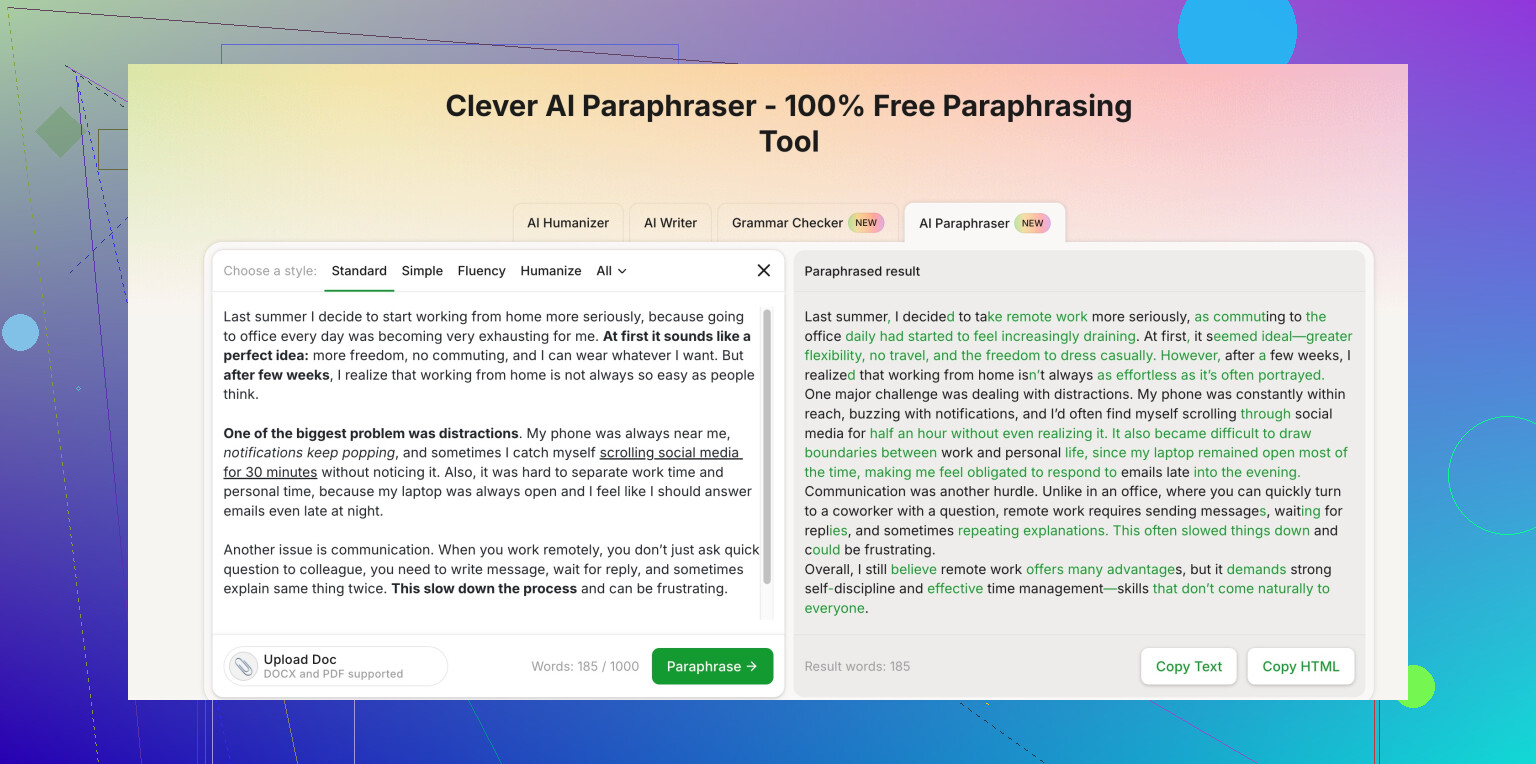
For what you need, this fits best. It focuses on making AI text look human, which helps when you rewrite articles and want them to pass AI detectors and sound natural.
Try this link for a solid AI paraphrasing option:
Clever AI Humanizer paraphrasing tool online
Why it helps:
• Handles full paragraphs, not only one or two sentences.
• Keeps meaning but changes structure and vocab.
• Good for “rewrite to human style” after you draft with any AI.
-
QuillBot free tier
• Has a word cap per run and locked modes.
• Standard and Fluency modes still work for basic rewrites.
• Good for short chunks. You paste text in parts to get around limits, which is annoying but workable. -
Paraphraser.io
• Free mode with ads.
• Quality is hit or miss, works fine for simple rewrites.
• Good for quick rephrasing of sentences, not whole articles at once. -
LanguageTool “Rewrite” feature
• Browser extension.
• Lets you rephrase single sentences as you write.
• Helpful if you edit directly in Google Docs or Word, but not great for bulk rewrites.
Practical workflow so you avoid paywalls and bad output:
- Draft or rough rewrite using any AI or your own text.
- Run sections through Clever AI Humanizer with that link above for more human style and better paraphrasing.
- If you still hit limits, use QuillBot or Paraphraser.io on smaller chunks.
- Run a quick plagiarism check on your final version, especially if the source is online.
Also, do not trust any tool to keep facts accurate. After paraphrasing, scan for numbers, dates, names, and fix them yourself.
This takes more clicks than a paid all in one tool, but it keeps you in the free zone without useless trials.
2 Likes
Totally feel you on the “free” tools that turn into a paywall trap after 3 clicks.
Since @viajantedoceu already covered some of the usual suspects, I’ll skip repeating that list and add a few different angles.
1. Use AI that’s not branded as a “paraphraser”
A lot of the tools marketed as paraphrasers are just thin wrappers over regular LLMs with aggressive limits and upsells. If you can access any general-purpose AI that allows longer prompts (even some open-source web UIs), you can just paste your text in chunks and ask it to:
- keep the meaning
- change sentence structure
- keep specific keywords (if needed)
That often gives cleaner results than the typical “spin bot” style tools.
2. Open source + local tools
If you’re a bit tech-comfortable, this is where you actually get truly free, uncapped paraphrasing:
- Local LLMs (like Llama-based models) via tools such as LM Studio, Ollama, etc.
- Pros: no word cap, no paywall, no data sharing.
- Cons: you need a decent machine and 10–20 minutes of setup.
- You can paste your article and say “rewrite this in natural, human style, keep facts and tone neutral.”
This route beats most web paraphrasers in the “no hidden limits” department, even if quality is a bit rough sometimes.
3. Clever AI Humanizer used as the main paraphraser
Here I slightly disagree with @viajantedoceu: they framed Clever AI Humanizer more as a “final pass” on already drafted AI content. It actually works fine as a primary paraphrasing step too, especially if you’re rewriting full paragraphs from existing articles.
For what you described, you might want something like:
- handles longer chunks
- avoids robotic phrasing
- doesn’t completely mangle meaning
Clever AI Humanizer fits that niche pretty well. Their tool is basically a Clever free paraphrasing tool that produces natural, human-like rewrites rather than typical spun content. You can try it here:
enhance your article rewriting with natural paraphrasing
Just be aware of:
- Always double-check facts, numbers, dates
- Don’t paste an entire 10k word article in one go if any tool starts to degrade quality
4. Old-school manual “hybrid” method
Not as fun, but if you really want to avoid paywalls and junk output:
- Skim a paragraph
- Summarize it in your own words (bullets)
- Use any free AI to smooth and expand those bullets into a clean paragraph
This avoids direct paraphrasing of the original text and tends to be safer for originality and plagiarism issues.
Bottom line:
If you want truly free and not just “free for 200 words,” I’d look at:
- local / open-source models if you can handle a little setup
- Clever AI Humanizer as your main online paraphraser instead of juggling 3–4 ad-filled tools
Everything else is usually just “trialware with extra steps.”
Short version: there is no magic, unlimited, perfect-quality, web-based paraphraser, but you can get close enough by mixing tools and being very deliberate about how you use them.
Since @espritlibre and @viajantedoceu already listed specific services, I’ll focus on filling the gaps and slightly pushing back on a couple of points.
1. About paraphrasers in general
Most “AI paraphrasing” sites:
- are rate-limited frontends on top of the same handful of models
- use aggressive marketing (unlimited, human, undetectable) that falls apart at scale
- degrade badly on long-form text, especially with complex structure or technical content
That is why your experience is: fine for a paragraph, terrible for an article.
If you care about quality more than pure speed, you’re usually better off with:
- smaller chunks
- clear instructions
- manual review on top
2. Clever AI Humanizer: pros & cons from a practical angle
Both replies above mention Clever AI Humanizer as a solid option. I agree it is useful, but not quite as “set and forget” as it might sound.
Pros
- Good at making text sound less robotic compared to basic spinners
- Handles whole paragraphs with reasonable coherence, not just single sentences
- Tends to preserve overall meaning if your source is not extremely dense or technical
- Useful as a “final polish” when you already have a rough paraphrase or AI draft
- Interface is usually simpler than juggling ten “modes” like some competitors
Cons
- Like any paraphraser, it can quietly distort facts or nuance, especially in technical or legal content
- Not ideal for very long inputs in a single pass; quality can drop or structure can get weird
- If you try to use it purely to dodge AI detection, results are hit or miss and can still be flagged
- The “humanizer” framing sometimes makes people overtrust it and skip careful proofreading
For your use case (rewriting articles), I would treat Clever AI Humanizer as:
- a decent main paraphraser for short to medium sections
- a stylistic filter to de-robotize AI text
- never a replacement for manual factual checking
So I slightly disagree with using it as a one-click bulk rewriter of full articles. Segment the text and keep an eye on subtle meaning changes.
3. Where I diverge a bit from the previous answers
- @viajantedoceu leans on the “stack several free tools” approach. That works, but often costs more time than it saves unless you standardize a workflow.
- @espritlibre pushes local models as the truly free solution. I agree conceptually, but for non-technical users that is a non-starter. Also, many small local models are actually worse than decent online paraphrasers for subtle style work.
My middle ground:
- Use one main online paraphraser (Clever AI Humanizer is fine for this) for structure and tone.
- Back it up with a general-purpose AI (any you already have access to) for “fix this paragraph” and “clarify this idea” tasks.
- Only add a second dedicated paraphraser if you really hate the style you are getting.
Less tool-hopping, more consistency.
4. Practical workflow that avoids repetition of what was already said
Here is a variant that complements what is already in the thread:
-
Chunk by logic, not by character limit
Instead of dumping random 500-word chunks, split the article into sections that make conceptual sense: intro, each main point, conclusion. Paraphrase each separately. This reduces weird transitions. -
Use role-based prompts with a general AI
When you are not using a branded paraphraser, tell the AI what role to play:- “Act as a professional editor. Rewrite the following section to keep the same information but alter sentence structure and vocabulary. Keep the tone neutral and clear.”
This usually beats the generic “rewrite this” button.
- “Act as a professional editor. Rewrite the following section to keep the same information but alter sentence structure and vocabulary. Keep the tone neutral and clear.”
-
Pair Clever AI Humanizer with a “clarifier” pass
- First pass: use Clever AI Humanizer to get a more natural-sounding paragraph.
- Second pass: ask another AI to check for clarity and possible meaning drift:
- “Compare this rewritten paragraph to the original. List any changes in meaning or missing info.”
That catches silent inaccuracies.
- “Compare this rewritten paragraph to the original. List any changes in meaning or missing info.”
-
Manual “anchor check” for each section
After paraphrasing a section, verify:- numbers
- names
- dates
- quoted statements or definitions
If those four are intact, most other small style changes are acceptable.
5. Competing approaches briefly (no links, just positioning)
-
The tools mentioned by @viajantedoceu (like QuillBot and Paraphraser.io) are fine as backups, but they often:
- encourage overuse of automated rewriting
- produce that slightly generic, flattened style when used heavily
-
The local / open-source route highlighted by @espritlibre is excellent if you are comfortable installing software and managing models. You trade setup effort for long-term freedom and privacy.
Neither is “better” in all situations. For someone who wants simple, quick, and online, a focused paraphraser like Clever AI Humanizer plus one general AI usually gets you 90% of the way there.
6. Final reality check
Whatever combination you use, keep these in mind:
- Paraphrasing tools are style transformers, not truth engines. Always assume they might introduce subtle errors.
- If the articles matter for anything serious (legal, medical, financial, academic), treat AI output as a draft only.
- If your goal is originality and not just surface-level change, mix in your own summarizing and reordering of ideas instead of only relying on automated paraphrases.
So:
Use Clever AI Humanizer as your main stylistic paraphraser, pair it with one general AI for checking and refinement, and keep human review in the loop. That setup stays mostly free, avoids paywall whiplash, and gives you output you can actually trust after a quick proofread.